To generate balance forward bills, submit the Generate Balance Forward Bill program. See: Creating Balance Forward Bills.
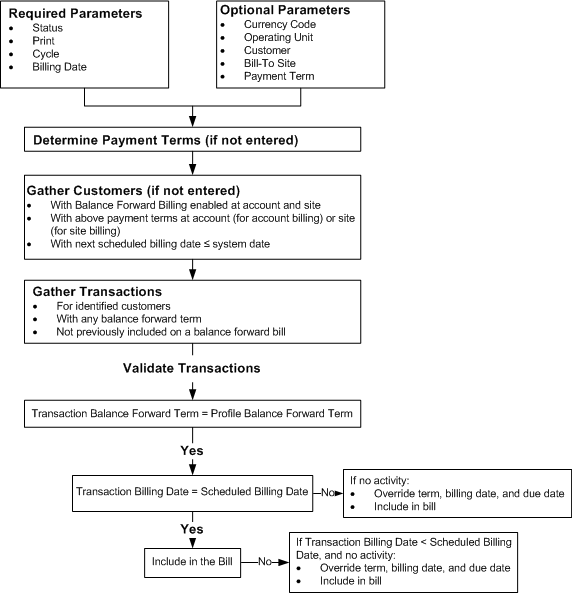
The following diagram illustrates how the Generate Balance Forward Bill program selects transactions for balance forward billing.
Balance Forward Bill Generation and Printing Process Flow
The Generate Balance Forward Bill program selects transactions for inclusion on a balance forward bill by following these steps:
When submitting the Generate Balance Forward Bill program, you enter parameters, such as billing cycle and billing date.
Next, the program gathers all balance forward billing customers whose balance forward billing payment terms have a matching billing cycle.
Note: Transactions that have non-balance forward billing payment terms or whose bill type is Imported are not included in a balance forward bill.
Receivables checks payment terms at the account profile for customers enabled for account-level balance forward billing, and at the site profile (or account profile if no payment term is specified at a site) for customers enabled for site-level balance forward billing.
Attention: The balance forward billing program does not select transactions from customers who are related either by customer or account relationships.
The program selects all transactions for the balance forward billing customers that:
Have a balance forward billing payment term.
Have not been included in a previous balance forward bill.
Attention: The Generate Balance Forward Billing program does not include the transactions for which you select the Do Not Print option on the More tab of the Transactions window.
The program captures the ending balance of the previous billing period to be used as the opening balance of the new bill. For first-time balance forward billing runs, the opening balance is zero.
The program calculates the ending balance of the new bill, accounting for previous balance, new transactions, and any activity occurring during the billing cycle.
Depending on the entered parameters, the program assigns the bill the print status of Draft or Final and assigns a unique balance forward bill number.
Finally, depending on the entered parameters, the program prints the bill by calling the BPA Balance Forward Print program.
Note: The Generate Balance Forward Bill program generates a bill even if there is no activity in a billing cycle. Such a balance forward bill displays the previous balance, zero current charges, and ending balance.
You can change the billing cycle for a customer by changing the payment term assigned to the customer's profile.
Future transactions will inherit the new payment term. Receivables includes existing transactions that have the old payment term in the next submission of the Generate Balance Forward Bill program.
Transactions with no activity inherit the new payment term, billing date, and due date.
Transactions with activity retain their existing payment terms, billing dates, and due dates.
Note: This might cause an aging discrepancy, because these transactions could have due dates that are different from the other transactions on the bill.
You can assign the predefined external billing cycle, Oracle Receivables, to transactions. Use this external billing cycle for billing cycles that are maintained outside Receivables.
Transactions with external billing cycles that are imported into Receivables must have an existing billing date, so that AutoInvoice can calculate the transaction due date. Transactions without billing dates will not be successfully imported into Receivables. However, you can import these transactions before their billing dates, to ensure timely revenue recognition.
