
These examples illustrate using de-duplication to merge multiple duplicate parties or cleanse a party.
You create a merge request with a set of four duplicate parties to merge, each with its own party sites or addresses, relationships, and party profile attribute values. Your merge request is automatically assigned the Multiple type.
This table shows the duplicates, addresses, and attribute values for Registry ID, CEO Name, and Number of Total Employees.
| Duplicate | Registry ID | CEO Name | Number of Total Employees | Party Site |
|---|---|---|---|---|
| Party A | 102 | Joe Smith | 100,000 | Address 1 Address 2 |
| Party B | 101 | Joseph Smith | 200,000 | Address 3 Address 4 |
| Party C | 101 | Joseph Smith | 100,000 | Address 5 Address 6 |
| Party D | 102 | Joey Smith | 100,000 | Address 7 Address 8 Address 9 |
Party D is defaulted as the master party that remains after the other three duplicates merge into it.
Map Party Profile AttributesThe default party profile attributes are determined by profile option settings. You can, however, designate a value from any duplicate to remain after the merge, as shown for example in this table.
| Attribute | Party | Attribute Value |
|---|---|---|
| Registry ID | Party D | 102 |
| CEO Name | Party B | Joseph Smith |
| Number of Employees | Party D | 100,000 |
As a result, Party D remains after the merge with these party profile values.
Map Addresses and RelationshipsYou decide to use the default mapping suggestions:
Address 1 and 7 are duplicates, and Address 1 is the master address that remains after the merge.
Address 2 and 3 are duplicates, with Address 2 as the master.
Address 4, 5, and 9 are duplicates, with Address 9 as the master.
Address 6 is not a duplicate and should transfer to Party D after the merge.
Address 8 is not a duplicate and should remain in Party D.
As a result, Party D remains after the merge with these party sites:
Address 1, which Address 7 merged into
Address 2, which Address 3 merged into
Address 6, which transferred to Party D
Address 8, which remained in Party D
Address 9, which Address 4 and 5 merged into
This diagram illustrates the address mapping and the result after the merge:
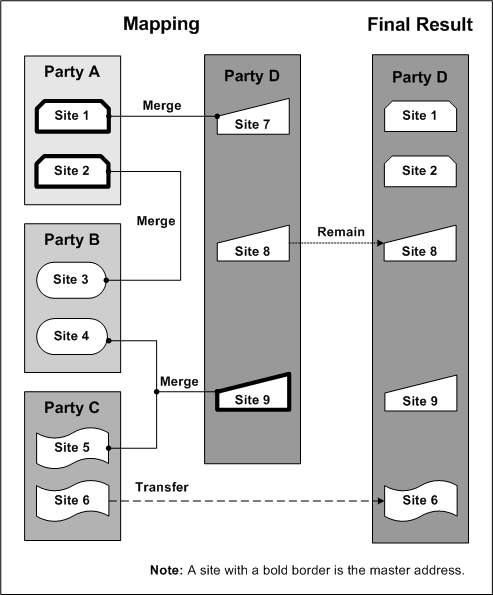
Note: Address 7 merged into Address 1, which remained after the merge even though Address 7 is the site from Party D. De-duplication lets you specify the master address no matter if it is from the master party or not.
For this merge request, you would also similarly map relationships among the four parties.
You create a merge request with one party to cleanse address and relationship information for. Your merge request is automatically assigned the Single type.
This party has these employee relationships, in which the party is the employer of these employees:
Jennifer Smith
Joey Lee
Jenny Smith
Janie Smythe
Joseph Lee
The suggested mapping defaults for the employee relationships include the duplicate sets shown in this table.
| Duplicate Employees | Master Employee |
|---|---|
| Jennifer Smith Jenny Smith | Jennifer Smith |
| Joseph Lee Joey Lee | Joseph Lee |
The master employee is randomly defaulted. You can select another employee as the master or override the default groupings themselves. In this case, you designate Jenny Smith as the master employee for the first duplicate set and determine that Joseph and Joey Lee are not duplicates.
As a result, these employees remain after the merge:
Jenny Smith
Janie Smythe
Joseph Lee
Joey Lee
For this merge request, you would also similarly map the party's addresses.