Although Oracle E-Business Suite applications share the same TCA Registry, each application uses TCA differently depending on the context and need for particular party information. Each application must quickly, accurately, and consistently retrieve information from the TCA Registry for transaction processing. Duplicate data in the Registry can reduce the efficiency and accuracy of party processing and reports.
To resolve duplicates, you can use batch duplicate identification to find duplicate parties that already exist in your TCA Registry and select the parties that you want to merge. The batch duplicate identification process compares all records for each party. For example, each contact point for a party is compared against all contact points.
Batch duplicate identification is powered by Data Quality Management (DQM) functionality. Your administrator can set up batch duplicate identification. See: Setting Up Batch Duplicate Identification and Data Quality Management Overview.
The batch duplicate identification process involves:
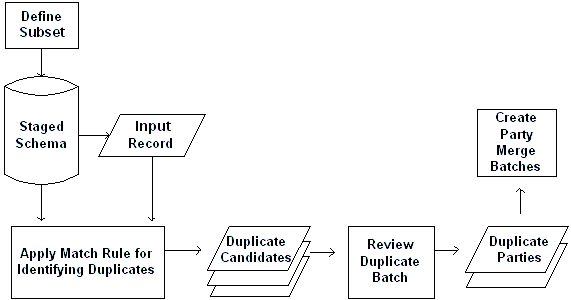
This diagram illustrates the process in more detail:
In the Submit Duplicate Identification Batch window, define a duplicate identification batch, which can consist of a subset of parties. Specify whether to compare the parties against one another or against all parties.
From the same window, run the DQM Duplicate Identification program, which searches for duplicates of the batch that you defined. The batch provides the input records that the staged schema matches against.
The DQM Duplicate Identification program applies the match rule in the Submit Duplicate Identification Batch window to identify duplicates.
The Duplicate Identification: Batch Review window displays the duplicate candidates for your batch.
Review the results for your duplicate identification batch and use the Match Details window to see more information about the matches.
In the Duplicate Identification: Batch Review window, specify the duplicate parties that you want to merge from and to and indicate which parties you do not want to be identified as duplicates in the future.
In the same window, create a merge batch with the parties that you want to merge.
Use the Review Party Merge Batches window to submit merge batches to Party Merge for the actual merge process. See: Party Merge Overview.
