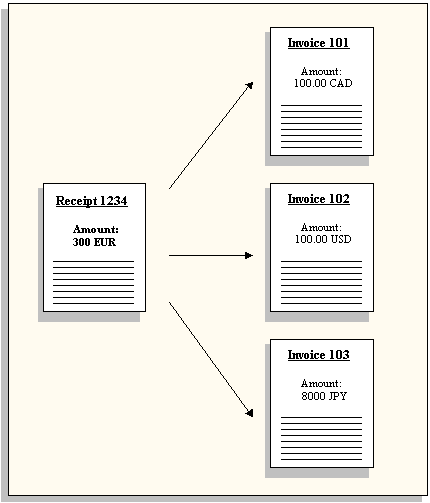
This section provides two examples of cross currency receipt applications. The first example shows how you can apply a receipt in one currency to an invoice in a different currency and the calculations Receivables performs during each step. In this example, both the invoice and receipt currencies are different from your functional currency.
The second example shows how you can apply a receipt to several invoices, each in a different currency.
Note: The Applications window is a folder form, which means you can choose the fields you want to see and the order in which they appear. The examples below show one possible way to set up the Applications window to help you create cross currency receipt applications; your implementation may be different. For more information about folders, see: Customizing the Layout of a Folder.
This example shows how you can apply a receipt in euro (EUR) to an invoice in Canadian dollars (CAD). For this example, assume that your functional currency is US dollars (USD), and that there is no tax, freight, or applicable discount.
Step 1: Create a Transaction
On JAN-01 you create Invoice 101 for 100 Canadian dollars (CAD). The corporate exchange rate on JAN-01 is 1 USD = 1.5 CAD. Receivables uses this rate to calculate the amount of the invoice in your functional currency to be 66.67 USD (100 / 1.5 = 66.67).
Receivables creates corresponding journal entries for this amount in both the invoice and your functional currency, as illustrated in this table:
| Account | Debit | Credit |
|---|---|---|
| Accounts Receivable | 100 CAD [66.67 USD] | |
| Sales | 100 CAD [66.67 USD] |
Step 2: Enter and Apply Receipt
On JAN-31, you receive payment of 64 EUR for Invoice 101. Your customer informs you that the entire amount (64 EUR) is a partial payment of 90 CAD for Invoice 101. The corporate exchange rate on JAN-31 is 1 USD = 1.13 EUR. When you enter the receipt information, Receivables uses this rate to calculate a receipt amount in your functional currency of 56.64 USD (64 / 1.13 = 56.64).
You choose Apply, then enter '101' in the Apply To field. Receivables enters the balance due in your functional currency (Balance Due Base) and the invoice currency (Balance Due).
The Applications window now appears as shown in the table below (see Note above):
| Apply To | Balance Due Base | Balance Due | Amount Applied | Amount Applied Base | Cross Currency Rate | Allocated Receipt Amount | Allocated Receipt Amount Base | Exchange Gain/Loss |
|---|---|---|---|---|---|---|---|---|
| 101 | 66.67 | 100.00 |
Following your customer's remittance information, you enter a new value of 90 in the Amount Applied field. Receivables automatically calculates the amount applied in your functional currency (Amount Applied Base) and updates the balance due in your functional currency (Balance Due Base) and the invoice currency (Balance Due).
The Applications window now appears as shown in the table below:
| Apply To | Balance Due Base | Balance Due | Amount Applied | Amount Applied Base | Cross Currency Rate | Allocated Receipt Amount | Allocated Receipt Amount Base | Exchange Gain/Loss |
|---|---|---|---|---|---|---|---|---|
| 101 | 6.67 | 10.00 | 90.00 | 60.00 |
Calculations
Balance Due = 100 - 90 = 10 (CAD)
Balance Due Base = 10 / 1.5 = 6.67 (USD)
Amount Applied Base = 90 / 1.5 = 60 (USD)
Next, you enter the amount of the receipt to apply to this invoice (64 EUR) in the Allocated Receipt Amount field. Receivables uses this amount to determine the Cross Currency Rate of 0.7111111 (64/90). Receivables then determines the Allocated Receipt Amount Base (in your functional currency) of 56.64 USD, using the exchange rate as of the receipt date (see Example Summary below). Finally, Receivables calculates an Exchange Loss of 3.36 USD.
The Applications window now appears as shown in the table below:
| Apply To | Balance Due Base | Balance Due | Amount Applied | Amount Applied Base | Cross Currency Rate | Allocated Receipt Amount | Allocated Receipt Amount Base | Exchange Gain/Loss |
|---|---|---|---|---|---|---|---|---|
| 101 | 6.67 | 10.00 | 90.00 | 60.00 | 0.7111111 | 64.00 | 56.64 | <3.36> |
Calculations
Cross Currency Rate = 64 (EUR) / 90 (CAD) = 0.7111111
Allocated Receipt Amount = 64 (EUR) / 1.13 = 56.64 (USD)
Exchange Gain/Loss = 56.64 (USD) - 60 (USD) = <3.36> (USD)
When you save this application, Receivables creates the accounting entries as illustrated in this table:
| Account | Debit | Credit |
|---|---|---|
| Cash | 64 EUR [56.64 USD] | |
| Foreign Exchange Loss | 3.36 USD | |
| Accounts Receivable | 90 CAD 60 USD] |
The table below summarizes each step in this example and the corresponding calculations that Receivables performs.
| Action | Exchange Rate | Calculation |
|---|---|---|
| You create Invoice 101 for 100 CAD. | 1 USD = 1.5 CAD (exchange rate on invoice date) | 100 CAD / 1.5 = 66.67 USD |
| You enter receipt for 64 EUR. Receivables calculates amount in functional currency. | 1 USD = 1.13317 EUR (exchange rate on receipt date) | 64 EUR / 1.13 = 56.64 USD |
| You enter 90 CAD in Amount Applied field. Receivables calculates Amount Applied in your functional currency. | 1 USD = 1.5 CAD | 90 CAD / 1.5 = 60 USD |
| You choose to apply the entire 64 EUR receipt to Invoice 101. Receivables calculates the cross currency exchange rate from this value. | 0.7111111 (cross currency rate derived by Receivables) | 64 EUR / 90 CAD = 0.7111111 |
| Receivables calculates Allocated Receipt Amount in your functional currency. | 1 USD = 1.13 EUR (as of JAN-31, receipt date) | 64.00 / 1.13 = 56.64 |
| Receivables calculates Foreign Exchange Gain or Loss. | (NA) | 57.48 USD - 60 USD = <3.36> USD |
Using the same procedure described in the previous example, you can apply a receipt in one currency to several transactions, each in a different currency.
Applying a Cross Currency Receipt
As in Example 1, to apply a receipt to several transactions in different currencies, your customer must provide detailed remittance information.
For example, your customer remits a Receipt 1234 for 300 EUR and includes the information as described in this table:
| Invoice Num | Date | Invoice Balance | Paid Amount | Rate to EUR | EUR Remitted |
|---|---|---|---|---|---|
| 101 | 1-JAN | 100 CAD | 90 CAD | .725298 | 65.28 |
| 102 | 2-JAN | 100 USD | 100 USD | 1.15989 | 115.99 |
| 103 | 4-JAN | 8000 JPY | 8000 JPY | .0086927 | 69.54 |
Total Remitted Amount: 250.78 EUR
On Account: 49.22
Total Remittance: 300.00 EUR
Note: In this example, your customer's remittance advice included rate information for each invoice. This is an alternative to requiring that your customer provide the Allocated Receipt Amount for each invoice. Receivables automatically calculates the Allocated Receipt Amount for each application when you enter the Cross Currency Rate.
After you enter and apply the receipt according to your customer's remittance information, the Applications window appears as shown in the table below:
| Apply To | Balance Due Base | Balance Due | Amount Applied | Amount Applied Base | Cross Currency Rate | Allocated Receipt Amount | Allocated Receipt Amount Base | Exchange Gain/Loss |
|---|---|---|---|---|---|---|---|---|
| 101 | 6.67 | 10.00 | 90.00 | 60.00 | .725298 | 65.28 | 57.14 | (2.86) |
| 102 | 0.00 | 0.00 | 100.00 | 100.00 | 1.15989 | 115.99 | 99.12 | (0.88) |
| 103 | 0.00 | 0.00 | 500.00 | 96.15 | .0086927 | 69.54 | 94.61 | 1.54 |
| On Account | 49.22 | 6.27 |
Suggestion: You can also use the Receivables Search and Apply feature to automatically select transactions for cross currency receipt application. For more information, see: Automatically Selecting Invoices for Cross Currency Receipt Application.
Receivables lets you review detailed information about your cross currency settlements. The Cross Currency Exchange Gain/Loss report lets you analyze each cross currency receipt application for a customer, customer site, receipt date range and receipt currency. This report is useful when you need a record of the cross currency rates used in your cross currency receipt applications.
The Cross Currency Exchange Gain/Loss report provides much of the same information as the Applications window during cross currency receipt application. In addition, this report provides a 'Rate Reconciliation' section that shows what the foreign exchange gain/loss for an application would have been if you had used the cross currency rate maintained in Oracle General Ledger. This information lets you analyze any significant discrepancies in the FXGL that can result from cross currency receipt applications.
To illustrate the Rate Reconciliation section of the report, consider Example 1 in this section where the cross currency rate used (in accordance with the remittance information) in the application was 0.7111111. The Rate Reconciliation section of Cross Currency Exchange Gain/Loss report will default the system's Corporate rate, for example, between CAD and EUR on 31-Jan of 0.726556. Based on this rate, it would have taken 65.39 EUR to close 90 CAD (where 90 CAD x 0.726556 = 65.39 EUR) of the customer's balance. In this case, you would have experienced a loss of 0.61 USD instead of the realized loss of 2.86 USD (refer to Example 1).
The report shows that the variance between the foreign exchange loss you actually experienced and the loss you would have experienced is 2.25 (2.86 - 0.61). This detailed information may be necessary to determine whether the cross currency rate used by your customer was appropriate. See: Cross Currency Exchange Gain/Loss Report.
