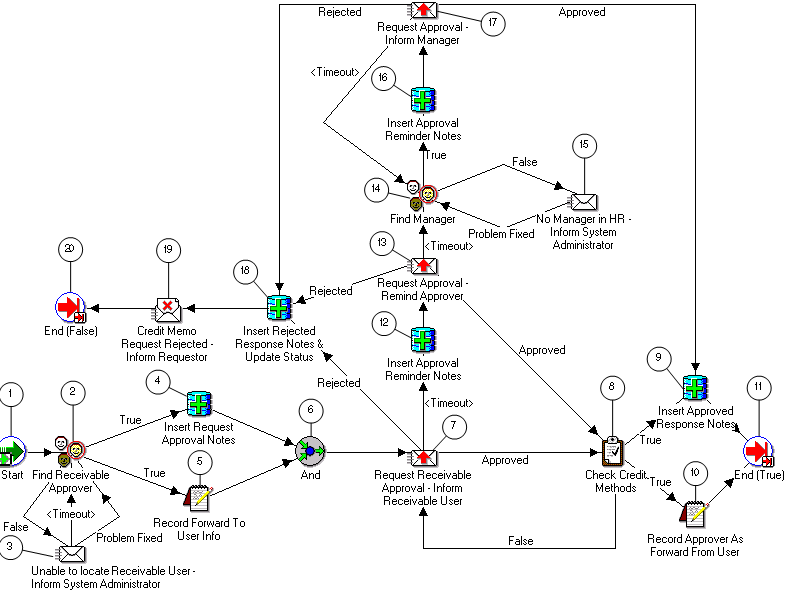
The Receivables Approval subprocess routes the request for final approval to an Oracle Receivables user.
The Receivables Approval subprocess has a result type of Boolean, which indicates that when the subprocess completes, it has a result of True or False.
This subprocess cannot be initiated as a top level process to run; it can be run only as a subprocess when called by another, higher level process.
To view the properties of the Receivables Approval subprocess, select its process activity in the navigator tree, then choose Properties from the Edit menu. When you do this, you see that the subprocess consists of 19 unique activities (one of which is reused) which comprise the 20 activity nodes in the workflow diagram below.
The process activity nodes are numbered to help you reference the descriptions that follow. The numbers themselves are not part of the process diagram.
Receivables Approval Subprocess
For a complete description of the Receivables Approval subprocess, see Receivables Approval Subprocess Activities.
The subprocess begins at Node 1 with the Start activity. At Node 7 the process notifies the Receivables role to approve the request within a specified period of time.
If the approver approves the request, the subprocess ends at Node 11 and returns a result of True to the top level Request Approval process. Similarly, if the approver rejects the request, the subprocess ends at Node 20 and returns a result of False.
If the approver does not respond in the time specified, the subprocess takes the <Timeout> transition to Node 13 to send a reminder to the Receivables role to approve the request. This loop continues until the approver approves or rejects the request at Node 8 or 18, respectively.