Instead of manually entering receipts, you can use the Receivables automatic receipts feature to automatically generate receipts for customers with whom you have predefined agreements. These agreements let you collect payments on time by transferring funds from the customer's bank account to yours on the receipt maturity date. You can also manage your cash flow by deciding when, where, and how much you should remit to your bank.
Automatic receipts also lets you manage your customer risk and reconcile bank statements. You can decide how you wish to process the receipts from creation to remittance and risk elimination.
The Automatic Receipts feature satisfies the many variations of bank remittance processing, such as direct debits.
Once created, automatic receipts can be reapplied in the same way as manual receipts. You can reverse an automatic receipt only if its status is Approved.
Note: You cannot create cross currency receipt applications using Automatic Receipts. For more information, see: Cross Currency Receipts.
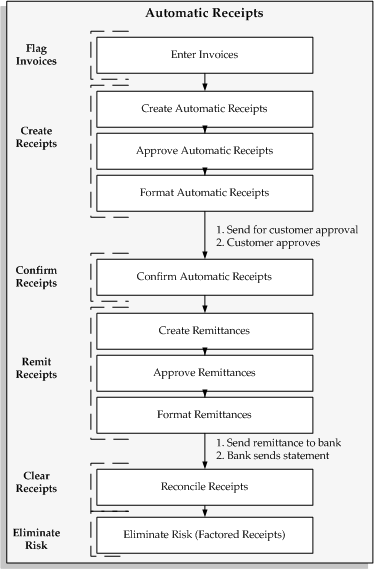
Creating automatic receipts involves three steps:
Create: Select the invoices to include in your automatic receipts.
Approve: Update, delete, and approve the receipts that you have selected.
Format: Format your automatic receipts onto paper to send to your customer for confirmation or notification before remitting them to your bank on either paper or magnetic media. This step is optional, as it depends upon the type of automatic receipt you create.
You can perform these steps at the same time or separately.
The following diagram provides an overview of the Automatic Receipts and Remittance processes.
Automatic Receipts and Remittance Process
For a text description of this graphic, see Text Description of the Automatic Receipts Graphic.
