Invoicing and accounting rules let you create invoices that span several accounting periods Accounting rules determine the accounting period or periods in which the revenue distributions for an invoice line are recorded. Invoicing rules determine the accounting period in which the receivable amount is recorded.
You can assign invoicing and accounting rules to transactions that you import into Receivables using AutoInvoice and to invoices that you create manually in the Transactions window.
Use accounting rules to determine revenue recognition schedules for your invoice lines. You can assign a different accounting rule to each invoice line. Accounting rules let you specify the number of periods and the percentage of the total revenue to recognize in each period.
You can specify whether accounting rules use a fixed or variable revenue recognition schedule. Accounting rules of Fixed Schedule span a predefined number of periods. Accounting rules of Variable Schedule let you define the number of periods during invoice entry.
If your enterprise requires the precise recognition of revenue for a schedule that includes both full and partial accounting periods, then you can use an accounting rule of either Daily Revenue Rate, All Periods or Daily Revenue Rate, Partial Periods. These accounting rules let you meet strict revenue accounting standards by using a daily rate to calculate revenue for partial periods. You can recognize the exact amount of revenue for multiple periods in a schedule at a very granular level.
You can also create rules that will defer revenue to an unearned revenue account. This lets you delay specifying the revenue recognition schedule until the exact details are known. When these details are known, you use the Revenue Accounting Management (RAM) wizard to manually recognize the revenue, or leverage the Revenue Adjustment API.
See: Deferred Accounting Rules and Revenue Accounting.
See: Using Rules.
Use invoicing rules to determine when to recognize your receivable for invoices that span more than one accounting period. You can only assign one invoicing rule to an invoice.
Receivables provides the following invoicing rules:
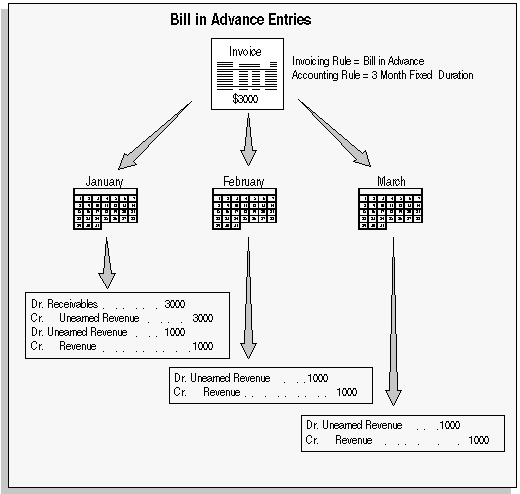
Bill In Advance: Use this rule to recognize your receivable immediately.
Bill In Arrears: Use this rule if you want to record the receivable at the end of the revenue recognition schedule.
Attention: With Cash Basis Accounting, you only recognize revenue when payment is received. Invoices with rules are therefore not applicable for this method of accounting, as they are designed to distribute revenue over several periods before receipt of payment. If you import invoices into a cash basis accounting system, lines with associated invoicing and accounting rules will be rejected by AutoInvoice.
Bill in Advance Accounting Entries
For a text description of this graphic, see Text Description of the Bill in Advance Accounting Entries Graphic.
Bill in Arrears Entries
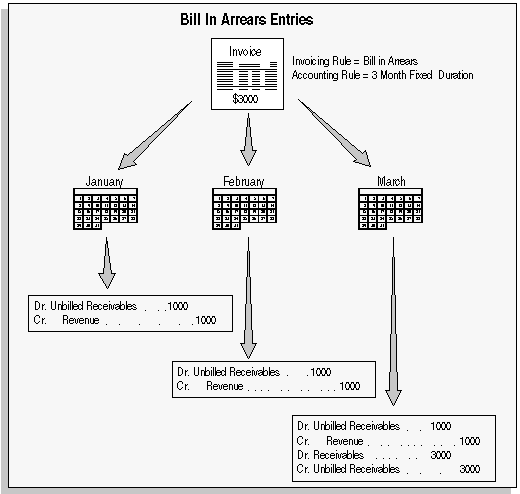
For a text description of this graphic, see Text Description of the Bill in Arrears Accounting Entries Graphic.
Account sets are templates used to create revenue and offset accounting distributions for individual invoice lines with accounting rules. These account sets enable you to split revenue for a line over one or more revenue or offset accounts. To meet your business requirements, you can change account sets before the Revenue Recognition program is run. After the Revenue Recognition program is run, you can change the individual GL distribution lines and Receivables automatically creates reversing GL entries. AutoAccounting creates the initial revenue and offset account sets for your invoice.
The Revenue Recognition program identifies all new transactions and creates the revenue distributions for those transactions. The distributions are created for all periods, even in periods whose status is Not Open, using the rules associated with the transactions. See: Recognizing Revenue.
