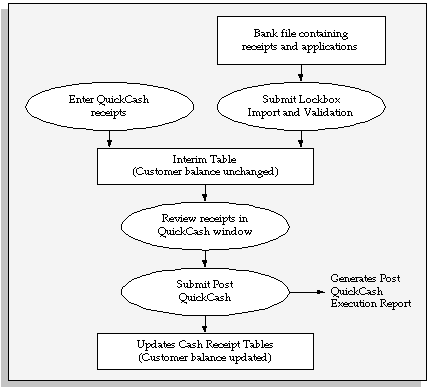
When you enter receipts in the QuickCash window or import them using AutoLockbox, Receivables stores them in interim tables. You can then use the QuickCash window to review each receipt and use the Applications window to ensure that the application information is correct. After you approve the receipts and their applications, run Post QuickCash to update your customer's account balances.
You can choose which QuickCash or Lockbox batches to review. For example, you may want to review only the receipts entered by your data entry clerks or the data files sent by your bank.
The following diagram summarizes how Post QuickCash transfers receipts and applications from interim tables into Receivables.
Post QuickCash
If you enter a receipt and fully apply it to an open invoice, Post QuickCash will process the receipt as well as the application. However, if you apply a receipt to an invoice that is closed by another application, Post QuickCash will only process the receipt. In this case, the receipt will be marked 'Unapplied'. You need to use the Applications window to manually apply these receipts.
Post QuickCash uses the AutoCash Rule Set assigned to the customer site or profile class to determine how to apply receipts. If an AutoCash Rule Set has not been assigned to the customer's site, Post QuickCash uses the rule set in the customer's profile class; if the customer's profile class does not have an AutoCash Rule Set, Post QuickCash uses the rule set in the System Options window. See: AutoCash.
If you use AutoCash rules to apply your receipt and all of the rules in your AutoCash Rule Set fail, Post QuickCash will apply the receipt using the Remaining Amount Rule Set that you specify for this customer's profile class. If you did not specify a Remaining Amount Rule Set for this customer's profile class, Receivables marks the remaining amount Unapplied. See: Defining Customer Profile Classes.
If you set the system option AR: Create Bank Charges to Yes, Receivables will also consider bank charges and a tolerance limit when applying receipts. See: Matching Using Bank Charges and Tolerance Limit.
If the system option 'Require Billing Location For Receipt' is set to Yes, Post QuickCash will not process receipts that do not have a bill-to location. Both the QuickCash window and AutoLockbox validate that receipts have a billing location if this option is set to Yes. However, the system option may change after the receipts have been entered but before Post QuickCash has been run, so Post QuickCash re-validates.
Post QuickCash uses the Application Rule Set assigned to the debit item's transaction type to determine how to apply payments and how discounts affect the open balance for each type of associated charges. If no rule set is assigned to this item's transaction type, Post QuickCash uses the rule set defined in the System Options window. See: Receivables Application Rule Sets.
You can use Post QuickCash to apply a receipt when the receipt and transaction currencies are different. See: Importing and Applying Cross Currency Receipts.
When you run Post QuickCash, qualified QuickCash application lines are passed to Oracle Trade Management for claim creation and management:
Application lines that short pay their applied transactions
Claim investigation application lines
Application lines with the Overapplication Indicator selected
A claim number is passed back to Receivables after Trade Management creates the claim.
You can net receipts by applying a QuickCash receipt against multiple open receipts. See: Receipt-to-Receipt Applications.
You can apply a QuickCash receipt against an open receipt's unapplied cash.
When you post the QuickCash batch, Post QuickCash confirms that the open receipt still has enough unapplied cash to accept the application on the QuickCash receipt.
If enough unapplied cash exists, then Post QuickCash creates two new applications, one on each receipt.
If not enough unapplied cash exists, then Post QuickCash will not overapply the open receipt. Instead, the QuickCash receipt remains in the interim tables and the Post QuickCash Execution report documents the error.
You can apply a QuickCash receipt against an open receipt's on-account cash or open claim investigation.
When you post the QuickCash batch, Post QuickCash confirms that the on-account cash or claim investigation application on the open receipt still exists, or is not locked by another process.
If the application line is available, then Post QuickCash unapplies the on-account cash or claim investigation application line on the open receipt, and creates two new applications, one on each receipt.
If the application on the QuickCash receipt is not the full amount of the open receipt's on-account or claim investigation application line, then Post QuickCash reapplies the remaining amount back to On Account or Claim Investigation on the open receipt.
Note: Receivables automatically notifies Trade Management if the application amount settles all or part of a claim investigation application.
If the application line no longer exists or is locked, then Post QuickCash reviews the status of the open receipt. Depending on the status, either:
The QuickCash receipt remains in the interim tables (the Post QuickCash Execution report documents the error), or
Post QuickCash rolls back the application to the open receipt, and creates the QuickCash receipt as an unapplied receipt.
