Print statements to provide your customers with a complete record of their invoice, debit memo, chargeback, deposit, receipt, on-account credit, credit memo, and adjustment activity for a specific period.
You can produce statements that differentiate between bill-to sites for a customer's outstanding items. If you do not define a statement site for a customer, Receivables produces statements for each of the customer's bill-to sites. Each of these bill-to site statements include transactions that are specific to that site. You can define statement and bill-to business purposes for your customer addresses using the Customers windows.
Note: You can also use Balance Forward Billing to create a single document that summarizes all of a customer's activity for a specific period.
Attention: When you print statements for all of a particular customer's locations, (by entering the customer name, but leaving the location blank), you must select a single language for the entire print run. If, however, you enter a specific customer's name and select a specific location, Receivables automatically selects the correct language in which to print the statements. Note that if you are printing statements for all customers, you do not select the language in which the statements are generated: Receivables automatically prints them in the correct language as specified for each of your customer's statement locations.
All Receivables receipt entry windows let you specify a customer location on your receipt. If you have specified a location on your receipt, Receivables prints this location on the statement.
If there are on-account or unapplied receipts that are not associated with a specific customer location, Receivables summarizes these receipts as credits on consolidated statements that you produce by defining a statement site. Receivables prints these receipts on a separate page of a customer's consolidated statement before a summarized listing of subtotals for each of this customer's bill-to sites.
If a customer has on-account and unapplied receipts that are not associated with a specific customer location and you have not created a statement site for this customer, Receivables does not include these receipts on any of the bill-to site statements for this customer.
If you define a statement site for your customer, Receivables generates a single, consolidated statement of all of this customer's transactions and sends the statement to this site. If you have not defined a statement site for a customer, Receivables creates statements for each of the customer's sites that has:
A Bill-To business purpose
The Send Statements parameter set to Yes for this profile class
See: Defining a Statement Site.
Use statement cycles to determine when to send statements to your customers. You assign these cycles to your customer and site level profiles. Receivables lets you generate statements for all customers associated with a specific statement cycle.
If you define a statement site for a customer, Receivables uses the statement cycle defined in the customer profile to determine when statements should be sent. If you have not defined a statement site, Receivables uses the statement cycle defined in the customer's site level profile to determine when statements should be sent to each site.
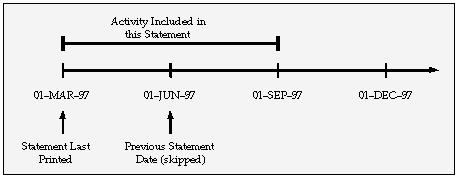
Receivables includes all activity from the last time you printed a statement for this customer to the current statement date, even if this customer's statement cycle is set up to skip printing on one or more statement dates. Receivables will also include open debit items from prior periods in the statement. For example:
Today's Date: 03-SEP-97
Statement Date: 01-SEP-97
Previous Statement Date: 01-JUN-97 (skipped)
Statement Cycle: Quarterly
The activity included in this statement spans the date the statement was last printed of 01-MAR-97 to the current statement date of 01-SEP-97. The previous statement dated 01-JUN-97 had been skipped, so the activity for that period now shows on the current statement. The following illustration shows the activity that is included in this statement:
Statement Cycles
This table illustrates which invoices would be included in the example statement:
| Invoice Creation Date | Included in Statement? |
|---|---|
| Invoice Date: 30-FEB-97 | No, unless it is either still open or was closed between 01-MAR-97 and 31-AUG-97 |
| Invoice Date: 30-AUG-97 | Yes, because the invoice date is between the date the statement was last printed and the statement date |
| Invoice Date: 02-SEP-97 | No, because the invoice date is later than the statement date |
See: Statement Cycles.
Receivables lets you define credit profiles for each customer and each of their bill-to locations using the Customer Profile Classes window. Profile classes let you choose whether to send statements to customers using this profile class and, if so, lets you specify:
A statement cycle
A minimum statement amount by currency
Whether to send a statement to customers if they have a credit balance
Note: When you print statements for a customer who has a statement site defined, Receivables uses the statement profile amounts defined at the statement site, provided that you set the AR: Use Statement, Dunning, and Late Charges Site Profiles profile option to Yes. Otherwise, Receivables uses the statement profile amounts defined on the billing site.
See: Defining Customer Profile Classes.
Before you can print statements for your customers, you need to define the following:
