The party relationships that you can use in Receivables for various payment-related functions are called party paying relationships.
In a party paying relationship, all corresponding accounts and transactions that are associated with one party are accessible to another party. For example, if you create a party paying relationship between Business World and Acme Worldwide, then you can select from among both Business World and Acme Worldwide transactions when applying a Business World receipt.
Note: Note: With party paying relationships, you cannot apply receipts to invoices across operating units.
Customer account relationships also provide this type of access. See: Defining and Updating Account Relationships.
Customer account relationships, however, build only flat hierarchies that can be difficult to maintain when multiple parties are involved. With party paying relationships, you can define groups of related parties that are easy to create and maintain in Relationship Manager. You can therefore use this flexibility to efficiently model the complex business relationships within your trading community.
Note: Paying parties must have at least one account.
Receivables supports both party paying relationships and customer account relationships during the following activities:
Applying receipts, including:
manual receipts
Search and Apply receipts
QuickCash receipts
Lockbox receipts
Applying invoices against commitments and bills receivable
Adjusting or crediting transactions
Entering, on the Transactions workbench, the paying customer for a transaction
Creating automatic receipts (via the paying customer that you specified on the Transactions workbench)
Note: In Oracle Order Management's Sales Orders window, you can enter an agreement that you defined for either a selected customer or related customers. Order Management recognizes related customers, however, only if the relationships were built via customer account relationships.
If you want to let a party pay for another party's transactions, you do not have to define relationships for each of these. You can simply set the system option Allow Payment of Unrelated Invoices to Yes. See: Defining Receivables System Options.
Use the Customer Relationships Listing to view a listing of all relationships that exist for a customer. See: Customer Relationships Listing.
To create a party relationship, you begin by selecting the subject party (the party that you want to create a relationship for) and a relationship type from the Overview page in Relationship Manager. A relationship type controls the characteristics of the relationship. See: Creating Relationships.
When creating a party relationship, you can select an existing relationship type or you can define a new one. See: Creating Relationship Types.
In both cases, the relationship type that you use to create a party paying relationship must meet these two requirements:
The relationship type must be hierarchical, and the subject and object parties must be of type Organization.
The relationship type must be assigned to one of these relationship groups, either:
Pay Within
Pay Below
A relationship group is a mechanism for grouping similar relationship roles and phrases together. It indicates the type of paying relationship that you want to create for use in Receivables.
To assign a relationship type to a relationship group, you assign one phrase of the relationship type to the group. Relationship phrases describe the roles of the subject and object parties within each direction of the relationship.
See: Assigning Relationship Phrases and Roles to Relationship Groups.
Attention: To create party paying relationships, you must also assign one phrase of the relationship type to the Customer Account Information relationship group.
If you assign one phrase of a relationship type to the Pay Within relationship group, then relationships that you create using that relationship type are Pay Within paying relationships. This means that any party within the relationship can pay for the accounts of any other party within the relationship.
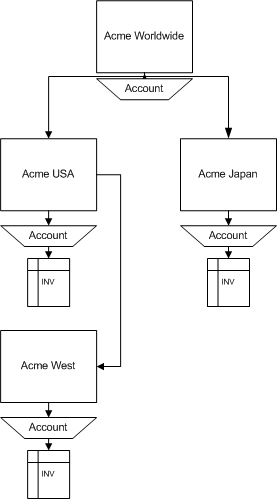
The following diagram illustrates several parties within a Pay Within paying relationship. In this scenario, all accounts of each party in the relationship are available to all other parties in the relationship for receipt application, commitment application, and so on.
Example of a Pay Within Paying Relationship
In other words:
Acme Worldwide can pay for Acme USA, Acme Japan and Acme West
Acme USA can pay for Acme Worldwide, Acme Japan, and Acme West
Acme Japan can pay for Acme Worldwide, Acme USA, and Acme West
Acme West can pay for Acme Worldwide, Acme USA, and Acme Japan
If you assign one phrase of a relationship type to the Pay Below relationship group, then relationships that you create using that relationship type are Pay Below paying relationships. A Pay Below paying relationship is a parent-child relationship where each party can pay for its own transactions, as well as the transactions of all parties that are lower in the hierarchy (children, grandchildren, and so on).
If the parties in the diagram shown in the Pay Within paying relationship section are in a Pay Below paying relationship, then all accounts of each child party in the relationship will be available to each parent party in the relationship for receipt application, commitment application, and so on.
In other words:
Acme Worldwide can pay for Acme USA, Acme Japan, Acme West, and its own transactions.
Acme USA can pay for Acme West and its own transactions.
Acme Japan can pay for its own transactions.
You can assign one phrase of a relationship type to more than one relationship group. For party paying relationships, however, you should not assign the same phrase to both the Pay Within and Pay Below relationship groups, because Receivables will recognize only the Pay Within group.
Therefore, if Business World wants to create a Pay Within paying relationship with Company A and a Pay Below paying relationship with Company B, they must:
Define two different relationship types.
For each relationship type, assign one phrase to a relationship group, either Pay Within or Pay Below.
Use the two relationship types to create two paying relationships, one for Company A and one for Company B.
