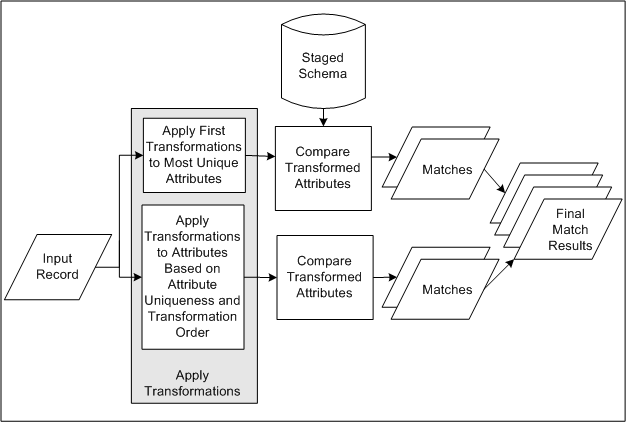
This diagram describes the DQM matching process involving match rules with the Search purpose.
The staged schema stores the transformed TCA Registry attribute values for comparison in the matching process. The included attributes and the transformations applied to each are defined in the Define Attributes and Transformations page.
Input records come in when you enter party information or search criteria.
The attributes in the match rule assigned the highest level of uniqueness, as defined in the Define Attributes and Transformations page, are transformed by the transformations ordered first in the match rule based on match precision. This combination represents criteria for the most exact matches.
For example, the Address 1 attribute provides a more unique value, across records, than the City attribute. The EXACT transformation, which modifies values less than the CLEANSE transformation, would provide more precise matches based on the transformed values. So Address 1, defined as the most unique attribute for the Address element, is first transformed by EXACT.
The attribute values in the input record that are transformed by the transformations in the match rule are compared against the attribute values in the staged schema to determine matches.
Note: In order for an attribute to be shown to the user during search, the attribute must be set for acquisition or both scoring and acquisition. It should not be set at scoring only as the attributes will not be displayed on the UI.
For each entity, steps 3 through 4 are repeated in sequence of attribute uniqueness and transformation order.
When a maximum number of matches is reached, the match results are returned. Search results from the first sequence, with the most exact criteria, would have the highest match percentages.
