Run the Synchronize WF LOCAL Tables program to perform synchronization in bulk. This periodically refreshes the information in the Workflow local tables for Oracle Trading Community Architecture (TCA). Use this concurrent program as an interim method to synchronize the Workflow local tables with the user and role information stored in the TCA tables until TCA performs the synchronization automatically.
The Synchronize Workflow LOCAL Tables request set contains ten instances of the Synchronize WF Local Tables program, one for each originating system. You can use this request set to submit requests for all the originating systems at once.
Note: Each request is defined as a separate stage and the stages will run sequentially because this program is incompatible with itself.
By default, this request set runs once a day to provide a minimal level of synchronization. You can modify the schedule for the request set to perform synchronization more frequently.
For more information, see: Synchronizing Workflow User and Role Information, in Setting Up an Oracle Workflow Directory Service.
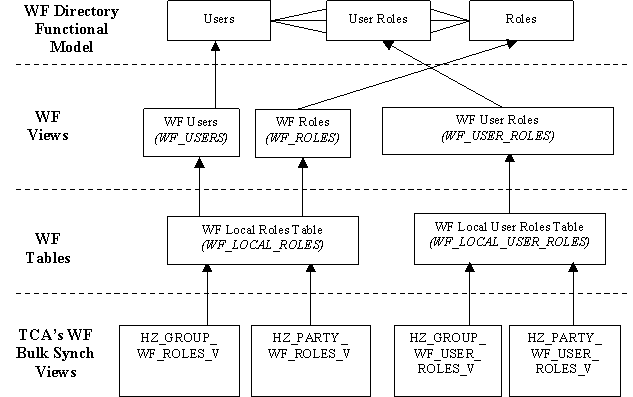
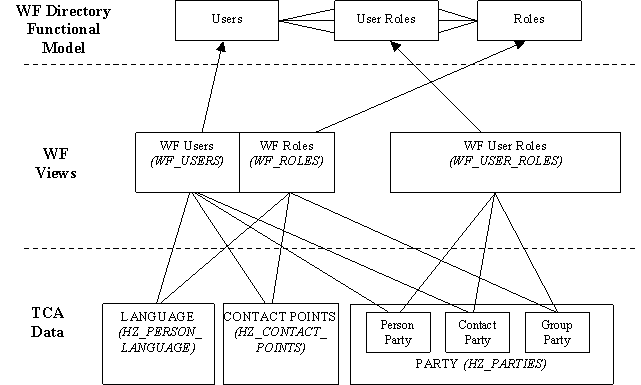
This diagram illustrates how the Workflow Directory Services interact with both their populating views as well as the data that is synchronized with TCA.
The Workflow views are views on two Workflow tables: WF_LOCAL_ROLES and WF_LOCAL_USER_ROLES. For TCA views, both bulk and incremental synchronizations write to these Workflow tables.
For bulk synchronization, TCA provides four views that populate data to the Workflow tables. The Workflow Directory views then capture the information present in the Workflow local tables.
This diagram illustrates how the four TCA bulk synchronization views are mapped to the Workflow tables.