After completing the map analysis, identify the document levels for both the source and target data.
A document level represents a collection of data that repeats. For the Application Open Interface tables or database views, each table represents a document level. A level is the parent in a parent-child relationship.
DTDs do not use document levels because the levels are implied based on usage. Refer to the tree diagram in the OAG definitions to get a sense of how the data is grouped. The tree diagram will also give you an idea of where additional occurrences of a datatype may be required.
Once you have identified the document levels for the source and target, proceed to relate the source data structure to the target data structure. This task is straightforward if the number of data levels in the source and target are identical, but can be difficult if the numbers are different. If the number of levels of the source is greater than the target number, you must collapse levels. If the number of levels of the source is less than the target number, you must expand levels.
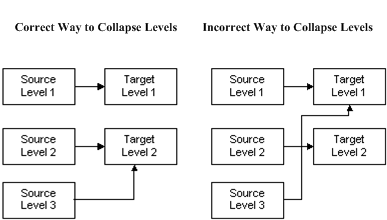
Collapsing levels is the mapping of multiple source levels to the same target level. For example, if your source is 3 levels and your target is 2 levels you can collapse the levels as shown in the following figure:
In the correct example above, the result of collapsing levels is that the data in Source Levels 2 and 3 are consolidated and mapped to Target Level 2. If there are two rows in Source Level 2 and three rows in Source Level 3, a total of six rows will be created in Target Level 2.
The incorrect example shows the collapsing of Source Levels 1 and 3 to Target Level 1, causing Source Level 3 to cross over Target Level 2.
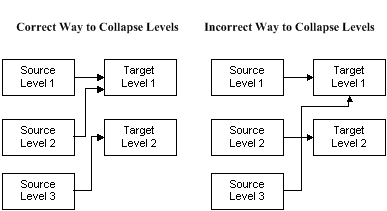
Another option is to relate Source Levels 1 and 2 to Target Level 1 and relate Source Level 3 to Target Level 2, as shown in the correct example below. (Do not map Source Level 3 to Target Level 1, crossing over Target Level 2.)
Whichever option you choose, consider what it means to promote lower level detail data to a higher level. The source data may need to be aggregated to be meaningful at the higher level.
Expanding levels is the mapping of one source level to multiple target levels. For example, if your source is 2 levels and your target is 3 levels you can expand the levels as shown in the following figure:
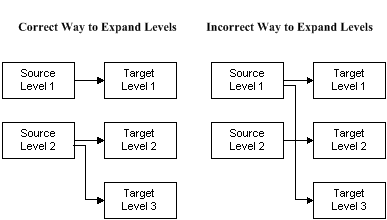
The result of expanding levels, as shown in the correct example above, is that the data in Source Level 2 is distributed and mapped to Target Levels 2 and 3. If there are two rows in Source Level 2, two rows will be created in Target Level 2 and Target Level 3.
Do not expand Source Levels across Target Levels, as shown in the incorrect example above. Source Level 1 is incorrectly expanded to Target Levels 1 and 3, crossing over Target Level 2.
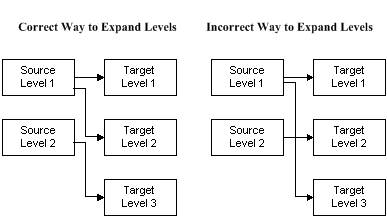
Another option, as shown in the correct example below, is to distribute Source Level 1 to Target Levels 1 and 2 and map Source Level 2 to Target level 3. (Do not map Source Level 1 to Target Levels 1 and 3, crossing over Target level 2, as shown in the incorrect example.)
Whichever option you choose, consider what it means to demote data from a higher level to a lower level of detail. The source data may need to be deaggregated to be meaningful at the lower level.
Level expansion is supported if the target expanded levels are all siblings of each other or if they are all children of the previous node. The following diagram shows an example of correct expansion of levels.
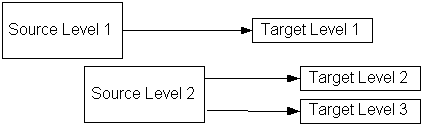
In the example above, Target Level 2 and Target Level 3 are siblings to each other and children of Target Level 1.
The following diagram shows an example of invalid level expansion:
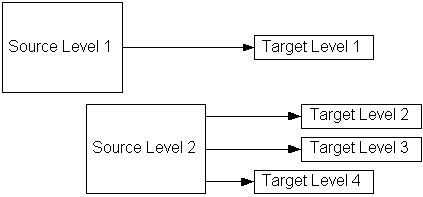
In the example of invalid level expansion above, Target Level 2 and Target Level 3 are siblings to each other and children of Target Level 1. Target Level 4 is a sibling of Target Level 1, with no relationship to Target Levels 2 and 3.
See Discontinuous Nodes for more information on discontinuous nodes.
Another way to accommodate the data structure mismatch is to collapse or expand the database views or Application Open Interface tables and use the modified database views or application open interface table definitions to create the message map.
The resulting hierarchy mapping is defined using the Message Designer Level Mapping Tab.