Messages can be passed through a middle trading party by using the static routing or dynamic routing feature. This method is also called a pass-through.
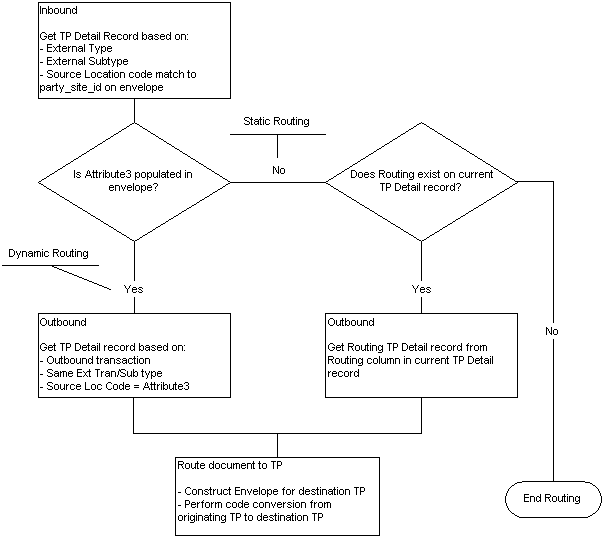
The following figure shows the routing flow of messages using the dynamic or static routing feature. The process starts with the review of the Trading Partner detail associated with the inbound message.
If data is found in the ATTRIBUTE3 field of the XML Gateway envelope, then the transaction is processed under the rules of Dynamic Routing. First the message is processed according to the inbound message map for the trading partner, then the message is rerouted to another trading partner who is the final recipient of the message. The trading partner detail for the final recipient is found in the Trading Partner Detail as an outbound message for the trading partner identified in the ATTRIBUTE3 field.
If there is no data in the ATTRIBUTE3 field of the XML Gateway envelope and there is data in the Routing field in the Trading Partner Detail for the inbound message, then the transaction is processed under the rules of Static Routing.
In Static Routing the message is processed according to the inbound message map for the trading partner, then the message is rerouted to another trading partner who is the final recipient of the message. The trading partner detail for the final recipient is found in the Trading Partner Detail as the trading partner identified in the Routing field for that inbound message.
If there is data in the ATTRIBUTE3 field of the XML Gateway envelope and there is data in the Routing field in the Trading Partner Detail for the inbound message, ATTRIBUTE3 will be used for the routing data.
If there is no data in the ATTRIBUTE3 field of the XML Gateway envelope and there is no data in the Routing field in the Trading Partner Detail for the inbound message, the message is not rerouted to another trading partner.
In both dynamic and static routing, data in the message may have code conversion applied at the trading partner level before constructing the outbound message for the final recipient. The retrieved code conversion values will be substituted into the XML message so the final trading partner receives the values that apply to them.
To explain Static and Dynamic routing for pass through messages, the following three trading partners are defined:
Party 1: Initiator of the Message
Party 2: First Recipient of the Message (This may be a hub)
Party 3: Final Destination of the Message
Party 1 will send the message to Party 2. Then Party 2 will reroute it to Party 3.
Static routing allows you to select another XML Gateway Trading Partner detail record from all your entries in the Trading Partner Setup form. You can select a trading partner within the same trading partner or from any other displayed trading partner. Every time a message is received for that trading partner and that transaction, it will automatically be routed to the trading partner defined in the "Routing" column.
Static Routing occurs under the following conditions:
The originator of the message (Party 1) does not include the final Destination Trading Partner Location Code in the message.
For the given transaction and trading partner, the first recipient of the message (Party 2) has selected a trading partner in the Routing field to automatically forward that message to.
In order for this to happen, the following is necessary:
Proper trading partner setup for the final recipient must be entered in the Trading Partner Setup in Party 2's environment.
The following illustration reviews the required trading partner setup for each party in the example.
Party 1: Initiator of the Message:
In Static Routing, the first initiator of the message does not indicate the final Destination Trading Partner Location Code in their setup. No data should appear in ATTRIBUTE3 of the XML Gateway envelope. This is illustrated in the following table:
| Entry | Trading Partner | Direction | External Transaction Type | External Transaction Subtype | Protocol | Source TP Location Code | Routing | Destination TP Location Code (in ATTRIBUTE3) |
|---|---|---|---|---|---|---|---|---|
| (1) | Party 2 | OUT | INVOICE | ADD | HTTP | Party 1 | N/A | N/A |
Party 2: First Recipient of the Message:
PARTY 2 must define the message for both the inbound trading partner and the outbound trading partner to whom the message will be rerouted.
(2) Party 2 received the message from Party 1. The message was an inbound invoice to Party 2. See entry (2) of the table below.
(3) Party 2 will reroute the message to Party 3, because the trading partner setup for Party 3 was stored under the Routing field for Party 2's trading partner setup for Party 1. The trading partner setup data for the trading partner in the Routing field is used to create the new message and the XML Gateway envelope. See entry (3) of the table below.
| Entry | Trading Partner | Direction | External Transaction Type | External Transaction Subtype | Protocol | Source TP Location Code | Routing | Destination TP Location Code |
|---|---|---|---|---|---|---|---|---|
| (2) | Party 1 | IN | INVOICE | ADD | N/A | Party 1 | (points to Party 3 for the outbound message) | N/A |
| (3) | Party 3 | OUT (will be set to out) | INVOICE (use the same External Transaction Type) | ADD (use the same External Transaction Subtype) | HTTP | Party 2 | N/A | N/A |
The following method is dynamic because the first party originating the message indicates the Destination Trading Partner Location Code for the final destination trading partner to receive the message.
Dynamic Routing occurs under the following conditions:
The originator of the message (Party 1) includes the final Destination Trading Partner Location Code in ATTRIBUTE3 in the XML Gateway envelope.
The first recipient of the message (Party 2) can identify the trading partner code in ATTRIBUTE3 in their own Trading Partner setup.
In order for this to happen the following is necessary:
Party 1's XML process must be set up to write the final trading partner to ATTRIBUTE3 of the XML Gateway envelope. The XML Gateway uses the Destination Trading Partner Location Code field in the Trading Partner Setup form.
The proper trading partner setup must be entered in Party 2's process to act on ATTRIBUTE3. For the XML Gateway, this is in the Source Trading Partner Location Code field in the Trading Partner Setup form.
The following illustration reviews the required trading partner setup for each party in the example.
Party 1: Initiator of the Message:
(1) In Dynamic Routing, the first initiator of the message (Party 1) passes a Destination Trading Partner Code in ATTRIBUTE 3 to the first message recipient (Party 2).
This code is defined by the first recipient of the message, so they can identify the trading partner to whom the message will be forwarded. The Destination Trading Partner Code will be copied to ATTRUBUTE3 in the XML Gateway envelope. See the table below:
| Entry | Trading Partner | Direction | External Transaction Type | External Transaction Subtype | Protocol | Source TP Location Code | Routing | Destination TP Location Code (in ATTRIBUTE3) |
|---|---|---|---|---|---|---|---|---|
| (1) | Party 2 | OUT | INVOICE | ADD | HTTP | Party 1 | N/A | Party 3 |
Party 2: First Recipient of the Message:
This second party must define the message for both the inbound trading partner and the outbound trading partner.
(2) Party 2 received the message from Party 1. The message was an inbound invoice to Party 2. See entry (2) in the Trading Partner Setup for Party 2 table.
Party 2 will validate Party 1 as a trading partner for that inbound message. The data is shown in the following table
| Direction | External Transaction Type | External Transaction Subtype |
|---|---|---|
| IN | INVOICE | ADD |
(3) Party 2 will reroute the message to Party 3. The message becomes an outbound invoice from Party 2. See entry (3) below.
Party 2 will also perform a trading partner lookup for the trading partner to whom the message is to be forwarded. The direction is changed to OUT. External Transaction Type and External Transaction subtype are copied from the inbound message. The lookup involves the data shown in the following table:
| Direction | External Transaction Type | External Transaction Subtype |
|---|---|---|
| OUT | INVOICE | ADD |
The Trading Partner Setup for Party 2, is shown in the following table:
| Entry | Trading Partner | Direction | External Transaction Type | External Transaction Subtype | Protocol | Source TP Location Code | Routing | Destination TP Location Code (in ATTRIBUTE3) |
|---|---|---|---|---|---|---|---|---|
| (2) | Party 1 | IN | INVOICE | ADD | N/A | Party 1 | N/A | N/A |
| (3) | Party 3 | OUT (set to OUT) | INVOICE (use the same External Transaction Type) | ADD (Use the same External Transaction Subtype) | HTTP | Party 2 | N/A | N/A |
Party 3: Final Recipient of the Message:
(4) Party 3 received the message from Party 2. The message was an inbound invoice. The data is shown in the following table:
| Entry | Trading Partner | Direction | External Transaction Type | External Transaction Subtype | Protocol | Source TP Location Code | Routing | Destination TP Location Code (in ATTRIBUTE3) |
|---|---|---|---|---|---|---|---|---|
| (4) | Party 3 | IN | INVOICE | ADD | N/A | Party 2 | N/A | N/A |