Create Trading Partner Message (for ECX internal use only)
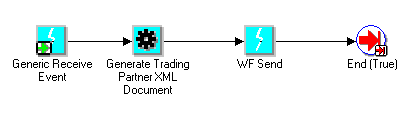
The XML Gateway Standard Item Type is a toolkit consisting of attributes, processes, functions, and event activities. These are provided to implementers to build Workflow processes to configure the seeded event subscriptions delivered by the Oracle E-Business Suite for prebuilt XML messages in support of B2B integration requirements.
In addition, the function activities can be used to define Workflow processes in support of A2A integration requirements.
The Notifications and Messages are contained in the Oracle E-Business Suite application module-specific item type and are defined using the XML Gateway Error Processing Item Type.
See XML Gateway Error Processing Item Type.
Attributes, also known as variables, are used to support the function, event, notification, and process activities defined for the XML Gateway Standard Item Type.
The XML Gateway Standard Item Type supports the following process:
Create Trading Partner Message (for ECX internal use only)
The Create Trading Partner Message is a rule function available from the Workflow Event Subscription page.
The XML Gateway Standard Item Type includes five function activities as shown in the following table:
| Function Display Name | A2A/B2B | Inbound / Outbound | Purpose |
|---|---|---|---|
| Consume XML Document | A2A | Inbound | Trigger XML Gateway to process inbound message on the Event Message attribute. |
| Generate XML Document | A2A | Outbound | Create XML message and store in Event Message attribute. Trading Partner verification is not required. |
| Generate Trading Partner XML Document | B2B | Outbound | Verify transaction is enabled for the Trading Partner, create XML message, and store in Event Message attribute. |
| Send Document | B2B | Outbound | Create and enqueue XML message onto outbound queue. |
| Transaction Delivery Required | B2B | Outbound | Verify transaction is enabled for the Trading Partner. |
| Transform XML | A2A/B2B | Inbound/Outbound | Enable XML to XML transformations |
Application-to-Application (A2A) exchange of data is conducted within and outside your enterprise to share or synchronize data between information systems. There is no Trading Partner involved in an A2A integration. An example of an A2A exchange is to move data from the Oracle Payables module to Oracle General Ledger for GL consolidation.
Business-to-Business (B2B) exchange of data is conducted with a Trading Partner outside of your enterprise for which Trading Partner validation is required. Data will not be sent to or received from an invalid Trading Partner. An example of a B2B exchange is to send a purchase order to a supplier.
There is not a controlling Workflow process for inbound B2B exchanges. The XML Gateway execution engine subscribes directly to the inbound queue.
Functions will be referred to by their function display names. The internal function names are provided for reference in the following table:
| Function Display Name | Internal Name |
|---|---|
| Consume XML Document | PROCESSXML |
| Generate XML Document | GETXML |
| Generate Trading Partner XML Document | GETTPXML |
| Send Document | DOCUMENT_SEND |
| Transaction Delivery Required | DELIVREQUIRED |
| Transform XML | XMLTOXML |
The following is a description of each function supported by the XML Gateway Standard Item Type.
The Consume XML Document function triggers the XML Gateway Execution Engine to process the inbound message in the Event Message attribute. The XML Gateway execution engine will process the message according to the message map associated with the message, and will conclude by raising a business event to indicate that it has successfully processed the inbound message.
See Procedure Call: Execute Procedure for details regarding the Procedure Call action to raise a business event.
The Consume XML Document function is for inbound messages in the A2A scenario only. The XML Gateway execution engine is automatically triggered in a B2B scenario when an inbound message arrives on the inbound queue.
The attributes for the Consume XML Document function are shown in the following table. The values for the attributes are provided by the business event, another function activity, or are set as constants.
| Attribute Name | Attribute Description |
|---|---|
| Map Code | This is the Map Code defined in the Message Designer and associated to the Trading Partner that uniquely identifies the message map associated with the business document enabled for the Trading Partner. |
| Event Message | Event Message contains the event data as well as header properties for the event name, event key, and error data. The Event Message attribute is required to store the inbound message for processing by the XML Gateway execution engine. |
The Generate XML Document function is used to retrieve data from the Oracle E-Business Suite. The data for the XML message retrieved from the Oracle E-Business Suite is stored in the Event Message attribute. The Event Message is then processed according to the subsequent Workflow instruction, which may be to send it to another Oracle E-Business Suite application module or to the WF_OUT agent.
The difference between the Generate XML Document function and the Generate Trading Partner XML Document function is that this function does not require Trading Partner validation since there is no Trading Partner involved in A2A integration.
The Generate XML Document function activity is provided for use in Workflow processes. For environments where a Workflow process does not exist, the ECX_STANDARD.generate function can be called from the Workflow Define Event window, Generate Function field. The details of the function are as follows:
function generate
(p_event_name in varchar2,
 p_event_key in varchar2
 p_parameter_list in wf_parameter_list_t)
 return CLOB;
| p_event_name | Unique identifier for the business event associated with the transaction. |
| p_event_key | Unique identifier for the business document from the Oracle E-Business Suite associated with the business event. |
| p_parameter_list | Parameter list containing the document selection criteria. |
The attributes for the Generate XML Document function are shown in the following table. The values for the attributes are provided by the business event, another function activity, or are set as constants.
| Attribute Name | Attribute Description |
|---|---|
| Document ID | This is the unique identifier for the business document. It can be the document number or its associated database key, whichever is guaranteed to be unique for the transaction. The Document ID is optional for the Generate XML Document function unless it is used in the message map as a selection criterion. |
| Map Code | This is the Map Code defined in the Message Designer and associated to the Trading Partner that uniquely identifies the message map associated with the business document enabled for the Trading Partner. The Map Code is required for the Generate XML Document function. |
| Event Name | This is a unique identifier for the business event. The naming convention is oracle.apps.<product code>.<component>.<object>.<event> The Event Name is required for the Generate XML Document function to store the value returned. |
| Event Key | This is a unique identifier for an instance of an event. The combination of event name, event key, and event data fully describe what occurred in the event. The Event Key is required for the Generate XML Document function activity to store the value returned. |
| Parameter 1 | Optional variable. This attribute is used if it is used in the message map. |
| Parameter 2 | Optional variable. This attribute is used if it is used in the message map. |
| Parameter 3 | Optional variable. This attribute is used if it is used in the message map. |
| Parameter 4 | Optional variable. This attribute is used if it is used in the message map. |
| Parameter 5 | Optional variable. This attribute is used if it is used in the message map. |
| Event Message | Event Message contains the event data as well as header properties for the event name, event key, and error data. The Event Message is required for the Generate XML Document function to store the value returned. |
The Generate Trading Partner XML Document function is used to retrieve data from the Oracle E-Business Suite. The data for the XML message retrieved from the Oracle E-Business Suite is stored in the Event Message attribute. The Event Message is then processed according to the subsequent Workflow instruction, which may be to send it to another Oracle E-Business Suite application module or to the WF_OUT agent.
The difference between the Generate Trading Partner XML Document function and the Generate XML Document function is that this function is used in B2B integration for which a valid Trading Partner is required.
The attributes for the Generate Trading Partner XML Document function are shown in the following table. The values for the attributes are provided by the business event, another function activity, or are set as constants.
| Attribute Name | Attribute Description |
|---|---|
| Transaction Type | This is the Transaction Type defined in the XML Gateway Define Transactions form. The Transaction Type is optional for the Generate Trading Partner XML Document function because it can be derived from the Map Code. |
| Transaction Subtype | This is the Transaction Subtype defined in the XML Gateway Define Transactions form. The Transaction Subtype is optional for the Generate Trading Partner XML Document function because it can be derived from the Map Code. |
| Document ID | This is the unique identifier for the business document. It can be the document number or its associated database key, whichever is guaranteed to be unique for the transaction. The Document ID is optional for the Generate XML Document function unless it is used in the message map as a selection criterion. |
| Party Site ID | This is the unique identifier for the Trading Partner site defined in Oracle E-Business Suite. The Party Site ID is required for the Generate Trading Partner XML Document function. |
| Party ID | This is the unique identifier for the Trading Partner defined in Oracle E-Business Suite. This field is optional. |
| Event Name | This is a unique identifier for the business event. The naming convention is oracle.apps.<product code>.<component>.<object>.<event> The Event Name is required for the Generate Trading Partner XML Document function to store the value returned. |
| Event Key | This is a unique identifier for an instance of an event. The combination of event name, event key, and event data fully describe what occurred in the event. The Event Key is required for the Generate Trading Partner XML Document function to store the value returned. |
| Parameter 1 | Optional variable. This attribute is used if it is used in the message map. |
| Parameter 2 | Optional variable. This attribute is used if it is used in the message map. |
| Parameter 3 | Optional variable. This attribute is used if it is used in the message map. |
| Parameter 4 | Optional variable. This attribute is used if it is used in the message map. |
| Parameter 5 | Optional variable. This attribute is used if it is used in the message map. |
| Event Message | Event Message contains the event data as well as header properties for the event name, event key, and error data. The Event Message is required for the Generate Trading Partner XML Document function to store the value returned. |
| Party Type | The Party Type defined in the XML Gateway Trading Partner Setup window. |
The Send Document function is used to trigger outbound message creation. The XML message may be created immediately or deferred depending on the setting of the Send Mode attribute. This function triggers XML Gateway to gather the data from the Oracle E-Business Suite, and to create and enqueue the XML message.
A Send Mode of "Deferred" defers the processing to the Workflow background engine.
A Send Mode of "Immediate" triggers the XML Gateway Execution Engine to create the XML message immediately after the data has been entered into the Oracle E-Business Suite. With this approach, a snapshot of the data is taken to avoid a race condition where the data may be changed after the time the event is raised and before the data is extracted.
The Send Document function may be modeled using the XML Gateway Rule Function or the Workflow Default Rule Function to ensure that XML messages are sent to Trading Partners enabled for the transaction.
The attributes for the Send Document function are shown in the following table. The values for the attributes are provided by the business event, another function activity, or are set as constants.
| Attribute Name | Attribute Description |
|---|---|
| Transaction Type | This is the Transaction Type defined in the XML Gateway Define Transactions form. |
| Transaction Subtype | This is the Transaction Subtype defined in the XML Gateway Define Transactions form. |
| Document ID | This is the unique identifier for the business document. It can be the document number or its associated database key, whichever is guaranteed to be unique for the transaction. |
| Party Site ID | This is the unique identifier for the Trading Partner site defined in Oracle E-Business Suite. |
| Party ID | This is the unique identifier for the Trading Partner defined in Oracle E-Business Suite. This field is optional. |
| Parameter 1 | Optional variable. This attribute is used if it is used in the message map. |
| Parameter 2 | Optional variable. This attribute is used if it is used in the message map. |
| Parameter 3 | Optional variable. This attribute is used if it is used in the message map. |
| Parameter 4 | Optional variable. This attribute is used if it is used in the message map. |
| Parameter 5 | Optional variable. This attribute is used if it is used in the message map. |
| Send Mode | Select "Deferred" or "Immediate" |
| Message ID | This is a unique identifier provided by the XML Gateway execution engine for each outbound message. |
| Party Type | Party Type defined in the XML Gateway Trading Partner Setup window. |
The Transaction Delivery Required function is used to determine if the Trading Partner is enabled for the transaction. It is used for B2B integration where Trading Partner validation is required. The function returns TRUE or FALSE.
The Transaction Delivery Required function is also embedded in the XML Gateway Rule Function. No Workflow process will be executed if the function returns FALSE.
The seeded event subscription delivered by Oracle E-Business Suite application modules can use the XML Gateway Rule Function or the Workflow Default Rule Function. The XML Gateway Rule Function is more efficient because it predetermines whether the Trading Partner is enabled for the transaction and executes the associated Workflow process only if the result of the rule function is TRUE. It is therefore the recommended approach.
The attributes for the Transaction Delivery Required function are shown in the following table. The values for the attributes are provided by the business event, another function activity, or are set as constants.
| Attribute Name | Attribute Description |
|---|---|
| Transaction Type | This is the Transaction Type defined in the XML Gateway Define Transactions form. |
| Transaction Subtype | This is the Transaction Subtype defined in the XML Gateway Define Transactions form. |
| Party Site ID | This is the unique identifier for the Trading Partner site defined in Oracle E-Business Suite. |
| Party ID | This is the unique identifier for the Trading Partner defined in Oracle E-Business Suite. |
| Party Type | The Party Type defined in the XML Gateway Trading Partner Setup window. |
| Confirmation Flag | The Document Confirmation flag from the Trading Partner Setup window. Indicates whether a confirmation is sent or received. The Confirmation Flag has been added to the Transaction Delivery Required? (DELIVREQUIRED) function activity. Workflows for outbound business documents can now be designed to wait for the inbound confirmation if the ECX_CONFIRMATION_FLAG is set to 1 (send confirmation if error detected) or 2 (always send confirmation). The Confirmation Flag is an attribute of the Trading Partner that is defined using the Trading Partner Setup window. Use this Workflow design approach if you want to link the outbound business document with the inbound confirmation. This is optional. |
The Transform XML function is used for XML to XML transformation.
The Transform XML function transforms a given Input XML document into another XML document. The input parameters to this activity are the Map Code and the Input XML Document. The output of the activity is the transformed XML document. The execution engine will execute the transformation according to the Map Definition.
The attributes for the Transform XML function are shown in the following table. The Event Message In attribute stores the input XML information and the Event Message Out attribute stores the transformed XML information.
| Attribute Name | Attribute Description |
|---|---|
| Map Code | The Map Code associated with the Transaction as defined in the Trading Partner Details form. |
| Event Message In | The Input XML message. |
| Event Message Out | The Transformed XML message. |
The XML Gateway Standard Item Type includes three Events to raise a business event from an existing Workflow process.
The Generic Receive Event is used to support the Create Trading Partner Message process.
The Raise Document Delivery Event is used to raise a business event from an existing Workflow process. This allows you to seamlessly integrate your existing Workflow process with Oracle XML Gateway to create an outbound XML message.
An alternate approach is to raise the business event directly from PL/SQL code. Refer to the Raise for the details.
The attributes for the Raise Document Delivery Event are shown in the following table. The values for the attributes are provided by a function activity or are set as constants.
| Attribute Name | Attribute Description |
|---|---|
| Transaction Type | This is the Transaction Type defined in the XML Gateway Define Transactions form. |
| Transaction Subtype | This is the Transaction Subtype defined in the XML Gateway Define Transactions form. |
| Document ID | This is the unique identifier for the business document. It can be the document number or its associated database key, whichever is guaranteed to be unique for the transaction. |
| Party Site ID | This is the unique identifier for the Trading Partner site defined in Oracle E-Business Suite. |
| Party ID | This is the unique identifier for the Trading Partner defined in Oracle E-Business Suite. |
| Parameter 1 | Optional Variable. This attribute is used if it is used in the message map. |
| Parameter 2 | Optional Variable. This attribute is used if it is used in the message map. |
| Parameter 3 | Optional Variable. This attribute is used if it is used in the message map. |
| Parameter 4 | Optional Variable. This attribute is used if it is used in the message map. |
| Parameter 5 | Optional Variable. This attribute is used if it is used in the message map. |
The WF Send Event enqueues a message onto the ECX_OUTBOUND queue. This event is used in conjunction with Callback. See Message Delivery Status for a complete description of this event and its attributes.
The XML Gateway Standard Item Type supports the Send Mode Lookup Type used in the Send Document function to indicate whether the event subscription should be processed immediately or in deferred mode.
Attachment Enabled HTTP
Attachment Enabled HTTPS
Attachment Enabled OTA over HTTP
Attachment Enabled OTA over HTTPS
Email Delivery
HTTP Delivery
HTTPS (Secure HTTP)
No Electronic Delivery
Oracle Integration Server
Oracle Transport Agent Using HTTP
Oracle Transport Agent Using HTTPS
Confirmation Values are used in the Transaction Delivery Required function activity.
No confirmation Business Object Document Delivery
Send a confirmation Business Object Document Regardless
Send back a confirmation Business Object Document only if an error has occurred
Party Types are used in the Get Trading Partner Role and Send Document function activities.
Bank
Customer
Carrier
Exchange
Internal
Supplier
XML Gateway Standalone
Send Mode is used in the Send Document function activity.
Deferred
The Deferred mode informs the XML Gateway execution engine to defer the message creation to the Workflow background engine. This is also known as asynchronous processing.
Immediate
The Immediate mode informs the XML Gateway execution engine to create and enqueue the XML message immediately after the data has been entered into the Oracle E-Business Suite. This is also known as synchronous processing.
Synchronous processing avoids the race condition where the data may be changed between the time the event is raised and before the data is extracted.