The target definition selected or created using the Map Creation Wizard is displayed in the Target Definition Tab. The target definition can be extended to perform the following:
Provide default values
Create duplicate nodes and elements using the Add Sibling button
Add fields using the Add Child button
Delete unused and unmapped DTD elements to prevent parser violations
Once the target data definition is complete, it can be saved for reuse in other message maps. Use the File > Save (Data Definition) menu option or the toolbar equivalent. Use the File > Properties menu option to change the default directory or data definition property values if necessary.
If you do not wish to save the target data definition as an entity independent of the message map, then continue with the mapping process and save the transaction map at the end of the Element Mapping process.
Refer to How to Map a Pass-Through Message, for guidelines related to developing a pass-through transaction.
Refer to How to Map to an API for guidelines for mapping an inbound message to an Application API (as opposed to mapping to Application Open Interface tables).
For DTD elements defined using "|" as the occurrence indicator, make sure you select one element from the choice list and delete the unused elements. The parser will validate that only one element is used.
Delete optional DTD data types and elements that are not used and therefore not mapped. If not deleted, these elements will appear as empty tags in the resulting message.
If you decide not to delete DTD data types and elements that are not used and not mapped, default the data type or element attribute to "OTHER". The parser requires the attribute even though the data type or element is optional.
Refer to How to Implement Attachments in XML Messages for details on how to include attachments with your XML documents.
Discontinuous nodes:
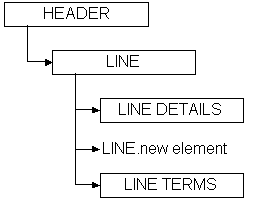
A discontinuous node is a non-level node that follows a level and is a sibling of that level. It can be represented graphically as follows:
In this example, the levels LINE DETAILS and LINE TERMS are children of the level LINE, and are siblings of each other. Inserted between LINE DETAILS and LINE TERMS is a new element of the LINE node. The new element is a continuation of the LINE node that creates a break between LINE DETAILS and LINE TERMS.
The ideal placement of the new element is as the last element of the LINE node before the LINE DETAILS node. However, some standards bodies do not have the flexibility to restructure an existing DTD, or may not wish to for backwards compatibility reasons. Regardless of the reason, the condition exists, and XML Gateway supports it.
For data definitions based on the Oracle data model, use the Add Child or Add Sibling button in the Message Designer, Transaction Map window to define a discontinuous node. Any new node introduced on the source and distributed across multiple target levels (expanded) or consolidated into a single target level (collapsed) will be grouped with the parent node and mapped according to the target definition. The rules against level cross-over still apply.
For data definitions based on a DTD, use the Transaction Map window, Item Type column to explicitly identify the data levels. This exercise may create a discontinuous node, which is not a problem unless you define the invalid scenario described below. The only user extensions supported for OAG DTDs are in the USERAREA. If you modify the DTD (using the Add Child or Add Sibling buttons) outside of the USERAREA, a parsing error will be triggered.
Message Designer will allow you to define a discontinuous node anywhere in the source or target definition. You will not know until runtime if the definition is valid or not. Therefore you should avoid introducing a discontinuous node for a node which also contains a child node.
The following graphic illustrates an invalid definition:
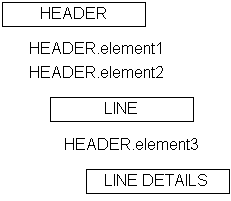
In the example above, HEADER.element3 is a continuation of the HEADER node. HEADER.element3 is also defined as a child of the LINE node. HEADER.element3 has a child node called LINE DETAILS. This is an invalid definition.
Field identifies the name of the element, document, or root. The names are based on the Application Open Interface table column names or DTD element names.
The field name can be changed if necessary, however, consider what this change implies. Because the field is based on the database column name or a DTD element name, corresponding changes may be necessary in Oracle E-Business Suite or the DTD. The only changes allowed to a DTD are to the USERAREA. Refer to How to Extend DTDs for details.
The first row is reserved for the Data Definition name (if target is based on Application Open Interface) or DTD root element name (if target is a DTD).
Additional field names are displayed when sibling or child elements are added using the Add Sibling or Add Child buttons.
Item type identifies the field as either a Level or an Element. Level represents the parent in a parent-child relationship. Element represents the child in a parent-child relationship.
The Item Type of the first row is defaulted to Level. The default value cannot be changed.
If the target is based on Application Open Interface tables, the Item Type for the tables is defaulted to "Level". The Item Type for the columns is defaulted to "Element".
If the target is based on a DTD or a production XML message, the default Item Type is "Element". DTDs do not support levels and therefore the levels must be explicitly defined by setting the Item Type to "Level".
Any node that represents a collection of data that repeats (for example, PO lines or shipment lines) represents a level. The Item Type for the node must be set to "Level".
For the OAG standard, change the Item Type of the following to "Level" to support Level Mapping:
Root
CNTROLAREA
DATAAREA
Make the same change for all other DTD data types identified as data levels during the map analysis process.
The Item Type for a new sibling or child element is defaulted to "Element". Change the Item Type setting where appropriate.
Enter a default value for the field as appropriate. This value is used in the outbound message. The default value will be used in an inbound message if the incoming value is null.
If the target is a DTD, use the Default column to set the DTD attribute values. The values will be displayed with the corresponding attribute tags when the message is created.
If the default value is based on a condition, set the default using the Assign Variable Value action. See Assignments: Assign Variable Value.
If Item Type is Level, this column is disabled.
Each field is defined with a data type. The data types supported by the XML Gateway Execution Engine are VARCHAR2, DATE, NUMBER, CHAR, and CLOB.
The CLOB data type is used to support large objects up to 4 GB in size. The CLOB is displayed between CDATA tags to escape parsing.
If the target is based on Application Open Interface tables, the data type is defaulted to the data type defined for the database column.
If the target is based on a DTD or a production XML message, the data type is defaulted to VARCHAR2.
Attention: It is not necessary to change the DTD element's data type until XML schemas are supported by the XML standards bodies which will make data types more meaningful.
The Data Type for a new sibling or child element is defaulted to VARCHAR2. Change the data type if necessary.
If Item Type is Level, the Data Type column is disabled.
DB Column is available only when the target is based on Application Open Interface tables.
A check mark indicates the column is defined in the Oracle E-Business Suite data model. This setting informs the XML Gateway Execution Engine whether to validate the element against the Oracle E-Business Suite data model or not.
If the Item Type is Level, the DB Column is disabled.
Node Type is available only when the target is a DTD. The default is the DTD setting.
The valid values are Element or Attribute. Elements contain the business data. Attributes contain qualifiers for the business data to indicate the intended meaning of the data.
The Node Type for a new sibling or child element is defaulted to "Element". Change the Node Type setting if appropriate.
If Item Type is Level, the Node Type column is disabled.
The Add Sibling button allows you to add new fields required to complete the map. This feature is also used to create duplicate DTD nodes such as PARTNER.
The same can be done if the target is Application Open Interface tables.
When the target is based on a DTD or production XML message, and you are adding a sibling between two attributes, set the Node Type for the new field to "Attribute". The default Node Type of "Element" will cause a parser violation.
Attention: You cannot add a sibling to the root node.
Refer to How to Extend DTDs for details on how to extend a DTD. Included are the naming conventions that must be followed for the XML Parser to recognize the DTD extensions.
The Add Child button adds child elements to an existing sibling or child. In addition, Add Child can be used to define an attribute for the root element if the source or target is a DTD.
This function can be used if the target is Application Open Interface tables or a DTD.
If Node Type is "Attribute", the Add Child button is disabled. You cannot define an attribute for an attribute.
Note: Refer to How to Extend DTDs for details on how to extend a DTD. Included are the naming conventions that must be followed for the XML Parser to recognize the DTD extensions.
The Delete button deletes any sibling or child element that has not been mapped.
If a sibling or child has child elements associated with it, a warning is displayed before the delete occurs.
Attention: If you are deleting any DTD extensions, be sure to remove the DTD extensions from the corresponding extension file created for the application or user. The extra information will not cause a parser violation, but it is a good practice to ensure the extension files match the message maps. Refer to How to Extend DTDs for the details.