You can define security rules for each segment or report parameter for which you want to restrict data entry. Within a rule, you specify ranges of segment values to include and exclude from use. You can create many rules for the same segment or parameter, and assign the rules to different responsibilities. You also define the error message you see if you try to enter a value for which you do not have access. If you define no security rules for a segment, you can enter any value you have defined into that segment.
Before you define your security rules, you should determine what segments you want to enable security on, and what types of access limits you want to place on segment values for the different responsibilities that use your flexfield.
Since you include or exclude values by ranges, you should plan your segment values carefully to make security rules easy to define. Organizing your values in ranges or "chunks" of related values helps you keep your security rules simpler (and helps keep cross-validation rules simpler as well).
Suggestion: We recommend that you define many rules that each have few rule elements rather than a few rules that each have many rule elements. The more rules you provide, the more specific you can make your message text.
You can only use flexfield value security rules on segments or report parameters that use value sets with a validation type of Independent, Dependent, or Table. You cannot use security rules for segments that use value sets with a validation type of None, Special, or Pair.
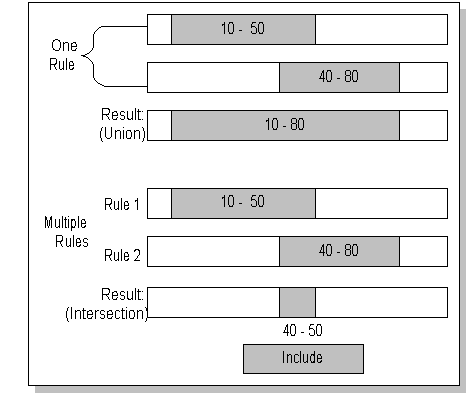
It is important for you to understand how the rules interact before you define them. You can define many security rules for a segment. Each security rule is composed of one or more rule elements. A rule element specifies a range of values to include or exclude. If you create rule elements that have overlapping ranges, the result is that all values included in either range are included by the rule. However, if you define two different rules that have overlapping ranges and assign both rules to the same responsibility, the effect is that only the values included in the overlap of both rules are available to users of the responsibility. More rules restrict more, not less. All values must pass all security rules for it to appear in a segment or parameter list of values. The following examples (shown in the following diagrams) illustrates how your rules interact:
Suppose you have one rule with two rule elements. The first element includes values 10 through 50, and the second element includes values 40 through 80. The resulting rule includes the union of the two elements, values 10 through 80.
Suppose instead you have two separate rules. The first rule includes values 10 through 50, and the second rule includes values 40 through 80. The resulting effect of the two rules includes the intersection of the two rules, values 40 through 50.
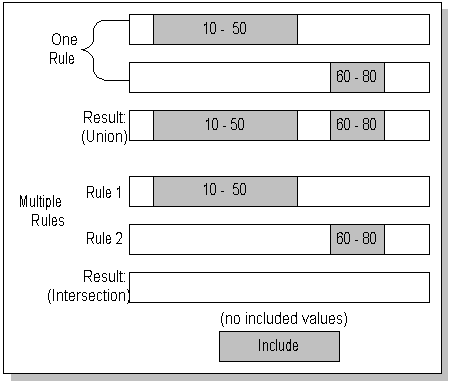
If you have multiple separate rules whose included values do not overlap, then no values will be allowed at all, because values must be included by all active security rules for that segment to be valid.
Now suppose you have one rule with two rule elements. The first element includes values 10 through 50, and the second element includes values 60 through 80. The resulting rule includes the union of the two elements, values 10 through 50 and values 60 through 80.
Suppose instead you have two separate rules. The first rule includes values 10 through 50, and the second rule includes values 60 through 80. The resulting effect of the two rules includes the intersection of the two rules, which is no values at all.
Once you define your security rules, you can assign them to responsibilities. The rules are active for every user in that responsibility. You can assign different rules to different responsibilities, and you can share rules across responsibilities. So, you can create some responsibilities with access to all segment values, and others with limited access. You are free to change the assignments of your security rules or create new ones at any time. See: Assigning Security Rules.
With hierarchical value security, the features of flexfield value security and flexfield value hierarchy are combined. With this feature any security rule that applies to a parent value also applies to its child values.
With hierarchical security enabled, the system does the following for a given value:
Checks if this value is excluded by any of the security rules.
Checks if this value is not included by any of the security rules.
Checks if any of the parents is excluded by any of the security rules.
Checks if any of the parents is not included by any of the security rules.
Warning: If you have a large hierarchical tree of values, then a security rule that applies to a parent value will also apply to all its child values, regardless of how many levels below the child values are.
