Since a value set is primarily a "container" for your values, you define your value set such that it can control the types of values that are allowed into the value set (whether predefined or non-validated). You can specify the format of your values:
Warning: Date and DateTime will be obsolete in a future release and are provided for backward compatibility only. For new value sets, use the the format types Standard Date and Standard DateTime.
You can also specify the maximum length your values can be, as well as a minimum and maximum value that can be used with your value set. Choosing the maximum size for your value set depends on what flexfield you plan to use with your value set. Your value set size must be less than or equal to the size of the underlying segment column in the flexfield table. Oracle E-Business Suite does not allow you to assign a value set whose values would not fit in the flexfield table.
You want to specify a maximum size for your values that fits the way your organization works. Generally, if you use values with descriptions, your values tend to be short and have longer descriptions. For example, you might have a value of 02 that has a description of New Orleans Region. If you plan to have Oracle E-Business Suite right justify and zero-fill your values (so a three-character value set value of 7 automatically comes 007), you want your maximum size to be short enough so that your users are not overwhelmed by zeros, but long enough so that your organization has room to add more values later.
Values never change; descriptions can. For example, a department code of 340 cannot change, but its description may change from Sales to Corporate Accounts. Disable values and create new ones as needed.
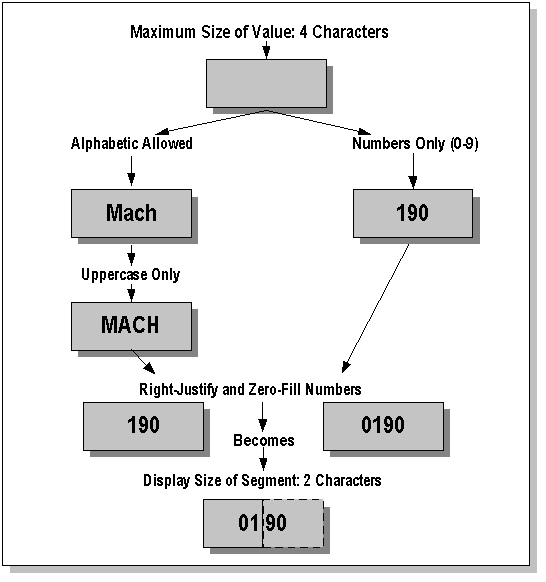
The following diagram shows how some of these formatting options interact.
Formatting Options
You have several other options from which to choose. See: Value Formats.
Value set options include the following:
Name
Description
List Type
Security Type
Format options include:
Format Type
Maximum Length
Precision
Numbers Only?
Uppercase Only?
Right-Justify and Zero-Fill Numbers?
Minimum Value
Maximum Value
Validation types include:
Independent
Dependent
None
Table
Special
Pair
Translatable Independent
Translatable Dependent
