Use the Loop Counter activity to limit the number of times the Workflow Engine transitions through a particular path in a process. The Loop Counter activity can have a result of Loop or Exit.
This Loop Counter activity calls the PL/SQL procedure named WF_STANDARD.LOOPCOUNTER.
The Loop Counter activity has an activity attribute called Loop Limit. If the number of times that the Workflow Engine transitions to the Loop Counter activity is less than the value specified in Loop Limit, the Loop Counter activity will complete with a result of Loop and the engine will take the 'Loop' transition to the next activity. If the number of times that the Workflow Engine transitions to the Loop Counter activity exceeds the value of Loop Limit, the activity will complete with a result of Exit and the engine will take the 'Exit' transition to an alternative activity.
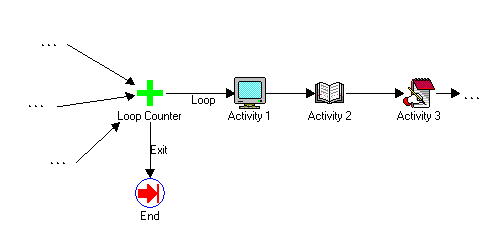
For example, suppose your workflow process contains a branch of activities that can be transitioned to from multiple source activities, and you want to ensure that that particular branch of activities gets executed just once in the process. Include a Loop Counter activity as the first activity in that branch and specify the Loop Limit activity attribute value as 1. Also draw an 'Exit' transition from the Loop Counter activity to an activity that you want the engine to execute if the Loop Counter activity is visited more than once, as shown in the diagram below.
Example Loop Counter Activity in a Branch
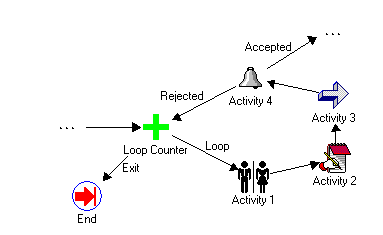
Additionally, for example, as shown in the diagram below, you can include a Loop Counter activity as the initial activity in a loop. The value you specify for the Loop Limit activity attribute will designate the number of times the engine is allowed to traverse through the loop. If the number of visits to the Loop Counter activity exceeds the value set in Loop Limit, then the process moves along the 'Exit' transition to the designated activity.
In this example, the engine moves from the Loop Counter activity through Activities 1, 2, 3, and 4 in the loop. If the result of Activity 4 is 'Accepted,' the process moves along the 'Accepted' transition. Otherwise, if the result is 'Rejected,' the process moves along the 'Rejected' transition to return to the Loop Counter activity. If the item is rejected multiple times, once the number of visits to the Loop Counter activity exceeds the Loop Limit value, the process moves along the 'Exit' transition and ends.
Example Loop Counter Activity in a Loop