The Primary to Secondary Mapping step specifies the conversion options to convert data from the primary ledger to the secondary ledger that may use a different chart of accounts, currency, and calendar from the primary ledger.
Note: If using an adjustments only secondary ledger, the Primary to Secondary Ledger Mapping step is not displayed. No conversion rules are required because the adjustments only secondary ledger must share the same chart of accounts, accounting calendar, and currency as the primary ledger.
This section describes the following conversion options:
In order to convert data between the charts of accounts of the primary and secondary ledgers, assign a chart of accounts mapping. A chart of accounts mapping is a set of instructions for mapping accounts or entire account segments from your primary ledger's chart of accounts to your secondary ledger's chart of accounts. This is particularly important if the primary and secondary ledgers use different charts of accounts.
Note: If a chart of accounts mapping is not assigned when the primary and secondary ledgers use different charts of accounts, errors are caused with Subledger Accounting and General Ledger posting.
If the primary and secondary ledgers use the same chart of accounts, the chart of accounts mapping is not required but can be assigned to the journal level and balance level secondary ledgers. This allows more flexibility to utilize different rollup rules when transferring journals or balances from the primary ledger to the secondary ledger. For example, you can maintain more detailed information in the primary ledger but maintain more summarized information in the secondary ledger, depending on the rollup rules defined for the chart of accounts mapping.
Note: You cannot change the chart of accounts mapping that is assigned to the secondary ledger once the accounting setup is complete.
Additional Information: Mapping Charts of Accounts
If the primary and secondary ledgers use different accounting calendars, the journal effective date is used to determine the corresponding non-adjusting period in the secondary ledger. If the secondary ledger does not share the same calendar as the primary ledger, each primary ledger journal is transferred to the secondary ledger's non-adjusting period that includes the journal's effective date.
In order to transfer journals to the secondary ledger, specify journal conversion rules. Choose the journals to transfer to the secondary ledger by specifying journal source and category combinations. The General Ledger Posting program uses these journal conversion rules to determine which journals it should automatically transfer to the secondary ledger during posting.
Note: Journal conversion rules are only applicable if the data conversion level of the secondary ledger is subledger or journal.
Journal sources identify the origin of journal entry transactions, such as Purchasing or Payables. Journal categories describe the purpose of journal entries, such as purchase requisitions or purchase orders.
Specifying a journal source and category combination and selecting Yes to Transfer Journals to this Secondary Ledger, instructs the General Ledger Posting program to automatically transfer those journals to this secondary ledger when they are posted in the source representation.
The journal source and category Other represents all other journal sources and categories other than those explicitly defined.
To transfer the majority of journals to this secondary ledger, specify Yes for the Other journal source and category and then selectively choose No for the journal source and category combinations that you do not want transferred.
If you do not want the majority of journals to be automatically transferred to this secondary ledger, specify No for the Other journal source and category and then selectively add those journal source and category combinations that you do want transferred.
By default, journals using the journal sources described in the following table are not automatically converted to the secondary ledger using General Ledger Posting.
| Journal Source | Journal Category | Transfer Journals to Secondary Ledger |
|---|---|---|
| Move/Merge | Other | No |
| Move/Merge Reversal | Other | No |
| Revaluation | Other | No |
This means that if you revalue balances in the source representation, such as the primary ledger, the resulting journals are not transferred to the secondary ledger. The same is true if you use MassMaintenance to move or merge balances between accounts in the source representation.
For example, if moving or merging account balances in the primary ledger, the resulting journal entries that use the source Move/Merge are not automatically converted to the secondary ledger. The same rule applies if reversing the Move/Merge journal entry. You must perform the Move/Merge operation and Move/Merge reversal in the secondary ledger separately.
Run Revaluation separately in the secondary ledger. General Ledger does not automatically convert the primary ledger's revaluation journal to the secondary ledger.
By default, all other journal sources and categories are converted to the secondary ledger as indicated by the Other journal source and category.
For subledger level secondary ledgers, the journal sources for transaction sources that use Subledger Accounting must be set to No in the Transfer Journals to this Secondary ledger field. Any journal source that uses Subledger Accounting to generate its accounting entries must not be converted to the secondary ledger using General Ledger Posting because Subledger Accounting automatically performs the conversion for these subledger journals.
Note: To find all transaction sources that integrate with Subledger Accounting, query them in the Subledger Application form that is accessed from the Subledger Accounting Setup menu.
Additional Information: Subledger Accounting Options
Note: If integrating with transaction sources that do not use Subledger Accounting and you want General Ledger posting to maintain journals from these subledgers in the subledger level secondary ledger, do not use Oracle's seeded journal sources. For example, if you use a non-Oracle Receivables application, you can create your own journal source for that application instead of using the seeded source Receivables that is reserved for Oracle sources. If you use the seeded source to import data from third party systems, those journals will not be transferred to a subledger level secondary ledger when you post them in the primary ledger.
If the primary and secondary ledger use different ledger currencies, currency conversion rules are required to instruct the system on how to convert data from the currency of the primary ledger to the currency of the secondary ledger.
Note: If both the primary and secondary ledgers use the same currency, the currency conversion rules are not applicable.
For information on the Default Rate Type and Retain Transaction Rate Type options, see the Journal and Subledger Level Reporting Currencies table.
This section includes the following topics:
A secondary ledger receives its data from its source representation.
When the source representation is the primary ledger, it means that the primary ledger's data is transferred directly to the secondary ledger.
When the source representation is a reporting currency that is assigned to the primary ledger, then the data is transferred directly from the reporting currency to the secondary ledger.
By default, the primary ledger is the source representation for all secondary ledgers, except the balance level secondary ledger that uses a different currency from the primary ledger. In this case, the source representation will always be the balance level reporting currency of the primary ledger whose currency matches the balance level secondary ledger.
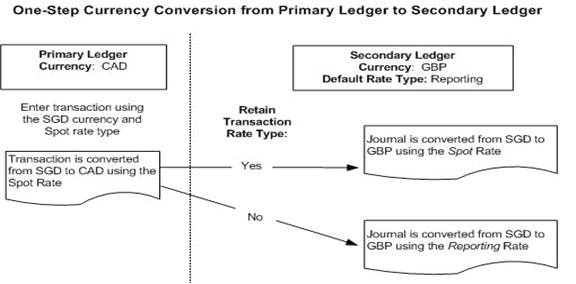
When the source representation is the primary ledger, this is referred to as a one-step conversion from the primary ledger.
Assume you have a primary ledger and a journal level or subledger level secondary ledger. The primary ledger's currency is CAD; the secondary ledger's currency is GBP; and the Default Rate Type is Reporting.
An SGD foreign currency journal is entered in the primary ledger using the transaction rate type of Spot.
The journal is first converted to the currency of the primary ledger using the transaction rate type, Spot. When the journal is posted in the primary ledger, the Secondary Ledger's Default Rate Type and Retain Transaction Rate Type settings determine how the SGD entered journal is converted.
If Retain Transaction Rate Type is set to Yes, then the journal is converted from SGD to GBP (the currency of the secondary ledger) using the transaction rate type, Spot.
If Retain Transaction Rate Type is set to No, then the journal is converted from SGD to GBP (the currency of the secondary ledger) using the Default Rate Type, Reporting.
This example is shown in the figure below.
One-Step Conversion from Primary Ledger to Secondary Ledger
For journal level secondary ledgers only, you can choose to make the source representation a journal level reporting currency that is assigned to the primary ledger. For example, the source representation for a journal level secondary ledger can be a journal level reporting currency.
Note: The currency of the journal level reporting currency must match the currency of the secondary ledger.
This is referred to as a two-step conversion from the primary ledger. When data is entered in the primary ledger, the data is first converted to the journal level reporting currency and then transferred to the journal level secondary ledger, as described in the figure below.
Two-Step Conversion from the Primary Ledger
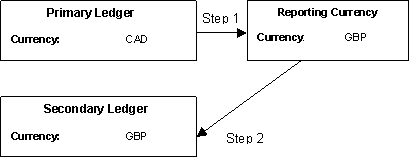
This is useful if you are already using a journal level reporting currency for reporting purposes. By using a journal level reporting currency as the source representation, you can enter additional journal entries directly in the reporting currency to have them propagated to the secondary ledger.
Note: The two-step conversion method is most suitable for companies that require a reporting currency level of detail for the primary ledger.
When choosing a journal level reporting currency as the source representation, the Default Rate Type and Retain Transaction Rate Type settings for the reporting currency control the currency conversion of transactions to the secondary ledger. In other words, the secondary ledger inherits the same settings as the reporting currency.
Two-Step Currency Conversion from Primary to Secondary Ledger
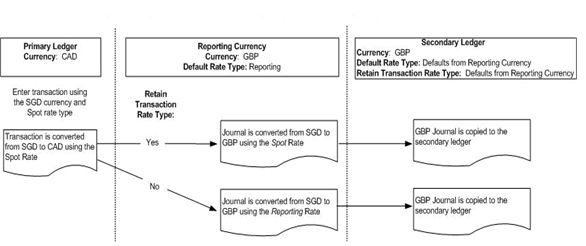
Assume you have a primary ledger, a journal level reporting currency that is assigned to the primary ledger, and a journal level secondary ledger. The primary ledger's currency is CAD and the currency for both the secondary ledger and reporting currency is GBP. The source representation for the secondary ledger is the reporting currency.
An SGD foreign currency journal is entered in the primary ledger using the transaction rate type, Spot.
The following table lists the conversion rates for different currencies used in this example.
| From Currency | To Currency | Rate Type | Rate |
|---|---|---|---|
| SGD | CAD | Spot | 1.50 |
| SGD | CAD | Reporting | 1.65 |
| SGD | GBP | Spot | 1.70 |
| SGD | GBP | Reporting | 1.75 |
The journal is first converted to the currency of the primary ledger, CAD, using the transaction rate type, Spot, as described in the following table.
Primary Ledger Journal
| Account | Entered Debit (SGD) | Entered Credit (SGD) | Converted Debit (CAD) | Converted Credit (CAD) |
|---|---|---|---|---|
| 01.6110 | 1000.00 | 1500.00 | ||
| 01.2110 | 1000.00 | 1500.00 |
Upon posting the journal described in the preceding table, the same journal is converted to the reporting currency based on the reporting currency's Default Rate Type and Retain Transaction Rate Type settings.
If Retain Transaction Rate Type is set to Yes, then the journal is converted from SGD to GBP using the transaction rate type, Spot.
The following table describes the journal entry that appears in both the reporting currency and the secondary ledger.
Journal for Reporting Currency and Secondary Ledger
| Account | Entered Debit (SGD) | Entered Credit (SGD) | Converted Debit (GBP) | Converted Credit (GBP) |
|---|---|---|---|---|
| 01.6110 | 1000.00 | 1700.00 | ||
| 01.2110 | 1000.00 | 1700.00 |
If Retain Transaction Rate Type is set to No, then the journal is converted from SGD to GBP using the default rate type, Reporting.
The following table describes the journal entry that appears in both the reporting currency and the secondary ledger if the default rate type is used.
Journal for Reporting Currency and Secondary Ledger
| Account | Entered Debit (SGD) | Entered Credit (SGD) | Converted Debit (GBP) | Converted Credit (GBP) |
|---|---|---|---|---|
| 01.6110 | 1000.00 | 1750.00 | ||
| 01.2110 | 1000.00 | 1750.00 |
If entering a journal directly in the reporting currency, the same journal may or may not be copied exactly as is to the secondary ledger. It depends on the Default Rate Type and the Retain Transaction Rate Type settings for the secondary ledger.
If Retain Transaction Rate Type is set to Yes, then the journal entered in the reporting currency is copied directly from the reporting currency to the secondary ledger.
The entered amounts and the converted amounts are exactly the same for the reporting currency and the secondary ledger.
If Retain Transaction Rate Type is set to No, then the journal is converted to the secondary ledger using the Default Rate Type.
Assume you have a journal level reporting currency that is the source representation for a journal level secondary ledger. The default rate type assigned to the secondary ledger is Reporting. The currency for both the reporting currency and secondary ledger is GBP.
The following table lists the conversion rates for different currencies used in this example.
| From Currency | To Currency | Rate Type | Rate |
|---|---|---|---|
| SGD | GBP | Spot | 1.70 |
| SGD | GBP | Reporting | 1.75 |
The SGD foreign currency journal described in the following table is entered in the reporting currency using the transaction rate type, Spot
Journal Entered in Reporting Currency
| Account | Entered Debit (SGD) | Entered Credit (SGD) | Converted Debit (GBP) | Converted Credit (GBP) |
|---|---|---|---|---|
| 01.6110 | 1000.00 | 1700.00 | ||
| 01.2110 | 1000.00 | 1700.00 |
Upon posting the journal in the journal level reporting currency, the same journal is converted to the secondary ledger based on the secondary ledger's Default Rate Type and Retain Transaction Rate Type settings.
If Retain Transaction Rate Type is set to Yes, then the journal is copied directly to the secondary ledger.
If Retain Transaction Rate Type is set to No, then the journal is converted using the Default Rate Type, Reporting.
The following table describes the journal entry that appears in the secondary ledger if Retain Transaction Rate Type is set to No.
Journal for Secondary Ledger
| Account | Entered Debit (SGD) | Entered Credit (SGD) | Converted Debit (GBP) | Converted Credit (GBP) |
|---|---|---|---|---|
| 01.6110 | 1000.00 | 1750.00 | ||
| 01.2110 | 1000.00 | 1750.00 |
To use a journal level reporting currency as the source representation for a journal level secondary ledger, perform the following tasks:
Define a journal level reporting currency for the primary ledger.
Note: A journal level secondary ledger can only have the primary ledger or a journal level reporting currency as its source representation.
Choose the reporting currency to be the source representation in the Primary to Secondary Ledger Mapping page.
Specify currency conversion rules.
Specify journal conversion rules.
The journal conversion rules specified for the secondary ledger should be the same as the journal level reporting currency, but you can change them for the secondary ledger in the Primary to Secondary Ledger Mapping page.
You can choose to transfer selected journals that use different sources or categories from the reporting currency to the secondary ledger. For example, you can choose to transfer only a subset of journals from the reporting currency to the secondary ledger by making the journal conversion rules more restrictive for the secondary ledger.
The following prerequisites are required to complete the primary to secondary ledger mapping step:
A chart of accounts mapping must be defined in General Ledger if the secondary ledger uses a different chart of accounts
Additional Information: Mapping Charts of Accounts
A secondary ledger must be assigned to a primary ledger.
The reporting currencies assigned to the primary ledger must be completely defined.
Additional Information: Assigning Reporting Currencies to Ledgers
The ledger options for the secondary ledger must be completely defined.
Additional Information: Completing Ledger Options
Note: This step is required to complete the accounting setup.
In the secondary ledger regions of the Accounting Options page, click the Update icon for the Primary to Secondary Ledger Mapping step.
Specify the following:
Chart of Accounts Mapping
This mapping is used to convert data from the primary ledger's chart of accounts to the secondary ledger's chart of accounts. If a mapping is not defined, click Create Mapping.
Note: You must assign a mapping if your primary and secondary ledgers use different charts of accounts.
Note: You cannot change the mapping assigned after the accounting setup is complete.
Additional Information: Mapping Charts of Accounts
currency conversion rules
The options in the following table pertain to balance level secondary ledgers only.
Balance Level Secondary Ledgers Currency Conversion Options
| Options | Description |
|---|---|
| Source Representation | When transferring balances using GL Consolidation, the source representation acts as the source of the balances. If the secondary ledger's currency is different from the primary ledger, the name of the primary ledger's balance level reporting currency defaults and cannot be changed. |
| Currency | Currency of the source representation defaults |
| Period End and Period Average Rate Type | The period end and period average rate types are used by General Ledger's Translation program. These rate types are used to translate balances from the primary ledger's currency to the balance level reporting currency that is used as the source representation for the secondary ledger. These rate types should be the same as the source representation. |
journal conversion rules for subledger level and journal level secondary ledgers
The following table describes currency conversion options for journal and subledger level secondary ledgers that use a different currency from the primary ledger.
Journal and Subledger Level Secondary Ledgers Currency Conversion Options
| Option | Description |
|---|---|
| Source Representation | Acts as the source of the data that is transferred to the secondary ledger. The primary ledger defaults. For journal level secondary ledger the source representation can be a journal level reporting currency that is assigned to the primary ledger.
Note: The source representation cannot be changed after completing the accounting setup. |
| Default Rate Type | The conversion rate type to use to retrieve exchange rates for converting transactions from the primary ledger to this secondary ledger. The Default Rate Type works with the Retain Transaction Rate Type field. If you choose not to retain the same rate type that was used to convert the original transaction, then the Default Rate Type is used instead. For the default rate type, specify your own conversion rate type or choose one of the predefined rate types. To specify your own, first define it in General Ledger. Additional Information: Defining Conversion Rate Types |
| Retain Transaction Rate Type | Controls the conversion rate type the system should use to convert transaction currency amounts from the source representation to this secondary ledger.
The Retain Transaction Rate Type option is ignored if the following conditions exist:
|
| If Missing Conversion Rate | Controls what the system should do if it cannot find a conversion rate as of the conversion date
|
| Number of Days to Find Last Rate | If Use Last Rate is selected, enter a number from 1 to 999. This number indicates how many days back in time the system should look to find a rate.
Note: If a number is not entered, it adversely affects system performance. |
| Post Journals Automatically from Source Ledger | Controls the automated posting of journals.
|
| Retain Journal Creator from Source Ledger | Controls the Created By user information that can be viewed for each journal using Tools > Examine.
|