Determine the segment that captures the natural account, such as assets, liabilities, expenses, and so on.
Define a separate Accounting Flexfield segment for each dimension of your organization on which you want to report, such as regions, products, services, programs, and projects.
For example, you may want to record and report on expenses by project. To do this, your account must categorize expenses by project. Define your account to include a "Project" segment. By doing this, you automatically categorize all your accounting information by project as you enter it, and you can easily report on project information.
Group similar business dimensions into one segment. This allows a more simplified and flexible account structure
For example, you only need one segment to record and report on both districts and regions, as illustrated below. Because regions are simply groups of districts, you can easily create regions within your district segment by defining a parent for each region with the relevant districts as children. Use these parents when defining summary accounts to maintain account balances and reporting hierarchies to perform regional reporting.
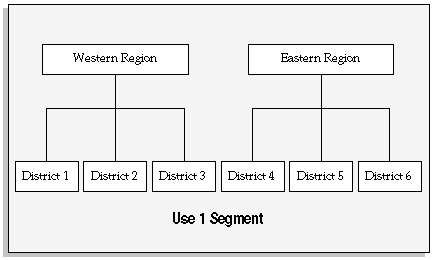
For a text description of this figure, see Text Description of Use 1 Segment
This method accommodates reorganizations. Using the previous example, if you want to move district 4 into the Western region, you simply redefine your parents so that district 4 rolls up into the Western region. You can even define new parents for your new organizational structure and retain your old organizational structure for comparative purposes.
Consider information you track in other accounting information systems. You may not need to capture certain organizational dimensions if another system already records and reports on this information.
For example, if you need to report on sales by product and your sales tracking system already provides this information, General Ledger account structure does not need to categorize information by product. If you are a government or not-for-profit agency using a labor costing system which captures work breakdown structure for reimbursable billing, you may not need to capture this in your account structure.
Identify segments that you might need in the future. Consider future expansion and possible changes in your organization and reporting needs. For example, you may not need a region segment now, but eventually you plan to expand you organization to cover multiple regions. See: Defining an Accounting Flexfield Segment for Future Use.
Remember, once you define your account structure and begin using it, you cannot modify it. Try to build flexibility for future needs into your account structure during setup.
Determine the length of each segment. Consider the structure of values you plan to maintain within the segment. For example, you might use a 3 character segment to capture project information, and classify your projects so that all Administrative projects are in the 100 to 199 range, all the Facilities projects are in the 200 to 299 range, and so on. If you develop more than 10 classifications of projects, you would run out of values within this segment. You might want to add an extra character to the size of each segment to anticipate future needs.
To perform multi-company or fund accounting within a ledger, choose a primary balancing segment. You must define one and only one primary balancing segment in your account. General Ledger automatically balances all journal entries for each value of this balancing segment and performs any necessary intercompany or interfund posting to the intercompany or interfund account you specify when you define your ledger.
If you generate many intercompany transactions, you can use an intercompany segment to augment resulting intercompany payables and receivables.
Identify a secondary tracking segment in your chart of accounts. General Ledger will track retained earnings, cumulative translation adjustments, and revaluation gains/losses by both the primary balancing segment and the secondary segment to provide you with more accounting detail. The secondary tracking segment cannot be the primary balancing segment, intercompany segment, or natural account segment. Assign the Secondary Tracking Segment Qualifier to your secondary tracking segment.
If you want to perform management reporting and secure read and write access to segment values for the management segment, designate one of your segments to be the management segment. This segment can be any segment, except the balancing segment, natural account segment, or intercompany segment. Typically, you should choose a segment that has management responsibility, such as the department, cost center, or line of business.
If you plan to maintain and consolidate multiple ledgers, think of common elements among your separate account structures. Consider which segments can share value sets, or where opportunities for rolling up segments from a subsidiary ledger into a parent ledger exist.
Plan your value sets. To reduce maintenance and to maintain consistency between ledgers, you can reuse value sets when defining multiple charts of accounts. Using the same value sets allow two different ledgers to reference the same segment values and descriptions for a specified segment. For example, the values in your natural account segment, such as Cash, Accounts Payable, and so on, may be equally applicable to each of your ledgers. Ideally, when you set up a new ledger you should consider how you will map your new Accounting Flexfield segments for consolidation. When a common natural account segment is used between ledgers, it is easier to map account balances from your subsidiary ledgers to a consolidating entity.
If you have multiple legal entities or companies that use different charts of accounts and you have designated the balancing segment as the legal entity or company segment, you should share the same value set for the balancing segment across all charts of accounts. This enables you to assign unique balancing segment values for each legal entity that is consistent across charts of accounts. This is very beneficial in enabling you to easily identify transactions per legal entity, and it allows you to take full advantage of the legal entity accounting features available, such as Intercompany Accounting.
