You can use the Transaction Import feature in Oracle Grants Accounting to import transactions from Oracle and non-Oracle applications. You can import both actual and encumbrance transactions.
Oracle Grants Accounting provides a set of predefined transaction sources to import transactions from other Oracle applications. In addition, you can define your own transaction sources to import transactions from non-Oracle systems.
The possible grants-related transaction sources are designated as follows:
GOLD is for actual transactions from Oracle Labor Distribution.
GOLDE is for encumbrances from Oracle Labor Distribution.
The GMSA- prefix indicates actual transactions from an external source.
The GMSE- prefix indicates encumbrances from an external source.
Note: You can import actual expenditures for both sponsored and nonsponsored projects. You can import encumbrances only for sponsored projects.
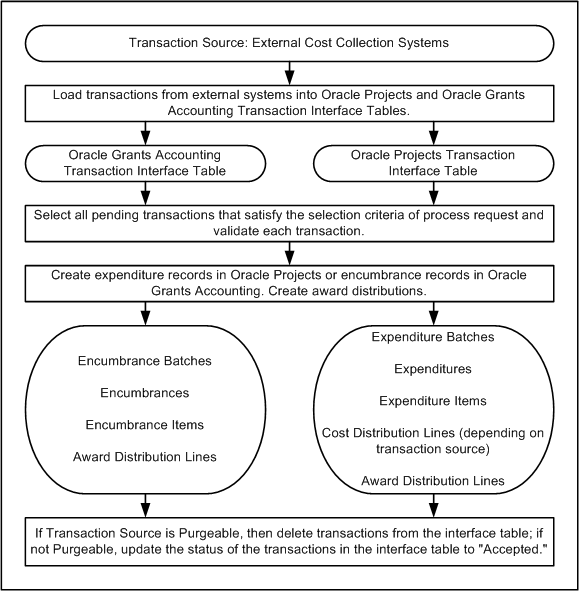
The table below describes the Transaction Import Process.
| Event | Description |
|---|---|
| 1. | Identify transaction source |
| 2. | Load transactions from external systems into the Oracle Projects or Oracle Grants Accounting Transaction Interface Tables |
| 3. | Select all pending transactions that satisfy the selection criteria of process request and validate each transaction |
| 4. | Create the following expenditure records in Oracle Projects: expenditure batches, expenditures, expenditure items, cost distribution lines, award distributions line; Create the following encumbrance records in Oracle Grants Accounting: encumbrance batches, encumbrances, encumbrance items, award distribution lines |
| 5. | If Transaction Source is Purgeable, delete transactions from the interface table; if not Purgeable, update the status of the transactions in the interface table to Accepted |
The figure below shows the Transaction Import Process described in the Transaction Import Process table.
Transaction Import Process Diagram