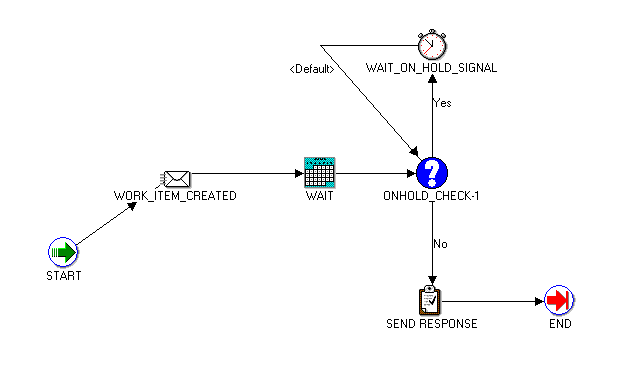
If the preconfigured workflows do not meet your needs, create a custom workflow. Oracle Advanced Collections provides a preconfigured workflow, IEX: Strategy Custom Work Flow (IEXSTRCM), that you can use as a template.
Warning: You must copy, modify, and rename this workflow. Do not add IEX: Strategy Custom Work Flow to a work item.
IEX: Strategy Custom Work Flow
The figure above shows the process defined for the IEX: Strategy Custom Work Flow.
Note: The WAIT step in this process is an internal workflow wait time for load balancing. It is not the same thing as a pre-wait or post-wait time you add to a work item. When you copy and modify this workflow, do not delete the WAIT step.
Your system administrator or DBA can modify this workflow process by following the general steps below.
Creating a Custom Workflow
Copy IEX: Strategy Custom Work Flow.
Rename the copy.
Using Oracle Workflow Builder, modify the workflow based on your business needs.
Attibutes: Add additional attributes as needed. Do not remove any attributes from the workflow.
Messages: Add or customize messages. Do not delete the messages or the workflow will not run properly.
Processes: Customize the process @ strategy custom work flow and rename. Process names cannot contain a colon (:).
Load the customized workflow into the database.
Select and add your new workflow in Step 3 of the Create Work Item task, Collections Checklist.
Add the name of the new custom workflow to the Work Flow Background Process as a new item type to schedule the workflow to run.
For more information, see: Oracle Workflow Developer's Guide.
