This section describes how to set up independent and dependent questions for a Contract Expert session. This section is only applicable to Clause Selection rules.
When you use Contract Expert, in the processing of authoring a business document, you typically are asked a series of questions.
Your answers to the first-level questions may cause further questions to appear in the Contract Expert session; these extra questions are dependent questions. In turn, answering these dependent questions can cause lower-level dependent questions to appear, up to a maximum of 5 levels.
Ultimately, the objective of the questions is to specify which clauses are to be added to the business document.
The following describes the general principle of defining a first-level, or independent, question in a rule:
In the Conditions region, specify a Question type condition.
In the Results region, specify one or more clauses, but no additional questions.
Associate the rule with a Contract Expert enabled contract template.
For independent questions, when you answer the question in a Contract Expert session during contract authoring, Contract Expert may add the clauses specified in the rule results, but no further questions will appear.
You can set up to 5 levels of dependency for questions.
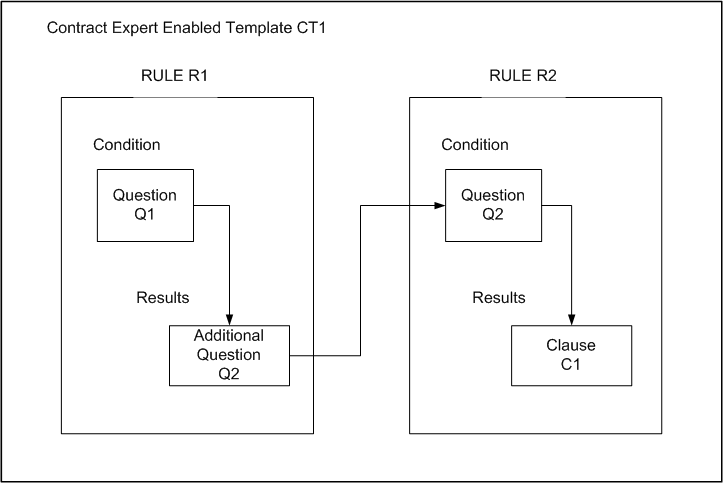
The method of setting up dependent questions is illustrated in the following diagram, that shows the simplest case of dependent question setup.
Simplest Case of Dependent Question Setup
The following are the general principles involved in the setup of all the elements to produce a dependent question:
Create the questions first.
Create the rules; it does not matter which rule is created first.
Add the questions to the rules, as shown in the diagram.
Associate both rules with a Contract Expert enabled contract template.
Note: If Rule R2 is the only rule associated with a contract template, then Q2 becomes an independent - that is, first-level - question in a Contract Expert session for any business document that uses that contract template.