Your site's HR Business Group Access Mode determines which organizations can belong to organization hierarchies and which jobs can be included in the job groups that are used by your operating units. Oracle HRMS provides the following two access modes:
Single Business Group Access (SBGA)
Cross Business Group Access (CBGA)
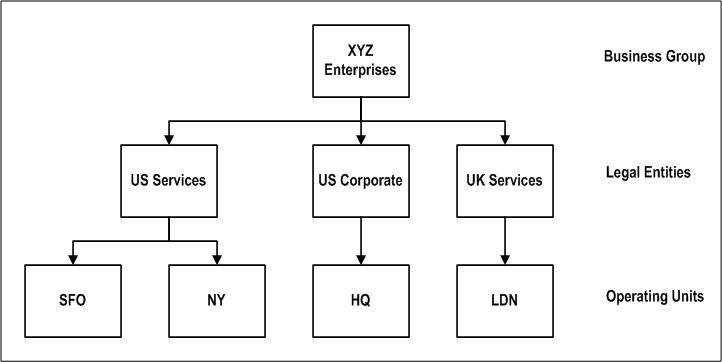
In Single Business Group Access mode, one business group encompasses all of the organizations of your company worldwide.
The following illustration shows an example of single business group access mode.
Single Business Group Access Mode
In this mode:
Organization hierarchies are business group specific and can contain only organizations within the business group.
Jobs used for bill rate calculations, invoice formats, and resource lists are limited to jobs in job groups within the business group.
Employees can cross charge only to projects within their business group.
Using Single Business Group Access, you log in using a user name and password. You then select a responsibility. Your user name and responsibility are linked to a business group. You can only access records for this business group. Who you can access is restricted by a security profile. Your permission to perform functions is limited by the menus assigned to your responsibility.
When using Single Business Group Access, note the following items:
You link one responsibility to one business group.
You cannot enable more than one business group for a responsibility.
You must define a separate responsibility for each business group.
Each responsibility must be assigned to one, and only one, security profile. Note that security profiles limit access to organizations within a business group.
The HR: Security Profile option is used to assign a security profile to a responsibility.
A view all security profile is automatically created for each business group. Additional security profiles are only required if you need more granular security within a business group.
Organization hierarchies defined in a business group can only contain organizations owned by that business group.
For detailed instructions on enabling HR Single Business Group Access, see Customizing, Reporting and System Administration in Oracle HRMS: Setting Up Standard HRMS Security.
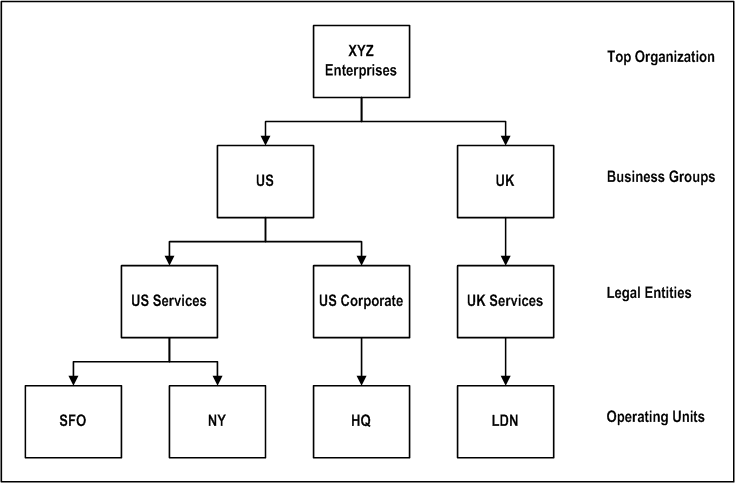
Use Cross Business Group Access mode when your enterprise uses more than one business group to segregate employees and organizations and you wish to allow resources to charge to projects outside their own business group.
The following illustration shows an example of cross business group access mode.
Cross Business Group Access Mode
In this mode:
Organization hierarchies can contain organizations from any business group.
Jobs used for bill rate calculations, invoice formats, and resource lists can be in any job group, without business group restrictions.
Employees can charge to any project in any business group within your enterprise.
To understand the setup and use of business group access modes, you must understand the following HR security components.
Responsibilities: The responsibility is your primary means of defining security. Business groups and menu structures are linked to a responsibility.
Menu Structures: Using menu structures, you can limit the functions a user can access.
Security Profiles: Using security profiles, you can limit access to certain organizations or organization levels within a business group.
You will benefit from using Cross Business Group Access if you have multiple business groups set up in a single database installation and you want one responsibility to be enabled for more than one business group. Using this mode, you still log in using a user name and password and select a responsibility. Your ability to perform functions is still limited by the menus assigned to your responsibility. Who you can access is still restricted by a security profile.
However, global organization hierarchies and global security profiles are not restricted to one business group. Global organization hierarchies can contain organizations from any business group. Global security profiles are created by using a global organization hierarchy to define the profile. The Assign Security Profile window is used to link the global security profile to a responsibility. Employees assigned to the global organization hierarchy are then accessible to holders of that responsibility.
When using Cross Business Group Access, note the following items:
You can enable more than one business group for a single responsibility.
You do not have to define a separate responsibility for each business group.
When you enable Cross Business Group Access, the system automatically creates a default global security profile that allows full access. To restrict user access, you must define additional security profiles.
You can define global organization hierarchies and global security profiles.
You use the Assign Security Profile window to assign security profiles to responsibilities.
The HR: Security Profile option is not used. If it is defined, it is ignored by the system.
For detailed instructions on enabling HR Cross Business Group Access, see Customizing, Reporting and System Administration in Oracle HRMS: Setting Up Cross Business Group Responsibility Security.
Attention: Multiple Organization Access Control and Cross Business Group Access operate independently of each other and can be used simultaneously. Entities such as resource lists or resource breakdown structures that use business groups derive the business group from the HR: Business Group profile. Multiple Organization Access Control enables users to enter expenditure batches in several operating units without switching responsibilities.