You organize your project work into smaller, more easily manageable units called tasks.
You use project structures to contain and order these tasks by defining task hierarchies. A project structure can contain an unlimited number of tasks, and as many task levels as you want. You can number and name the tasks as you wish.
Oracle Projects processes tasks based on their position in the structure. The three distinct positions are:
Top Task: A task whose parent is the project
Mid Task: A task that is not a top task or a lowest task
Lowest Task: A task that is at the bottom of the structure, without any child tasks
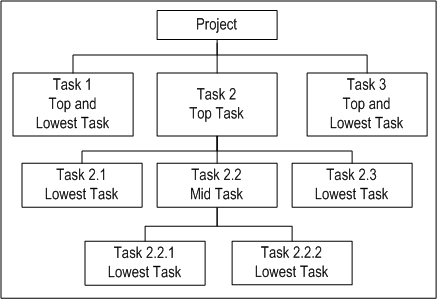
A top task can also be considered a lowest task, if the task does not have any child tasks. For example, in the following graphic, Tasks 1 and 3 are lowest tasks as well as top tasks. Tasks 2.1 and 2.3 are lowest tasks although they are on the same level as Task 2.2, which is a mid task. A task that is the child of another task is commonly referred to as a subtask.
The following illustration shows the position of tasks in a structure.
Tasks
Oracle Projects sorts the project structure alphanumerically by task number within a task level, so be sure that your numbering methods reflect an organized structure. For example, if you have several subtasks for a particular top task, such as Task 3, you number the tasks as follows:
3 - Top Task
3.1 - Subtask 1 under Task 3
3.2 - Subtask 2 under Task 3
3.2.1 - Subtask 1 under Subtask 3.2
3.2.2 - Subtask 2 under Subtask 3.2
Or, if you have more than ten top tasks in your project structure, use the following numbering method, so Oracle Projects displays the levels in the correct numerical order:
01 - Task 1
02 - Task 2
03... - Task 3, Task 4, and so on
10 - Task 10
Note: Plan your task numbering method carefully, whether it is numeric or alphanumeric. For example, if you used numbers 1 through 11 (instead of 01, 02, etc.) in the previous example, Oracle Projects would display your tasks in the following order: 1, 10, 11, 2, and so on.
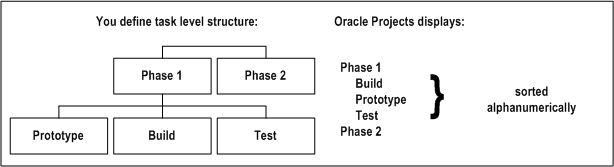
In this example, note how the unplanned use of an alphanumeric numbering method yields unexpected results when the project structure is displayed online in indented format.
The following illustration shows a task level structure that consists of two top tasks: Phase 1 and Phase 2. Phase 1 has three subtasks defined as follows: Prototype, Build and Test. Phase 2 is a top task as well as a lowest task.
The following three tables show how Oracle Projects supports functions at the project and task levels:
| Functions for All Projects | Project | Top Task | Lowest Task |
|---|---|---|---|
| Budgeting | supported | supported | supported |
| Transaction Entry | not supported | not supported | supported |
| Customer Entry | supported | not supported | not supported |
| Functions for Capital Projects | Project | Top Task | Lowest Task |
|---|---|---|---|
| Asset Definition | supported | not supported | not supported |
| Asset Assignments | supported | supported | supported |
| Functions for Contract Projects | Project | Top Task | Lowest Task |
|---|---|---|---|
| Funding from Customer Agreements | supported | supported | not supported |
| Event Entry | supported | supported | not supported |
| Invoice Generation | supported | not supported | not supported |
You can set up two types of project structures in Oracle Projects:
Workplan structures consist of tasks that help project managers and team members plan, track, and deliver projects on time. For more information about workplan structures, see Workplan Structures.
Financial structures consist of tasks that help project managers and financial administrators track billing, costs, budgets, and other financial information for individual projects. For more information about financial structures, see Financial Structures.
Any project you create can include one or both of these two structure types. If your project includes both of these structure types, you have the option of integrating them fully or partially. You can also map workplan tasks to financial structure tasks. Or you can have the two structures remain entirely separate. For more information about structure integration, see Integrating Workplan and Financial Structures.
You can also create projects that do not include structures, such as projects that are used for administrative purposes rather than the planning and tracking of tasks.
