Oracle Projects fully integrates with Oracle Receivables to process your invoices and track customer payments. Oracle Projects generates draft invoices interfaces them to Oracle Receivables.
You can interface released invoices and invoice lines from Oracle Projects to Oracle Receivables whenever you are ready and as many times during an accounting period as you wish.
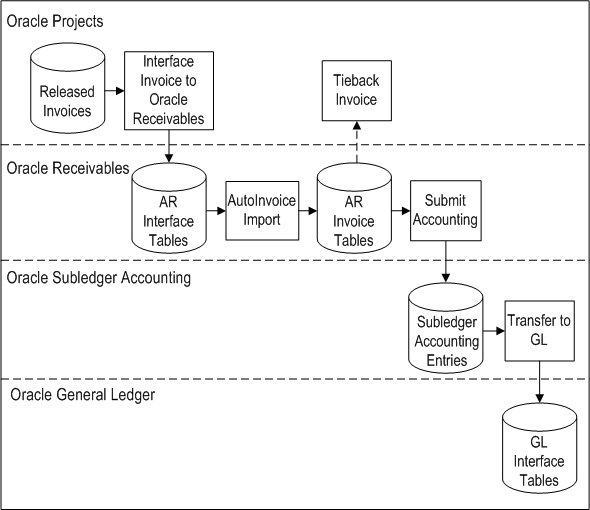
When you interface invoices to Oracle Receivables, you use an Oracle Projects process that collects all eligible released draft invoices in Oracle Projects and interfaces them to Oracle Receivables interface tables. This process also maintains project balances of unbilled receivables and unearned revenue and creates accounting transactions for these amounts.
After the draft invoices are interfaced to the Oracle Receivables interface tables, they await further processing by Oracle Receivables AutoInvoice process. The AutoInvoice process matches the invoices to the prepayments that have been applied to the agreement.
After you run the AutoInvoice program to create invoices in Oracle Receivables, you tie back successfully interfaced invoices as well as rejected invoices using another Oracle Projects process. During the tieback process, rejected invoices are corrected and interfaced again to Oracle Receivables.
You run the Submit Accounting process in Oracle Receivables to create accounting for the invoices in Oracle Subledger. If you define your own detailed accounting rules in Oracle Subledger Accounting, then Oracle Subledger Accounting overwrites default accounts, or individual segments of accounts, that Oracle Receivables derives using the Account Generator. To define your own Oracle Subledger Accounting setup for Oracle Receivables, you must access the Accounting Methods Builder from an Oracle Receivables responsibility. For more information, see the Oracle Subledger Accounting Implementation Guide.
The following figure illustrates this processing flow.
Interfacing Invoices with Oracle Receivables
You can use standard Oracle Projects reports to track your invoices as you interface data between Oracle Projects and Oracle Receivables. You can also use AutoInvoice output reports to review imported transaction data and transaction data that fails when you run AutoInvoice.
For information pertaining to performing an action on a project invoice, such as generating, canceling, crediting, or writing off an invoice; and tracking customer payments on an invoice, see: Invoicing a Project.
Other Sources
Determining Your Invoice Printing Method, Oracle Projects Implementation Guide
Implementing Oracle Receivables for Oracle Projects Integration, Oracle Projects Implementation Guide
Importing Invoice Information into Oracle Receivables Applications Using AutoInvoice Oracle Financials and Oracle Public Sector Financials Implementation Manual