Oracle Projects checks all levels of chargeability control when you try to charge a transaction to a project. The check is performed when you save the record. Oracle Projects checks the control when you:
enter an online or pre-approved expenditure item
copy a pre-approved timecard item
transfer items to a new project or task
enter a project-related requisition or purchase order distribution in Oracle Purchasing
enter a project-related invoice distribution in Oracle Payables
The transaction validation checks are performed using the following tests (chargeability controls):
Project status allows new transactions
Task is chargeable
Expenditure item date is between the start and end dates for the project and task
Expenditure item passes validation based on applicable project or task transaction controls
If the expenditure item passes the first three chargeability controls, then Oracle Projects checks the transaction controls.
The system first looks for an applicable task level transaction control. If it does not find applicable task level controls, it looks for project level controls. If the item matches an applicable transaction control at the task level, project level controls are not checked. The task level controls override the project level controls.
Applicable transaction controls are all of the transaction control records that apply to an expenditure item based on the person, expenditure category, expenditure type, non-labor resource, and dates.
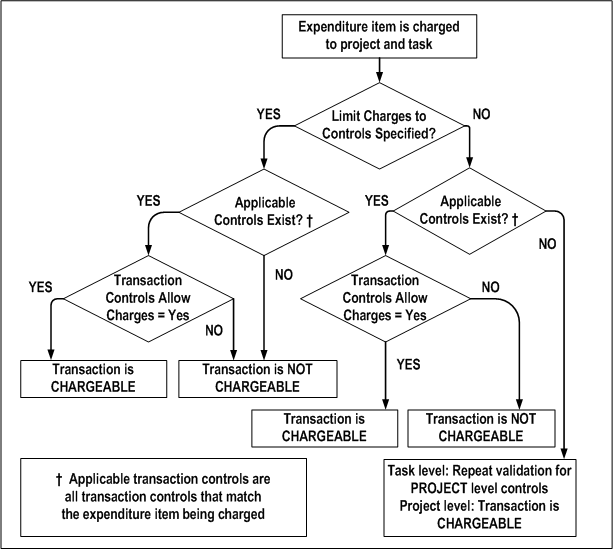
The following illustration shows the steps Oracle Projects uses to determine the chargeable status of an expenditure item. The steps, which are explained in the paragraphs that follow, are first followed when checking transaction controls at the task level, then are repeated at the project level, if required.
Determining the Chargeable Status of an Expenditure Item
If the Limit to Transaction Controls check box is selected and applicable transaction controls do not exist, then the transaction is not chargeable. If applicable controls do exist, then the system checks whether the controls allow charges. If the Chargeable check box is selected for an applicable control, then the transaction is chargeable. If the Chargeable check box is not selected, then the transaction is not chargeable.
If the Limit to Transaction Controls check box is not selected and there are no applicable controls, then the transaction is chargeable. If applicable controls do exist, then the system checks whether the controls allow charges. If the Chargeable check box is selected for an applicable control, then the transaction is chargeable. If the Chargeable check box is not selected, then the transaction is not chargeable.