This section describes the concurrent programs used for project performance and exceptions reporting. These programs include:
The program that enables you to review if project performance reporting setup is complete and correct
Project performance reporting programs and request sets that perform the following tasks to report cost, revenue, effort, and earned value for projects, tasks, and resources on Oracle Projects pages:
Extract and summarize transaction data to create a base summary of reporting data
Further summarize the base summary data for project-level reporting on Oracle Projects pages
Update summary amounts
Refresh summary amounts for specified projects
Delete all summarized amounts to enable you to perform a reinstall of Oracle Projects project performance reporting
The program that evaluates project performance information to generate exceptions, calculate performance scores, and generate notifications for stakeholders on performance status and exceptions
The program that generates and distributes project performance reports to project managers by e-mail
Note: Project performance reporting programs create the latest summary amounts for display on published workplan, generated budget and forecast, program reporting, and project performance reporting pages.
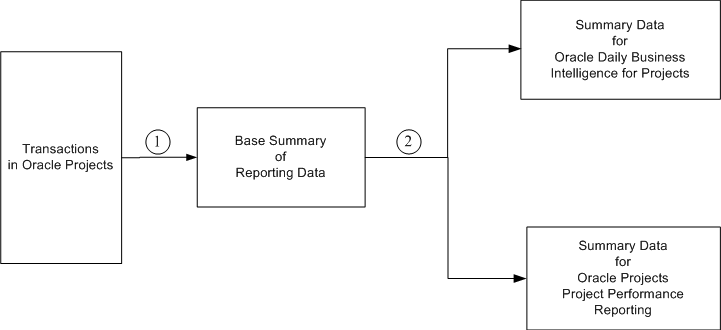
Oracle Projects summarizes project transaction amounts for reporting at the project level. Summarization is a two-step process. The first step extracts and summarizes project transaction amounts to create a base summary of reporting data. The second step separately summarizes base summary data for reporting by project . The following diagram illustrates the two-step summarization process.
Reporting Data Summarization
After you set up project performance reporting and before you run the following summarization programs, run the following program that Oracle Projects provides to review if your setup is complete and correct.
AUD: Project Performance Reporting Setup
Oracle Projects provides the following concurrent programs to initially extract and summarize, and then maintain the base summary of reporting data used by Oracle Projects project performance reporting.
PRC: Load Project and Resource Base Summaries
PRC: Update Project and Resource Base Summaries
PRC: Refresh Project and Resource Base Summaries
PRC: Delete Project Intelligence and Performance Reporting Data
The second step of summarization in Oracle Projects uses the following concurrent programs. These programs further summarize base summary data for workplan, financial plan, program reporting, and project performance reporting pages, and for reporting pack reports.
PRC: Load Project Performance Data
PRC: Update Project Performance Data
PRC: Refresh Project Performance Data
PRC: Delete Project Performance Reporting Data
PRC: Summarize Workplan and Financial Plan Data
PRC: Refresh Project Reporting Data Using Database Analytics
PRC: Update Project Reporting Data Using Database Analytics
PRC: Process Resource Breakdown Structure Updates
PRC: Generate and Distribute Reporting Pack
The following table describes business cases or scenarios for submitting the concurrent programs that extract and summarize data for project performance reporting. The table identifies the programs you must run, the order and recommended method of submitting each program, and the expected outcome for each program.
| Business Case | Order of Submission | Recommended Submission Method | Results |
|---|---|---|---|
| A new instance of Oracle Projects project performance reporting1 |
| Submit the request set PRC: Load Project Reporting Base Summaries and Performance Data. | The first program extracts and
summarizes actual and commitment transaction amounts to create the
base summary of reporting data. The second program further summarizes base summary data for reporting in Oracle Projects. This program also performs the initial summarization of financial plan data for reporting in Oracle Projects. |
| New and changed transactions in Oracle Projects |
| Submit the request set PRC: Update Project Reporting Base Summaries and Performance Data. | The first program updates the
base summary with new transactions and incremental changes in existing
transactions. The second program further summarizes the updated base summary data for reporting in Oracle Projects. |
| A new version of the resource
breakdown structure used for project performance reporting is frozen. Changes are made to the resource breakdown structure. A new resource breakdown structure is associated with the project and marked for primary reporting. |
| Submit the PRC: Process Resource
Breakdown Structure Updates program. Next, submit the request set PRC: Update Project Reporting Base Summaries and Performance Data. | The first program resummarizes
base summary data for a new resource breakdown structure or changes
in an existing resource breakdown structure. The second program updates the base summary data for new resource breakdown structures or changes in existing resource breakdown structures. The third program further summarizes the updated base summary data for reporting in Oracle Projects. |
| Adding or removing resources in a resource list used in one or more projects | PRC: Refresh Project Performance Data | Submit this program for projects that use the resource list. | The program resummarizes base summary data to report plan amounts for the changed resource list. |
| Incorrect or missing data for some projects on project performance reporting, workplan, and financial plan pages |
| The system administrator submits the request set PRC: Refresh Project Reporting Base Summaries and Performance Data. | The first program resummarizes
data for specified projects and overwrites the existing base summary
data with new data. The second program further summarizes the new base summary data of the specified projects for reporting in Oracle Projects. |
| Changed implementation options
for Oracle Projects project performance reporting not reflected on
reports. Incorrect or missing data for all projects on project performance reporting, workplan, and financial plan pages. Existing implementation data that is no longer required and must be removed. |
| The system administrator runs
a request set that includes the first two processes. Then, use the request set PRC: Load Project Reporting Base Summaries and Performance Data. | The first program deletes the
base summary data. The second program clears data reported in project performance reporting, workplan, financial plan, and program reporting pages. The third program recreates base summary data. The fourth program further summarizes the new base summary data for reporting in Oracle Projects. |
Note: The following notes pertain to the preceding table.
1A new instance can be the result of a fresh install or a reinstall. Changes in implementation options or erroneous data across projects can require a reinstall. A reinstall comprises the removal of all existing data from the base summary and from display on Oracle Projects pages.
2Run the concurrent program only at the direction of an Oracle Support representative.
3To optimize performance, PRC: Load Project Performance Data should be run specifying either the parameter Operating Unit or From/To Project.
Other Sources
Resource Breakdown Structures, Oracle Projects Implementation Guide
