Your plan design defines, categorizes, and helps you to manage the benefits that you offer to your employees and other eligible participants. The plan design is the domain of the benefits practitioner who uses the product to define the structure and elements of the benefits offering and the rules that administer these benefits.
At its core, the plan design determines the benefits that eligible participants may receive. Examples of such benefits include health and welfare plans, savings plans, and group term life insurance.
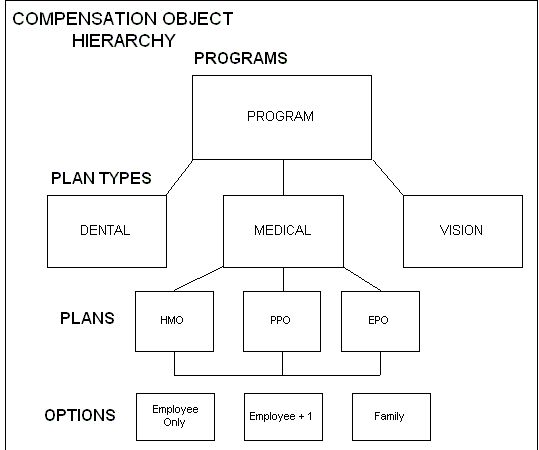
You structure your benefits offerings according to a hierarchy so that the rules and definitions that are set at the top level (the program) cascade to the benefits at the bottom level (the options in the program).
Your plan design also includes eligibility definitions and enrollment requirements, and the activity rates calculations that determine the contributions and distributions associated with a plan.
Central to benefits administration are the compensation objects that you use to define, categorize, and manage the benefits that you offer to eligible participants. The four compensation object types that you use to structure your benefits offerings are programs, plan types, plans, and options.
Defining compensation objects is a key part of your overall plan design that includes defining eligibility and enrollment requirements, plan year periods, activity rates, and other elements of benefits management.
The hierarchical structure of compensation objects
Viewing a program structure that you have defined
Compensation objects are designed hierarchically so benefits that share similar features can be defined in similar ways. You build this hierarchical structure by defining attributes of the different compensation objects and then linking the components into a hierarchy.
Compensation Object Hierarchy
A description of the four compensation objects follows:
Program: A package of benefits offerings. Programs are important because they set the boundaries for the benefits you offer. You define many administrative procedures and rules at the program level.
Plan Type: A grouping of similar benefits offerings to facilitate their management. Example plan types include medical, dental, employee group life insurance, and savings.
Plan: A formally defined benefits offering that a participant can elect, such as a medical plan.
Option: A level of coverage for a participant's election, such as Employee Only for a medical plan, or 2x Salary for a life insurance plan.
Attributes set at the program level are inherited by each level of the compensation object hierarchy. However, if these same attributes are set at a lower level in the hierarchy, the compensation object inherits those attributes set at the lowest level at or above its level. A compensation object never inherits attributes set at a lower level in the compensation object hierarchy.
Before you set up a benefits program, you should familiarize yourself with fundamental terms that refer to associations between the four compensation objects. Whether or not you choose to link compensation objects together depends on your eligibility rules and the breadth of benefits that you offer to your participants. The table below outlines the programme structure terminology:
| Terminology | Description |
| Program | Any program, regardless of whether that program has been associated with any other compensation objects. |
| Plan Type | Any plan type, regardless of whether that plan type has been associated with a program. |
| Plan Type in Program | A plan type that has been associated with a program. |
| Plan | Any plan, regardless of whether that plan has been associated with a program. |
| Plan in Program | A plan that has been associated with a program. |
| Not in Program Plan | A plan that has not been associated with a program. |
| Option | Any option, regardless of whether that option has been associated with a plan. |
| Option in Plan | An option that has been associated with a plan. |
You define your compensation objects in the order below. As you define objects in the hierarchy, you associate objects together to form your program structure.
1. Define plan types.
2. Define options.
3. Associate options with plan types.
4. Define plans.
5. Associate options with plans.
6. Associate plans with plan types.
7. Identify which plans are not part of a program.
8. Define programs.
9. Associate plans and plan types with programs.
For example, let's say you want to define the medical plans offered by a benefits program you are administering. You first define the plan type of medical. Then, you define the coverage options available for the medical plan type, such as Family and Employee only.
Next, you define the medical plans in the plan type, such as an HMO or a PPO offering. Lastly, you associate the plans or plan type with a program that groups together a variety of plans and plan types into a single benefits offering.
You define plan types as categories of benefits grouped according to the type of benefit provided. Common plan types include medical, employee group life insurance, and savings.
Plan types are used to record administrative rules for all benefits of the same type. When you define a program that groups plans together, you specify parameters that control how plans of the same plan type behave.
Plan types are the most stable of the four compensation objects. Once you define the plan types that you need to support your benefits offerings, you rarely need to modify them.
You can define options for many purposes, but commonly you do so to define coverage available under one or more plans.
Options are re-usable. Once defined, you can associate an option with one or more plans. When you associate an option type with a plan type, you make options of that type available for selection to all plans in that plan type.
For example, you could define the options Employee Only, Employee Plus Spouse, and Employee Plus Family and then associate each option with the plan types of Medical, Dental, and Vision.
Some benefits plans require that dependents and beneficiaries covered by an option are a specific familial relation to the primary participant. You can limit the relationship types covered under an option by defining a relationship group that includes specific types of people. Group relationship types include:
Children
Domestic partner
Family
Nonpersonal
Within a group relationship, you define which relationship types apply to the group. For the group relationship of Children, you might include the relationship types:
Adopted child
Natural child
Step child
You can also limit the number of dependents covered by an option. A designee that does not meet the designation requirements for an option is not eligible for coverage under that option.
You define a plan as a formal benefits offering. Your organization may define medical, dental, and savings plans among many others.
Your plan definition consists of:
The kind of plan you are defining and its plan type
The eligibility profile that controls who is eligible for the plan
The plan's activity reference period
The options in the plan
The plan year
In addition to these definitions, there are a variety of other factors that you include when defining a plan. However, these are some of the most common.
You define programs in order to group benefits together as a package. Your program definition consists of:
The plan types and plans in the program
The eligibility profile that controls who is eligible for the program
The program year period
For Advanced Benefits customers, the life events that enable enrollment in the program
Programs are important because they set the boundaries for what benefits are offered to your employees and other eligible participants. Also, it is at the program level that you define many administrative procedures and rules, such as eligibility requirements that cascade to the plan types, plans, and options in the program.
You define currency types at the program level. A plan in program must inherit the program's currency definition. You cannot associate a plan with more than one program if those programs use different currency types.
For Advanced Benefits users, you can specify the valid reasons for waiving out of waivable plan types in a program. You can then define the waive certification that you accept for each valid waive reason.
You use the Hierarchy window to display the program structure that you have created. The program structure shows how plan types, plans and options are grouped hierarchically in your program.
You can display four views of a program's structure. Each view displays data by program year or plan year and by effective date.
Plans in Programs: Displays all programs, and under each program, its plan types, the plans in each of these plan types, and the options in each of these plans. This is the most comprehensive view.
All Plans: Displays all plan types, the plans in each of these plan types, and the options in each of these plans.
Plans Not In Programs: Displays those plans types that contain the not in program plans, the not in program plans in each of these plan types, and the options in these not in program plans.
Options In Plans: Displays all active options, the plans that use these options, and the programs that use these plans.
You define program and plan year periods--as well as fiscal years--using the calendar start and end dates through which programs or plans are in effect.
Once you define a year period, you associate it with the appropriate program or plan.
You can establish context-sensitive information access between Oracle HRMS and the third party information product Authoria HR.
Authoria HR uses a common knowledge repository to manage and communicate HR and benefits information. Once you set up a total compensation plan, you can configure links between Oracle HRMS and Authoria HR. End users can click on links in Total Compensation windows and self-service pages to display context-sensitive Authoria HR documentation.
You can configure the following windows in the Professional User Interface for Authoria HR:
View Enrollment Results window
View Participation Information window
Flex Program window
Non-Flex Program window
Savings Plan window
Miscellaneous Plan window
Person Life Events window
You can configure the following self-service pages for Authoria HR:
Benefits Enrollment Overview page
Current Benefits page
Confirmation page
Benefits Selection page
See Configuring Links Between Oracle Standard and Advanced Benefits and Authoria HR
In addition to traditional benefits offerings, such as health and welfare and savings plans, you can define goods and services that your organization approves for reimbursement.
You can use this feature to define flexible spending account plans or to define other reimbursable goods and services, such as a medical insurance claim form, a monthly invoice from a registered dependent care provider, a cash award, or a wall plaque.
Flexible Spending Accounts (FSAs) and other plans that reimburse participants for certain incurred expenses have special plan design features. You define information that is specific to reimbursement plans after you perform basic plan set up tasks, such as defining a plan's eligibility requirements.
Note: When you set up the coverage for a flexible spending account, select a coverage calculation method of Same As Annualized Elected Activity Rate so that the participant receives the amount of coverage they elected for the year.