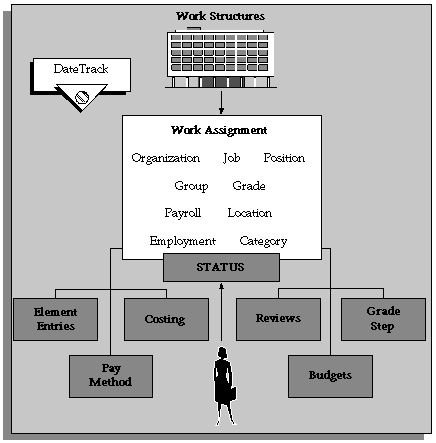
The assignment is the central concept that relates employees to the structures in which they work, and the compensation and benefits for which they are eligible.
In Oracle HRMS, many of the activities you undertake in human resource management, such as vacancy management and budget planning, are based around assignments and not people. In particular, you enter all earnings, deductions, and other pay-related elements for the employee assignment, rather than the employee. This makes it possible to give an employee two or more assignments when this is necessary.
Note: The assignment is datetracked to maintain a work history as the employee moves through your enterprise.
Employee Assignment
When you hire an employee, Oracle HRMS automatically creates a default assignment for that employee. This is because an employee must have a current assignment at all times. You then record relocations, promotions, transfers and so on as changes to the existing assignment. These changes are datetracked so that you can make future-dated changes in advance and view the history of changes to an assignment.
At a minimum, an assignment defines the Business Group and GRE for which an employee works, the date the assignment began, and its current status, such as active or suspended.
You can use the assignment to define more precisely the place of the employee in the enterprise, including his or her job, position, organization, location, grade, and supervisor. You can also assign the employee to any of the employee groups you set up using the People Group key flexfield, such as pension groups or unions.
You can assign employees to an employment category, such as Part Time - Regular or Full Time - Temporary. Your startup data includes four categories, and you can add others for the Lookup Type EMP_CAT.
You can assign employees to a salary basis and maintain their salaries or wages using the Salary Administration procedure.
At installations using Oracle Payroll to pay employees, each employee's assignment must include these components:
A GRE:
An organization with a physical location that is entered in the HRMS database.
A payroll.
An employment category.
Additionally, there must be on record for each assignment:
W-4 and other tax information.
A salary basis and an approved salary entry.
Note: A prerequisite for the establishment of employee tax information is entry of a primary US or Canadian residence address for the employee, and assignment of the employee to an organization having a location with a complete address.
W-4 and Other Tax Data for Employees
Setting Up Salary Administration
Contract Staff and Other Non-Standard Assignments
If your enterprise permits employees to work in two or more different capacities at once and thereby become eligible for different benefits, you can enter multiple assignments for them. An employee can have multiple assignments, but only one is the primary assignment, any others are secondary.
Relocations, transfers, promotions and so on go on record as datetracked changes to employees' existing assignments. You do not enter new assignments for changes like these.
For example, if a university professor of history also coaches the baseball team, receiving additional pay but retaining the same benefits, there is no reason to give him a second assignment. But if he becomes eligible for different benefits as a coach, it is best to give him a separate assignment for this work.
Oracle HRMS separately manages each assignment, together with its associated compensation and benefits. When an employee has more than one assignment, one assignment is designated as the primary assignment. When you hire an employee (by entering a person as an employee, or by changing the person type to employee), Oracle HRMS automatically creates a primary assignment for that employee. (The Primary box is automatically checked in the Miscellaneous tabbed region of the Assignment window).
If you then enter an additional assignment, the Primary box is automatically unchecked for that secondary assignment.
You can end all assignments except the primary assignment by entering a status change in the Assignment window. However to end an employee's primary assignment, you must terminate the employee, using the Terminate window.
To show that an assignment is part time, you use the employment categories Part Time - Regular or Part Time - Temporary. You could also set up a Full Time Equivalent budget, and weight each assignment as a fraction of a full time equivalent for the calculation of actual values. For more information about budgeting, see: Human Resource Budgets
For overtime purposes, the application combines the total hours worked for employees with multiple assignments or joint employment.
Notice that when employees split their time between two departments performing the same job, or fulfill two different roles in one organization, you do not need to define two separate assignments to maintain accurate costing records. You can set up cost allocation to distribute proportions of one assignment's payroll costs to different cost centers.
For more information see: Costing Information at the Organization and Assignment Levels
When an employee experiences changes such as a promotion or transfer, or moves from full time to part time, you change a component of the assignment. A change to any of the assignment components produces the DateTrack prompt.
If you choose Correction, Oracle HRMS overwrites the existing assignment information back to the last effective from date.
If you choose Update, Oracle HRMS records the date and change, and retains the original information.
By changing your effective date on the system, you can see the employee's assignment at any point in time. You can also view the changes made to the assignment over time using DateTrack History.
DateTrack History shows the changes made to one assignment. Use the Assignment History window to view the history of all the employee's assignments, both currently and in any previous periods of service.
Changing any assignment component can have the following effects:
The employee may lose eligibility for some compensation types, benefits or deductions, and gain eligibility for others. You receive a warning that the system automatically ends any unprocessed element entries for which the employee is no longer eligible.
The employee may have a different level of access to Oracle HRMS, since the system's security is based on assignment to work structures.
If you change the employee's grade when a grade step placement exists for the assignment, you receive a warning message that the placement will be date effectively ended and any future placements will be deleted. Also, the special ceiling point field is cleared.
Note: If an assignment change causes the system to change element entries, you may not be able to save the change if a current or future pay period is closed. You must reopen the period or change your effective date to make the change.
Oracle HRMS does not permit an employee to exist in the system without an assignment. That is, an employee must always have at least one assignment at any point in time. This means that for an employee with just one assignment, the only way to end the assignment is to terminate the employee, using the Terminate window.
For employees with more than one assignment, you can end all but one of their assignments by selecting an assignment status of End or Terminate in the Assignment window. At sites using Oracle Payroll, the choice of End or Terminate controls the ability to include the assignment in a payroll run after the date the assignment ends. Sites not using Oracle Payroll can use these two statuses to provide information. For example, End may mean that further pay processing cannot occur for the assignment, while Terminate may mean that further processing can occur. Alternatively, these sites can simply use the status End.