With Oracle HRMS, you define a working model of your own types of compensation and benefits and the policies or business rules that govern the allocation of these to your employees. You define these types as elements. Elements are the building blocks of pay and benefits, both for HR analysis and payroll processing.
Example
Elements can represent:
Earnings, such as salary, wages, and bonuses
Benefits, such as employee stock purchase and pension plans
Absences from work
Non-payroll payments, such as expense reimbursements
Tangible items distributed to employees, such as tools, uniforms, mobile phones, or computers
Voluntary and involuntary deductions, as well as pre-tax and tax deductions
Employer taxes and other employer liabilities
There is no limit to the number of elements you can define, and all your definitions are datetracked.
Some elements are supplied predefined with Oracle HRMS, some are available in template libraries, others are generated by the system when you define certain types of compensation and benefits, and the remainder you can define using the Element window to best meet the needs of your own enterprise.
Predefined Elements
The predefined elements are specific to your localization. They typically include deductions for tax and wage attachments. They may also include standard earnings, such as salary. You should not make any changes to these predefined elements.
Template Elements
Using the Configuration Workbench, you can select many earnings and deductions from a template library for your country and industry. Your selected earnings and deductions form a template set that you can load into your business group. The template set includes the elements and the balances, balance feeds, and formulas required for payroll processing. You can configure any of these definitions to match your specific requirements.
Generated Elements
In certain legislations, including North America and the UK, Oracle Payroll users can initiate earnings and deductions, and the system generates the elements you require, along with balances, balance feeds, and formulas. The method of initiating earnings and deductions depends on your localization. Typically you use the Element Design Wizard, Earnings and Deductions windows, or other template windows for specific earnings and deduction types. The processing options you select in the wizard or window determine the rules embedded in the generated elements and formulas. As with template elements, you can configure generated elements and formulas to match any special requirements.
Also, when you create PTO Accrual Plans, the system generates elements for you.
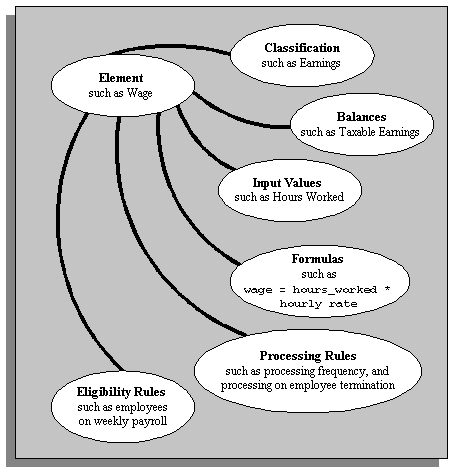
The following diagram illustrates the items that you can define or select to control the entry and processing of any earning, deduction, basic benefit, or payment.
Compensation Definition
To take a simplified example, you could define an element called Wage, for hourly paid employees. You classify it in the predefined classification Earnings, which determines when it is processed in the payroll run and what payroll balances it feeds.
You specify one input value, Hours Worked, which must be entered in each pay period. (If necessary, you can define up to 15 input values, with fixed values, defaults, or validation.)
You associate a formula with the element, to calculate the wage for the pay period. A simple formula might be hours worked (from the input value) multiplied by hourly rate (which might, for example, be entered in the Grade Rate window).
You define who is eligible for the element by linking it to components of the employee assignment, such as grade, payroll, salary basis, or organization. In this example, the wage element is available to all employees on the weekly payroll.
You can define other processing rules, such as a termination rule. For example, you might specify that the employees' entry of the wage element should not close down on their termination date but remain open for processing of final pay.