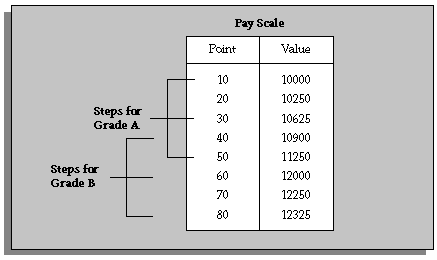
If you are involved in negotiating pay levels with staff or union groups, you may be using a system of grade steps or points with specific values of pay for each step, or point. For example, you may have negotiated different pay scales with different union groups. Or, you may have negotiated a single set of pay points for all of your employees.
Typically, employees are placed on a step within their grade. They move up the steps for the grade by a periodic incrementing process. This process might run automatically at a fixed time each year or it might be based on a review process specific to the employee.
In Oracle HRMS you set up a pay scale to show the separate points and the value negotiated for each point. You can set up any number of pay scales, for example for negotiated pay scales with different unions.
You create a rate and enter a fixed value for each progression point on a pay scale. You can create as many rates as you require, such as one for a shift allowance, and another for overtime. Notice that, unlike grade rates, you can only enter a fixed value for each point; you cannot enter a range of valid values.
The values are datetracked so that you can keep the history of the actual values you use. You can also set up rate values at a future date and be sure that this information will automatically take effect on the date you set, and not before.
You define rates in monetary units, or as integers, numbers, days, or hours, in various formats. For example, you can define a rate in hours to specify the maximum number of overtime hours that can be worked per week.
Scale rate values can be linked directly to currencies. When you enter monetary values for a scale rate you can associate a currency with these values.
When you define rates, an automatic process creates corresponding database items that formulas can access.
A pay scale defines a complete set of progression points. You can associate a subset of these points with each grade.
The group of points valid for a grade is called a grade scale. Each point in the grade scale is called a step because it represents the steps for incrementing an employee's pay. The steps must follow the sequence of points on the pay scale but they can jump several points, if appropriate to the specific grade.
Note: Grade scales are datetracked.
You can create pay scales and associate grades to progression points on a pay scale using either the Scale Rate and Grade Scale windows or the Total Compensation Setup Wizard depending on whether you implement the non-automatic step progression approach or the grade/step progression approach in your enterprise.
You can upload scale rate values that you created using the Scale Rate window to create default salary rates in a grade ladder. However, once you have uploaded any existing rates, we recommend that you use the Total Compensation Setup Wizard to maintain salary rates for use in Grade/Step Progression, see: Setting Up Grade/Step Progression.