The security features in Oracle HRMS enable you to restrict security access based on individual assignments. The security processes evaluate permissions on an assignment-by-assignment basis, rather than displaying all assignments if a manager has access to any assignment.
For example, without assignment-level security, a manager with access to an employee's primary assignment would also have access to the employee's other assignments even though the supervisor for the other assignments may be a different manager. To allow supervisors to view only the relevant employees and assignments, you can enable assignment-level security in the Security Profile window. You use this functionality in conjunction with your security profile settings (for example, organization, position, supervisor security).
The following examples show how a manager's access to person records differs when assignment-level security is enabled and when it is disabled for a supervisor hierarchy, organization hierarchy, and position hierarchy.
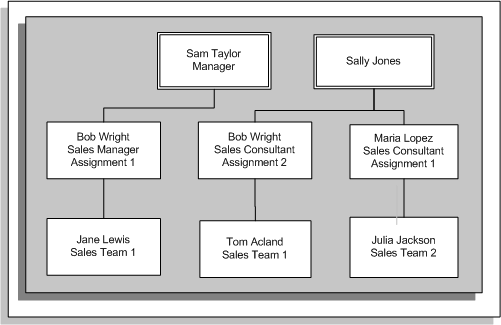
The graphic below shows the direct reports for Sam Taylor and Sally Jones. The subsequent examples show how the managers' access to the direct reports varies with the different security configurations.
Supervisor Hierarchy
Example 1: Assignment-Based Supervisor Hierarchy (No Assignment-Level Security)
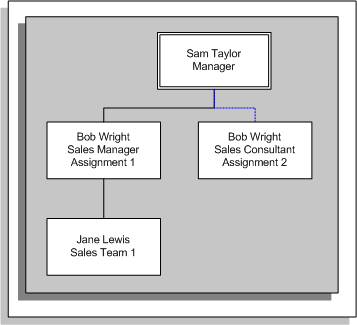
If you set up a supervisor hierarchy that is based on the supervisor assignment, Sam can see the direct report for Bob's first assignment (Jane). Because there is no assignment-level security, Sam can also see Bob's second assignment, however, Sam cannot access the direct reports for the second assignment. Sally Jones can see Bob's first assignment but cannot see the direct reports for this assignment (Jane). The following graphic illustrates the new hierarchy for Sam Taylor:
Assignment-Based Hierarchy for Sam Taylor (No Assignment-Level Security)
Example 2: Assignment-Based Supervisor Hierarchy (Assignment-Level Security)
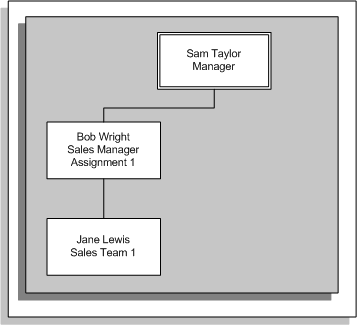
With assignment-level security, Sam can only see Bob's first assignment and the direct reports for this assignment (Jane). Sally can see Bob's second assignment and Maria's assignment and the direct reports for these assignments. The following graphic illustrates the hierarchy with assignment-level security for Sam:
Assignment-Based Hierarchy with Assignment-Level Security
Note: If you are using an assignment-based hierarchy, it is advisable to use assignment-level security.
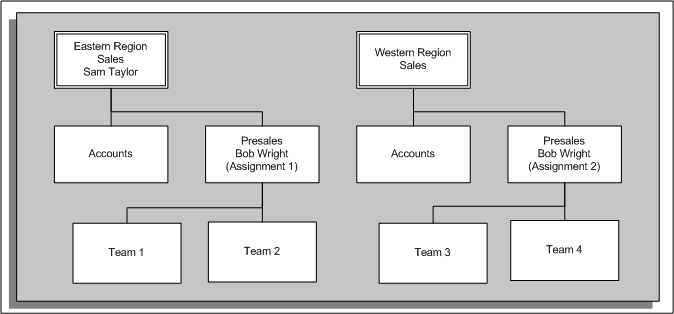
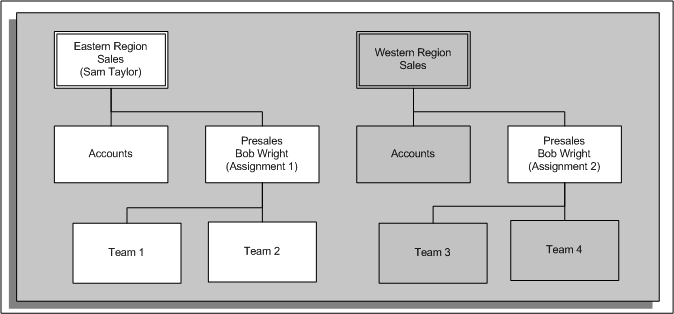
The graphic below shows two organization hierarchies. Within the first hierarchy (Eastern Region Sales) there is an employee with multiple assignments. The subsequent examples show how the hierarchy changes with assignment-level security disabled and enabled.
Organization Hierarchy
Organization Hierarchy (No Assignment-Level Security)
In this situation, Sam can see the people within the Accounts and Presales organizations. He can also see the people in organizations below Presales in the organization hierarchy (Team 1 and Team 2). Bob Wright has a second assignment in a different organization (Western Region Sales/Presales). Because assignment-level security is disabled, Sam can see this assignment (if a manager can access one assignment, he can access them all). Sam cannot see the organizations below the organization for Bob's second assignment. The following graphic illustrates the hierarchy without assignment-level security for Sam Taylor:
Organization Hierarchy (No Assignment-Level Security)
Organization Hierarchy (With Assignment-Level Security)
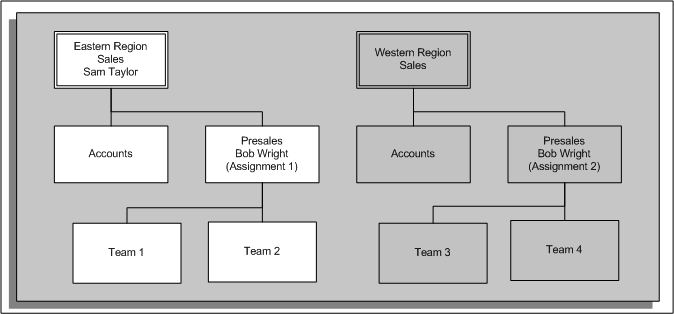
In this situation, Sam can see all people within the Accounts and Presales organizations. However, Sam cannot see Bob's second assignment (Western Region Sales/Presales) because the organization for the second assignment is not within the organization hierarchy to which Sam has access. The following graphic illustrates the hierarchy with assignment-level security for Sam Taylor:
Organization Hierarchy (With Assignment-Level Security)
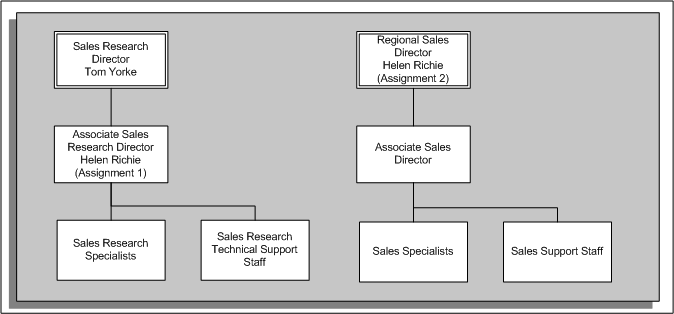
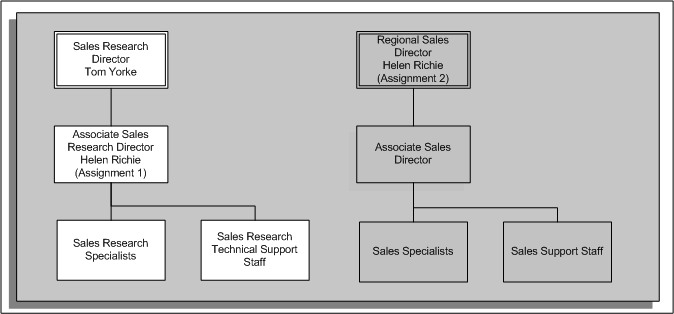
The graphic above shows two position hierarchies. Within the first hierarchy (Sales Research Director) there is an employee with multiple assignments. The following examples show how the hierarchy changes with assignment-level security disabled and enabled.
Position Hierarchy (No Assignment-Level Security)
In this situation, Tom can see the position below him in the hierarchy (Associate Sales Research Director). He can also see the reporting positions (Sales Research Specialists and Sales Research Technical Support Staff). Helen Richie has a second assignment for a different position (Regional Sales Director). Because assignment-level security is disabled, Tom can see this assignment (if a manager can access one assignment, he can access them all). Tom cannot see the positions below the position for Helen's second assignment. The following graphic illustrates the hierarchy without assignment-level security for Tom Yorke:
Position Hierarchy (No Assignment-Level Security)
Position Hierarchy (With Assignment-Level Security)
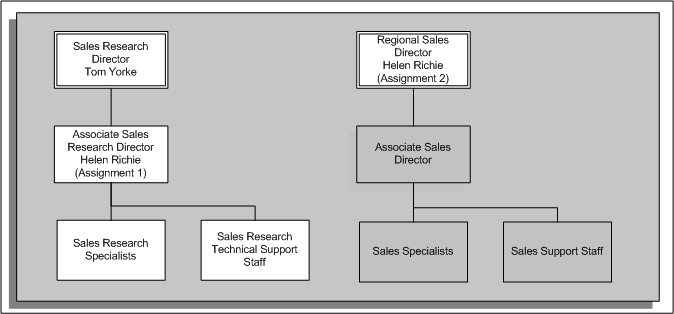
In this situation, Tom can see the position below him in the hierarchy (Associate Sales Research Director). However, Tom cannot see Helen's second assignment (Regional Sales Director) because the position for the second assignment is not within the position hierarchy to which Tom has access. The following graphic illustrates the hierarchy with assignment-level security for Tom Yorke:
Position Hierarchy (With Assignment-Level Security)
You enable assignment-level security in the Security Profiles window. To enable assignment-level security, select the Restrict on Individual Assignments option.
For more information, see: Defining a Security Profile
Assignment-level security is available for several areas of Oracle HRMS. The areas that currently support assignment-level security are:
Self-Service Human Resources (SSHR)
The following Oracle HRMS forms:
Combined Person and Assignment
(PERWSHRG)
Enter Assignment (PERWSEMA)
People Management (PERWSQHM)
Define Assignment Extra Info (PERWSAEI)
View Benefits (PERWSVBI)
View Salary History (PERWSSLH)
Salary Review (PERWSEPY)
View Worker Assignment History (PERWSASH)
Assignments Folder (PERWSFAS)
The following Oracle Payroll forms:
View Employee Run Result History (PAYWIELH)
Payroll and Assignment Processes (PAYWSACT)
Run QuickPay (PAYWSRQP)
Batch Element Entry (PAYWSQEE)
View Element Entry History for Employee (PAYWIEEH)
List Employees by Element (PAYWSLEE)
Element Entry (PAYWSMEE)
Adjust Balances (PAYWSABL)
Pay Method (PAYWSEPM)
Irish P45 Form (PAYIEP45)
Irish SOE Form (PAYIESOE)
Reverse Payroll Run (PAYWSRPR)
Irish Tax Information (PAYIETAX)