A typical implementation for self-service actions allows you to process multiple changes to a person's record at the same time. Another common configuration allows any approver on the chain of recipients to change the effective date of an action. The ability to process concurrent actions and choose an effective date at any point in the approval process adds both flexibility and complexity. For example, what if another manager submits a status change that affects a person's grade at the same time you are processing a job change on the same person? What if you submit a change of working hours, and another manager approves a transfer while your action is in process? What if choosing a retroactive effective date for a bonus means that another bonus (already approved) becomes effective on a future effective date to your own?
The flexibility of processing multiple changes simultaneously requires the application to handle complex interactions among three dates associated with each action:
Initiation date: the date you submit your action for approval (usually the system date)
Effective date: the date your approved action takes effect (not necessarily the approval date)
Approval date: the date you save your action to the database
The application helps you manage complex situations arising from interactions among multiple actions and dates in three ways. Consider three scenarios:
Concurrent Actions: The application processes multiple actions on a selected person at the same time. On final approval, each action takes effect on its own effective date, superseding any actions with a previous effective date.
Intervening Actions: After your action is in process, the application encounters an approved action on the same person with an effective date that falls between your initiation date and effective date. Your setup can help you manage which information prevails, and (as appropriate) replace values in your action.
Future-Dated and Retroactive Actions: After your action is in process, the application encounters an approved action on the same person with a later effective date. Your setup can allow you to route your action to a Human Resources representative on final approval, for manual entry of all appropriate changes.
When you begin an action, the application checks the person/assignment combination for other actions currently in process:
Saved for Later
Returned for Correction
Awaiting Approval of Others
Most implementations allow concurrent actions. Otherwise, if you try to begin an action on a person with pending changes, you cannot proceed beyond the Actions page. But in a typical setup, existing actions on the selected person appear as actions Awaiting Your Attention or Awaiting the Approval of Others.
Intervening changes can occur for a variety of reasons, most often due to delays between request and approval. Another manager can approve a change to your selected person's record after your own action has entered the approval process. When the application encounters approved changes to your selected person's record, effective somewhere between your own action's initiation date and effective date, it manages them in one of two ways. Consider two scenarios:
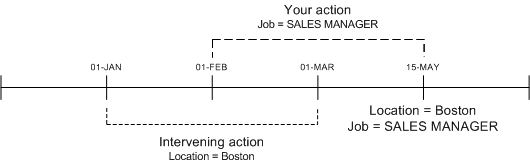
After you submit your job change for approval, an HR manager approves a transfer on the same person while your action is still in process. In this case, the intervening change of location prevails, because your action does not specify a location. You may still need to know about the transfer, however, in order to decide whether to approve, update, send back for correction, or cancel your job change.
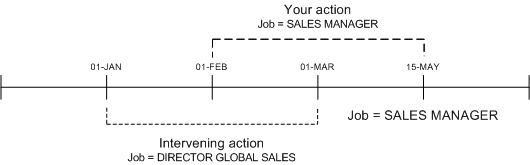
Your action's proposed job change conflicts with an intervening change from another manager that specifies a different job. Because both your action and the intervening action specify a job, your action's proposed job prevails, because your action has the later effective date. Nevertheless, you may need to know about the intervening job change in order to make a more informed decision about your own proposed job change.
In the following illustrations, broken lines connect the initiation date and effective date of each action. Another manager approves an intervening action while yours is still in the approval process.
Scenario 1: Intervening Action Specifying Different Attributes
Scenario 2: Intervening Action Specifying the Same Attributes
When intervening actions exist, and as an approver when you receive a transaction for approval, you must click Update Action for approval notifications to refresh with data from intervening actions.
Data refresh options enable you to manage potential conflicts by replacing your action's values with the changed information from the intervening action (scenario 1), or preserving the values from your action (scenario 2). The application displays a Refresh page with a table informing you of the original, intervening, and prevailing values.
Note: The application may also display a Refresh page if you change the effective date of your action. A new effective date can create potential conflicts with values in effect at a different point in time.
When the application encounters an approved change to your selected person's record, effective subsequent to your action's effective date, configuration options can help you to manage potential conflicts by routing your action on approval to a person with an HR Representative role. On review, the HR representative applies all necessary changes to the database manually.
You can perform an action on a person retroactively by choosing a past effective date. The application treats changes to the person's record subsequent to your effective date as future-dated actions, and routes your action on final approval to an HR representative.
No automated system can resolve every scenario involving conflicting data. In some cases, an HR representative applies all appropriate changes manually. On the whole, managers prefer to get their actions in process and approve them. Your configuration accommodates most scenarios automatically by setting the following options:
Refresh your action with valid information as of your effective date, or require that your action fail on final approval (intervening actions)
Allow approval of your action with subsequent routing to an HR representative, or terminate it with an error (future-dated actions)
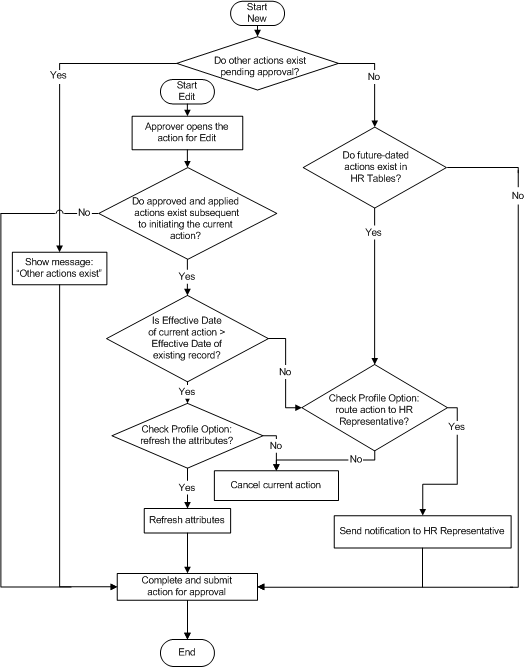
The process flow diagram below describes in greater detail how the application manages data conflicts when intervening or future-dated actions exist. The figure assumes that concurrent transactions are allowed.
Managing Conflicting Actions
Note: If an action has an effective date matching that of an existing change, the application assumes it to be a correction to the existing record.
For more information about date tracking in Oracle HRMS, see the Oracle white paper, How Date Track Works, available on My Oracle Support.