Generic hierarchies group and correlate information about your business into an ordered structure of parent-child relationships that implementation teams can use as input parameters to reports and concurrent processes. One standard purpose for a generic hierarchy is to supply input parameters to a generic purge process you perform on temporary tables. With appropriate access rights, you can also design your own generic hierarchies from scratch. You can extend predefined hierarchy and node types, using any combination of HRMS data.
You can use the flexibility of generic hierarchies to correlate information across business groups, specifying combinations of people, jobs, competencies, grades, locations, training, or other structures, with precise scope. You can reuse hierarchies, delivering comparable and consistent information limited only by your maintenance of the hierarchies. You can process specific groupings of workers, process flexfield data, or trigger Oracle Alerts or Workflow. Here are some examples of business questions you can address using generic hierarchies:
What is the competency hierarchy for a given job?
Who is qualified for which job?
Who can take leave on a given date?
What training is available in which location, for which jobs?
What objectives apply to which job?
Defining a New Hierarchy
You create or maintain generic hierarchies in the Generic Hierarchies pages. You define a new hierarchy in three stages:
Create a hierarchy based on a predefined or user-defined hierarchy type.
Enter information about the initial version of the hierarchy and specify effective dates.
Note: Some government-mandated reports, such as Multiple Work Site in the US, require that you submit the report within a specified date range. When you create the hierarchy, enter an effective date and end date to match or encompass that range.
You cannot create a hierarchy version with an effective date range that overlaps another version.
Enter node information, based on predefined or user-defined node types.
Hierarchy Types and Node Types
The top node is the hierarchy type itself you create in the Generic Hierarchies pages, bearing a user-defined name, such as Competencies or Job Objectives. You define node types and add them to your hierarchy structure as child nodes, to specify the kind of information you want to include on each level. You can group related categories of nodes on the same level. For example, you can define Personal, Programming, and Communication node types, and include them on the same level in a competencies hierarchy. Validation is optional, but you must link a value set to a node type if you want to validate the data. Contact your system administrator to obtain access to the Maintain Hierarchy Types module by attaching the self-service menu PQH_GHR_MENU to your responsibility.
For example, the structure of the predefined Establishment Hierarchy type ("VETS, EEO, AAP, OSHA, Multi Work Sites") specifies that the top node must be a Parent Entity. The value set for a Parent Entity node type contains organizations with the classification of Parent Entity. Subordinate nodes must be an Establishment or a Location. The value set for the Location node type contains locations that store report information in a Location EIT.
Hierarchy Versions
You can specify a status of Active or Inactive for your hierarchy version. You can create a new version of an existing hierarchy, preserving only its structure. Or you can duplicate an existing version, preserving both its structure and data.
Note: If you change a hierarchy after using it for government-mandated reports, create and save a new version. This enables you to use the old version to recreate old reports retrospectively, in compliance with applicable laws.
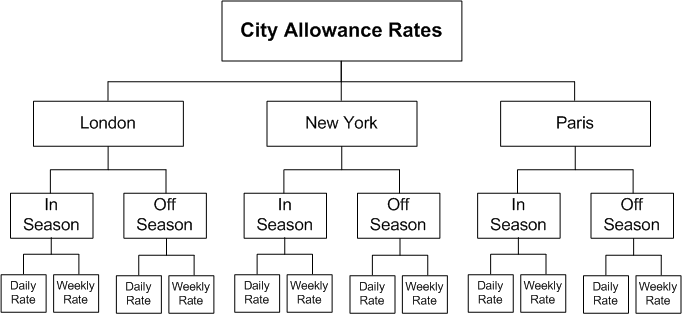
Example: City Allowance Rates Hierarchy
The figure below is an example of a hierarchy that provides input data for travel expense reports, correlating allowance rates with cities. Because it is unlikely that travel destinations always correspond with organization locations, this example uses no validation or value sets.
See: Defining Value Sets in Oracle Applications Flexfields Guide, available on Metalink.