There are several models for grade implementation that reflect common approaches to grade-related compensation. Oracle HRMS supports the following models
Model 1: Individual pay
Model 2: Group Pay - Common Pay Scale
Model 3: Group Pay - No Common Pay Scale
Model 4: Criteria-based Pay
Once you have identified the models that most closely resemble your grade and compensation model, you can determine how to configure your grade information in Oracle HRMS.
If your enterprise uses this approach, you process salary updates manually and grade changes do not trigger salary administration changes. Commercial organizations frequently use this model. Oracle HRMS supports this model with grade rates, salary administration and a salary basis.
See: Models of Pay Administration: Model 1 Individual Pay
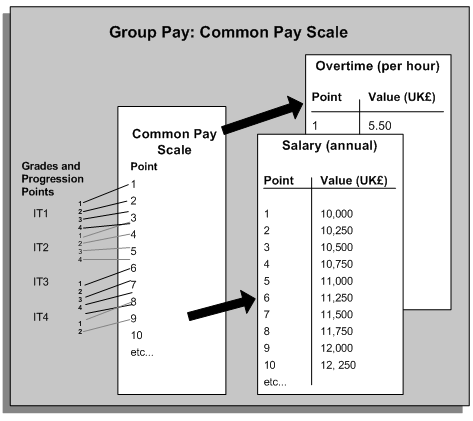
In this model, group pay is based on a national or common pay scale for different grade groups. The enterprise uses a single reference table (the pay scale) which comprises a series of points in a predefined sequence. Every grade or grade progression point in the organization maps to a point on that pay scale, enabling the organization to compare multiple grade groups to a single set of values. Typically, the employee receives a salary update when they move to another grade or step. This approach is often used by public-sector type organizations, for example, in the education and healthcare sectors.
The points on the pay scale map to values in one or more additional tables. If your enterprise records multiple rates for any single point on a pay scale, you use multiple tables.
The following graphic shows four grades in an organization (IT1, IT2, IT3, and IT4). Each grade comprises between two and four progression points. Each progression point maps to a point on the national pay scale. This organization needs to record both annual salaries and also its hourly overtime rate. Therefore the same pay scale is used by two different tables.
Example: Group Pay - Common Pay Scale
If your enterprise uses this model, you can use pay scales to create one scale rate (per table) to record multiple values for each grade step.
See: Non-automatic Step Progression Approach
To progress your employees automatically (and make automatic salary updates when they move from one grade or step to another), use Grade/Step Progression.
See: Grade/Step Progression Approach
If you use this model, your enterprise uses multiple pay tables to record different rates of pay for people on the same grade. Typically, the employee receives a salary update when they move to another grade or step. Enterprises that use this model pay their employees differently according to predetermined factors. For example, the pay for employees on the same grade step may vary according to their location. The graphic illustrates how an organization uses multiple pay tables to differentiate grade pay by location. For example, Employee A is on the third step of the SE.1 grade in Sydney and is eligible for a different rate of pay from Employee B, who is on the same grade step, but located in the Melbourne office.
Example: Group Pay - No Common Pay Scale
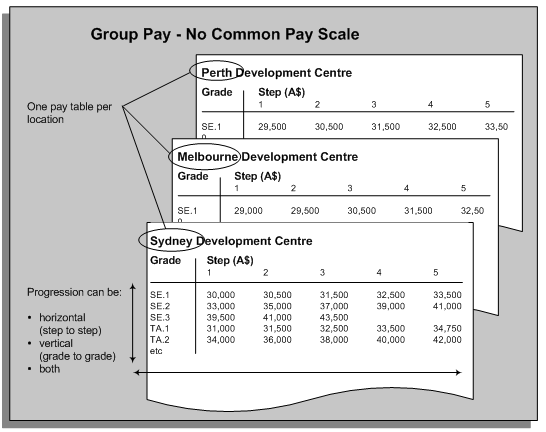
In the example shown, each pay table uses only one criterion to differentiate the pay that people on the same grade step receive. There could be multiple criteria for a grade, for example, location and currency.
If your enterprise varies grade pay in this way, we recommend that you use Grade/Step Progression and criteria salary rates to combine multiple criteria, plus a value for each criterion, to record different rates of pay depending on an employee's individual circumstances.
See: Grade/Step Progression Approach
In this model, you can vary pay by multiple criteria (up to seven). You can select grade as one of the criteria. For example, you could enter pay rates for each performance rating, within each grade, for each job. Similarly, you could enter rates for each grade within each location and according to bargaining unit. You use an API to identify the appropriate pay rate from the rate matrix. There is no provision, in this model, for automatically progressing employees through grades.