The save for later functionality enables a manager or recruiter to store a vacancy or an offer they are creating or modifying prior to submitting it. They can then complete the creation or modifications at a later date. The vacancy or the offer can be saved for later at any point during the creation or modification process, up until it is submitted.
If the creation or modification of a vacancy or an offer is interrupted, for example if the browser is closed or if the session is timed-out through user inactivity, then this vacancy or the offer is also saved for later.
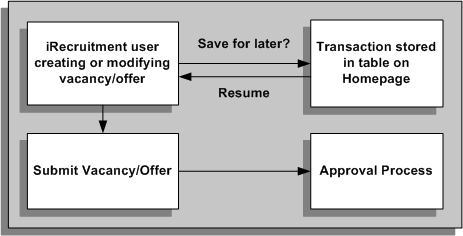
Managers and recruiters can see the vacancies and offers that they have stored in the Save for Later table on their home page. From here they can resume the work they were doing. The following graphic depicts the save for later process.
Save for Later Functionality
When a manager or recruiter creates or makes a modification to a vacancy or an offer, they can either submit the transaction for approval immediately or save the transaction for subsequent processing. If they submit the transaction immediately, the transaction is subject to the usual approval processes. If they choose to save the transaction for later, it is suspended and the user can restart it or delete it from the Save for Later table on their home page.
If a manager or recruiter has made a modification to an approved vacancy or an offer, saves the change for later, and then deletes the save for later record, the vacancy or the offer remains as it was before the modifications were made.