iRecruitment uses offer templates to create offer letters. When you define a template, iRecruitment uses Oracle XML Publisher, a template-based publishing tool, to merge your template file with the offer data to create an offer letter.
On the Offer Template Associations page, you can select a default offer template for a business group, organization, job, or position. When a manager creates an offer, iRecruitment uses the default template to create an offer letter.
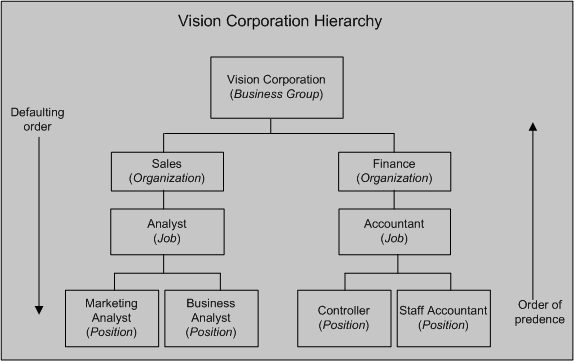
The following figure shows an example of a business group Vision Corporation with its organizations, jobs, and positions.
You can analyze your recruitment practice to decide whether you want to set a default template for your business group or specify different default templates. Using Vision Corporation as an example, the following points explain different approaches that you can take when setting up default templates for offer letters:
Set a default template for the business group
To use the same offer details for all job offers in the Vision Corporation business group, select a default template for the business group. When managers create offers in the Vision Corporation business group, iRecruitment uses the default template set for the business group to create offer letters.
Business Group is the highest level. If you select a default template at the highest level and do not define default templates for organizations, jobs, and positions, then the default template at the business group level is inherited at the lower levels.
Set a default template for different levels in the business group
Alternatively, if terms and conditions of job offers vary, then select default templates at the appropriate levels. For example, if job offer details are different in the Sales and Finance organizations, then select different default offer templates for those organizations.
The default templates set at the lower levels override the default offer template set at the higher levels. For example, you select Vision Offer Template as a default template for the Vision Corporation business group and Sales Offer Template as a default template for the Sales organization. When managers create offers for the Sales organization in the Vision Corporation business group, iRecruitment uses the default template set at the organization level (Sales Offer Template) to create offer letters.
You can delete template associations in use and add new templates to jobs, positions, organizations, and business groups. For example, you can add a new template, if there is a change in the company policy or a request for a change from the HR department. Your changes or deletions do not affect offers associated with previous templates.