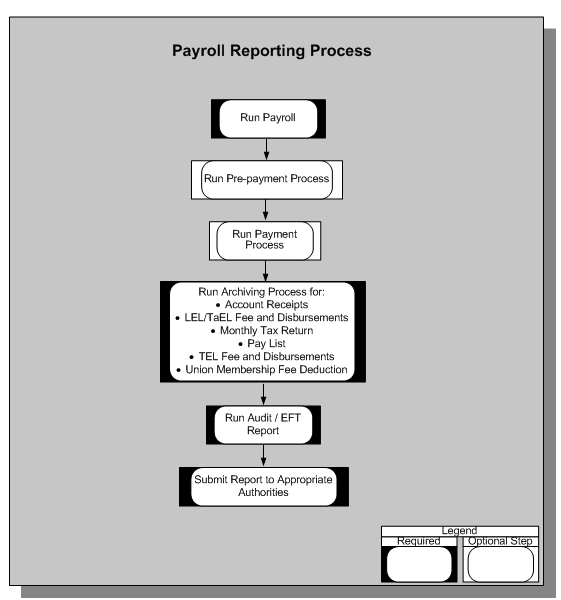
You can run the following payroll, deduction, and payment reports:
Account Receipts Report
Monthly Tax Return Report
Pay List Report
Pay Sheet Report
TyEL Monthly Fee and Disbursements Report
TyEL Yearly Fee and Disbursements Report
Union Membership Fee Deduction Report
Yearly Documents of Paid Salaries Report
Archiving and Reporting Overview
You generate the payroll reports after running the required payroll processes. As shown in the preceding graphic, running reports is basically a two-step process that requires:
Archiving the relevant data for the report.
Running the report request.
After archiving the report data once, you can run the same report again without re-archiving. The application searches for the most recent archived data. For an up-to-date report, always perform both steps. You can choose to run the audit and EFT (final) reports for the following reports:
Finnish TyEL Monthly Fee and Disbursements
Finnish TyEL Yearly Fee and Disbursements
Monthly Tax Return Report
Yearly Document Paid Report
Union Membership Fee Deduction Report
Overtime Reporting:In addition to the regulatory reports, you can also track employee's overtime and generate reports. During implementation, you can set up balances for overtime and add your own solution for overtime reporting. You can link the predefined balance attributes to the overtime reporting solution. To report the overtime values for a pay period or year, the application picks up values using the balance attributes.
For Finland, you must upload the following two predefined global values for overtime:
FI_QUARTERLY_OVERTIME_LIMIT: Holds the quarterly overtime limit which the employee is not allowed to exceed within a 3-month period (quarter of a year).
FI_YEARLY_OVERTIME_LIMIT: Holds extended yearly overtime value which is an absolute maximum per employee.