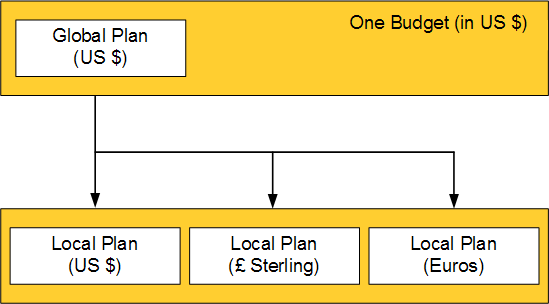
Your primary design decision is how many compensation plans to create. If you want to handle awards together on a single worksheet or allocate them from a single budget, you must set them up within the same plan or group of plans. You group plans by associating them with one global plan, even if the plans are defined in different business groups and using different currencies.
For example, if you want to allocate compensation across currencies or business groups, create a local plan for each business group and associate all the local plans with the same global plan, which uses your corporate currency. You create a single budget for the global plan, which you can distribute across the local plans in their local currencies. This is called a global basic plan structure.
If you are allocating in one business group, you can create a single standalone plan that acts as its own global plan. However, if you have several plans of the same plan type in your business group and you want to allocate money across the plans from one budget, you can group them under a single global plan using the global basic plan structure.
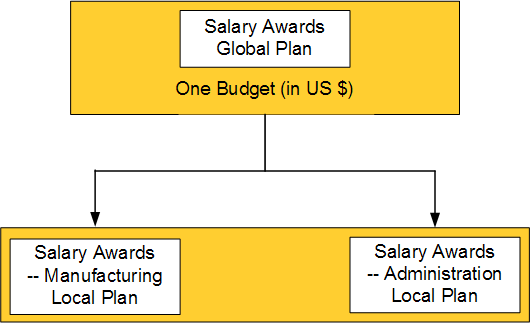
Note: Local plans do not have budgets. You always budget at the global plan level.
For all global and local plans, you can define up to four options.
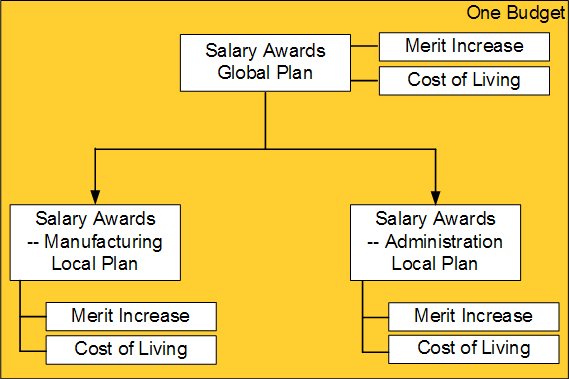
If you want to break down allocations into components such as cost of living increase and merit awards, select the same plan type, such as Salary Increase, for all the options (and the plans). These plans are called component plans. You can set up rates based on your business requirements. Decide whether you store your budgets as a percentage of eligible salaries or as amounts. For example, you can set up option level budgets for a component plan with 5% for merit, 2% for cost of living, and 3% for company performance or set up a plan for 10% to budget or allocate between salary increases and bonuses.
See: Setting Up a Component Plan
If you want to allocate different types of compensation (such as salary increases and bonuses) on the same worksheet, select different plan types for the options, and select Combination Plan as the plan type for the plan. You can publish a separate budget for each option in the global plan.
See: Setting Up a Combination Plan
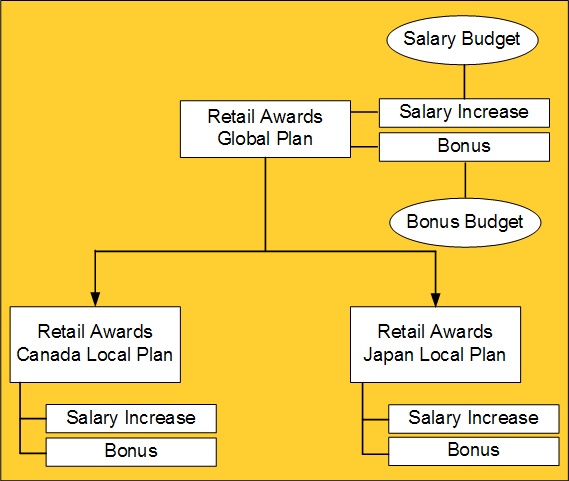
Combination plans do not total options so you can create options with different units of measurement.