The Performance Management Plan Appraisal Rating Summary provides managers information on progress of appraisals in their hierarchy.
Using the Performance Management Plan Appraisal Rating Summary, HR professionals and managers can:
View appraisal rating distribution in their reporting line
View and compare appraisal ratings in a hierarchy
Track progress of appraisals
Drill down to appraisal details
Note: The Performance Management Plan Appraisal Rating Summary report supports a maximum of 20 rating levels.
Prerequisites
To view the latest appraisal rating summary for any plan, the performance management plan must be published. The HR administrator must run the Refresh Appraisal Summary concurrent program after managers rate the appraisals. This concurrent program populates the latest ratings in the Appraisal Summary table. For more information, see: Running the Refresh Appraisal Summary Program
If you want the Performance Management Plan Appraisal Rating Summary to display information based on HR changes such as new hires, transfers, and terminations, then your plan administration must use the Reevaluate Plan Population republish option and republish a plan. This option rebuilds supervisor hierarchy based on HR changes, if any, so that the Performance Management Plan Appraisal Rating Summary displays information based on the changes made in the supervisor hierarchy. See: Using the Performance Management Plan Republishing Options
Select a plan and a corresponding appraisal period (if the plan includes more than one appraisal period), to view the rating distribution of the appraisals in your hierarchy.
Managers can view the summary of appraisals of their direct reports and indirect reports in their reporting line. The Appraisal Summary displays the name of each of your direct reports, along with the levels defined for the rating scale, and the Not Appraised and Total columns.
When you log in as a manager, you can:
View the appraisal summary of your direct reports who report to you.
View the appraisal summary of your indirect reports (workers reporting to your direct reports) by clicking the Total column of the direct reports. When you click the Total column, a drill-down page appears that displays the details of the appraisals such as the Appraisal template, Appraisee, Main Appraiser, Appraisal Date, and Appraisal Period.
The last row displays the total number of workers for each rating level. The individual column totals in the last row sum up to the total number of workers in the hierarchy.
The number in each of the rating level columns represents the number of workers who have obtained the same overall rating. The Not Appraised column displays the total number of appraisals that are not given an Overall Rating.
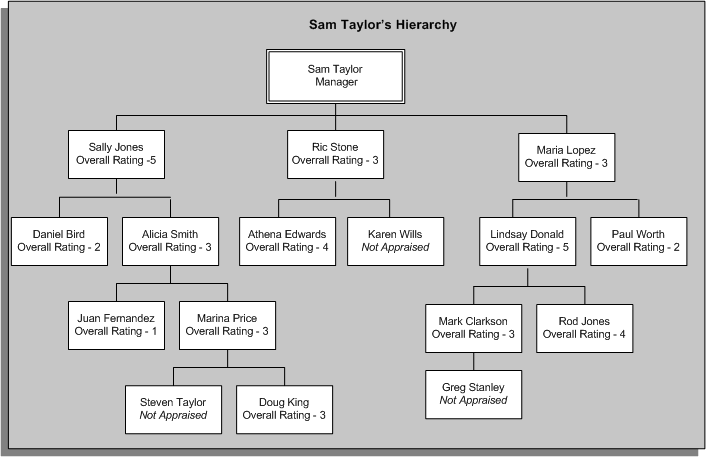
The following section explains the information that the Appraisal Summary table displays using Sam Taylor's hierarchy as an example.
This example uses the following rating scales:
1: Indicates that the performance is significantly below the required level.
2: Indicates that the performance is below the job requirement.
3: Indicates that the performance is good.
4: Indicates that the performance exceeds required level.
5: Indicates that the performance is exceptional.
The Appraisal Summary table for Sam displays the name of each manager along with the levels defined for the rating scale. Sam can view the ratings of all workers in his hierarchy. The table also displays the number of workers not appraised and total number of workers reporting to his directs.
Appraisal Summary
| Manager | Overall Rating 1 | Overall Rating 2 | Overall Rating 3 | Overall Rating 4 | Overall Rating 5 | Not Appraised | Total |
|---|---|---|---|---|---|---|---|
| Sam Taylor | 0 | 0 | 2 | 0 | 1 | 0 | 3 |
| Sally Jones | 1 | 1 | 3 | 0 | 0 | 1 | 6 |
| Ric Stone | 0 | 0 | 0 | 1 | 0 | 1 | 2 |
| Maria Lopez | 0 | 1 | 1 | 1 | 1 | 1 | 5 |
| Total | 1 | 2 | 6 | 2 | 2 | 3 | 16 |
To view appraisal summary of workers who report to Sally, Ric, or Maria, Sam must click the number in the Total column of his direct reports. In this example, the rating columns, not appraised and total columns include workers in the direct reports' hierarchy. The summary for Sally Jones includes information of her directs' Daniel Bird and Alicia Smith and their direct and indirect reports.
Note: The data that the Appraisal Rating Summary displays is based on the effective date when the Refresh Appraisal Summary concurrent program is run.
You can view a graphical representation of the rating summary, which is represented by a pie chart. The pie chart shows the percentage distribution of workers for different rating levels. The application calculates rating distribution percentage as:
(Total number of appraisals for a rating) / (Total number of appraisals) * 100
For example, the application calculates the rating distribution percentage in Sam's hierarchy as:
Percentage distribution for Overall Rating 1 = 1/16 * 100: 6.25%
Percentage distribution for Overall Rating 2 = 2/16 * 100: 12.5%
Percentage distribution for Overall Rating 3 = 6/16 * 100: 37.5%
Percentage distribution for Overall Rating 4 = 2/16 * 100: 12.5%
Percentage distribution for Overall Rating 5 = 2/16 *100: 12.5%
Percentage distribution for Not Appraised = 3/16 * 100: 18.75%
You can view a graphical representation for rating by manager, which is represented by a bar graph. The bar graph shows the number of workers for each rating level for a particular manager.
For example, in Sam's hierarchy, the Rating Distribution by Manager for Ric displays a bar graph for the overall rating 4 for one of his workers (Athena) and another bar graph for Not Appraised (Karen Wills).