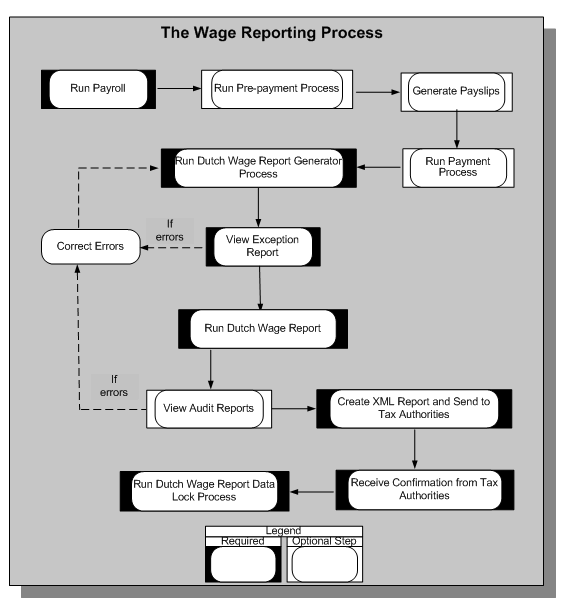
Wage reporting is a multistep process that employers follow to submit the wage report to the tax authorities for every payroll period. The wage report contains information about the employer, the personal and assignment information of all employees, and corresponding payroll-related information. Oracle HRMS enables you to process the wage report as shown here:
Oracle HRMS uses this process to validate the social insurance and tax information available for wage reporting so that the report information complies with the legislative requirements. When you run the generator process, the application archives the relevant report information required for the wage report.
The Dutch Wage Report Generator process validates the wage report information and, if information is incorrect or missing, generates an exception report. After correcting any errors, you run the generator process again until you have no errors.
See: Running the Wage Report Generator Process
Once the generator process has run without error, you can run the Dutch Wage Report process, which generates two types of reports:
Audit reports, which are in PDF format so that you can easily verify the report contents
XML Report, which you send to the tax authorities
See: Running the Dutch Wage Report
You run the Dutch Wage Report Data Lock Process after the tax authorities have confirmed that your wage report is valid. This process prevents you from accidentally rolling back the generator process, which is the source of the wage report you submit to the tax authorities.