Oracle HRMS enables you to record information about constituencies, representative bodies, supplementary roles and elections. Within your enterprise you can perform a number of different roles. These roles range from company defined initiatives such as Fire Warden to legislative defined roles awarded as a result of an election.
Constituencies are made up of components, such as, organization, location, and grade. You select components to define which people are part of the constituency. For example, if you include a grade in the constituency, all the people of that grade are included in the constituency. The people within the constituency are those eligible to vote in an election.
You can select the components to include in the constituency by using existing organization hierarchies. You use the Organization window to define the components of the constituency.
As a result of performing a role, an employee can be a member of a representative body. Representative bodies are typically committees or organizations with joint employer and employee representation.
Where these bodies are established by legislation, there are rules concerning the election process and you, or your enterprise, are responsible for recording the results of that election process.
The Organization window enables you to enter information about a representative body. By assigning constituencies to a representative body, you define which people make up that body.
Supplementary roles are additional tasks that an employee performs in addition to being an employee. You can elect a person to a role, such as Union Representative, or a non-elected role, such as Fire Warden.
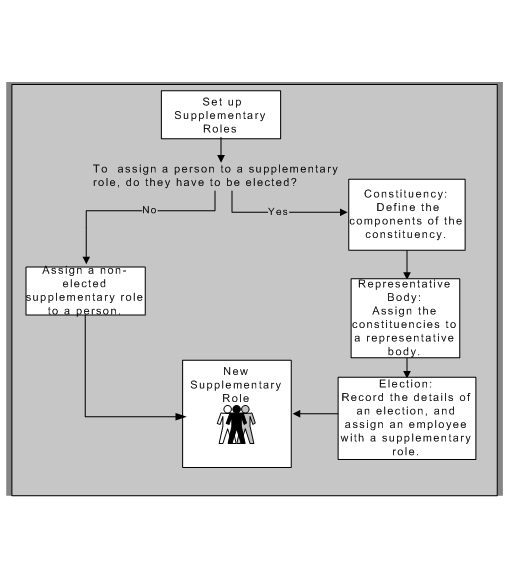
If a person needs to be elected to the role, you enter the election details and assign the person to the role using the elections window, but if they do not need to be elected, you can assign the person to the role through the Supplementary Roles window. You do not need to create any supplementary roles using the Job window before you can assign a person to that role.
You can record election information, results and the role being undertaken by the person following an election, using the Elections window.
The following graphic illustrates the two processes of assigning supplementary roles:
Assigning Supplementary Roles