Life Event Reasons
You define a life event reason as any change to a person that impacts benefits participation. The system creates a life event when it detects a change in a person's HR record that you have defined as a life event reason.
You can define these types of life event reason:
-
Compensation--Use this type to set up one life event reason for each Compensation Workbench plan
See: Setting Up Compensation Workbench Plans
-
Absence--Use this type to set up three life event reasons (Absence Started, Absence Ended, and Absence Deleted) to detect creation of, and changes to, absence records.
-
Checklist--Use this type to assign an HR administrator a series of tasks based on a common event, such as a new hire or termination.
If you use iRecruitment, use the iRecruitment type to set up one life event reason to process compensation plans for applicants.
In Advanced Benefits, assignment changes, an anniversary of employment, a marriage, or the occurrence of an open enrollment, are all examples of life events (in addition to the Compensation and Absence life event reasons). You can define life event reasons to determine key benefits processes, including:
-
Enrollment eligibility and electability
-
Rates and coverage amounts
-
Available flex credits
-
Coverage start and end dates
-
Required communications
-
Automatic and default enrollments
Life events can be explicit, temporal, or scheduled.
-
Explicit life events are changes to a person's HR record, such as a job change.
-
Temporal life events occur with the passage of time, such as the six month anniversary of employment.
-
Scheduled life events are assigned life events, such as an open enrollment period.
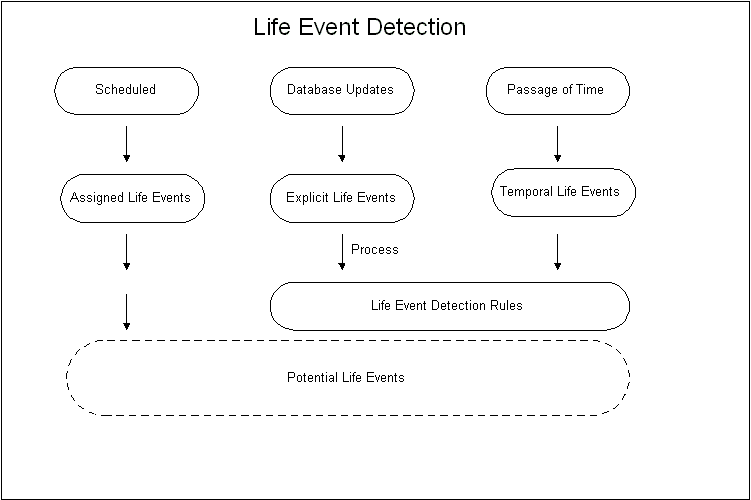
Because life event detection can be complex, and because the accurate determination of qualifying life events is important to benefits administration, detected life events are initially given a status of potential so that they do not generate enrollment actions.
You can review potential life events for a person and then process the life event using the Participation batch process. Potential life events become active life events if they meet your plan design requirements. Active life events can trigger enrollment opportunities.
Life Event Terminology
Life events are a cornerstone of benefits processing; understanding some basic terminology before you define any qualifying life event reason is important. The table below outlines the basic life event terminology:
Life Event Terminology
| Terminology
| Description
|
| Life Event Reason
| A life event reason is an approved explanation for enrollment, de-enrollment, or change in enrollment resulting from a life event. Participation eligibility is determined based on the life event reasons and eligibility profiles you associate with programs, plans, and options.
|
| Related Person Life Event Reason
| A related person life event reason occurs when a life event experienced by the primary participant generates a life event for a person related to the participant.
|
| Person Change
| A person change is a change in system data that you define to indicate that a person has experienced a given life event.
|
| Related Person Change
| A related person change is a change in system data that you define to indicate that a person has experienced a given related life event.
|
Life Event Definition
You define a life event by specifying the processing characteristics of the life event and the database change that triggers the life event. You can trigger life events with criteria similar to those you use to define your eligibility profiles and variable rate profiles. Not all criteria are available to trigger life events, but you can always write a formula (using the Person Change Causes Life Event formula type) to trigger an event using criteria that are not available in the list of tables and columns.
You can also trigger life events based on changes to segments in special information types.
See: Setting Up Special Information
Life events are defined separately from any compensation object or activity rate so that a single life event can have multiple uses.
Life Event Notification
Because life events are not always reported and recorded in a timely manner, you can specify whether a life event is processed as of the date the life event occurred, as of the notification date (the date the life event is recorded in the system) or the later of the actual date or notification date.
Temporal life events, such as age changes, are always processed as of the actual occurred date.
Person Changes
You define the changes to a person's record that trigger a life event by specifying the value of the database field that indicates this person change has occurred.
Note: Do not define person changes for Compensation life event reasons.
You select the database table and column for which you want to define a change that the system detects and processes as a life event. You specify the new value for this combination of database table and column that, when detected, indicates that a life event has occurred.
For example, you can define that a person change is detected when the database value of a person's marital status changes from Single to Married.
A person change can be defined based on the detection of:
-
A new value
-
A change from a specific old value to a specific new value
-
Any change to a value
-
A change from any value to no value
-
A change from no value to any value
You can also select a rule that defines more complex conditions for triggering a life event.
You link the person change that you define to a life event. You can link multiple person changes to a single life event and you can link a single person change to more than one life event.
You can define a life event to trigger based on changes to more than one table, or based on multiple changes to the same table.
For changes based on multiple tables, the APIs detect the life event when there is a data change in one of the tables that meet your Person Change criteria (an Or condition).
For multiple changes in the same table, the person must satisfy all Person Change criteria associated with the table for the API to detect the life event (the And condition).
Life Event Detection
Advanced Benefits
When you define a life event, you specify whether or not it is an overriding life event. If two or more life events with the same Occurred On date are detected for a person, the system picks the overriding life event as the winner.
If two or more potential life events are detected with the Override Flag set to On, the Participation batch process records an error in the log file. In these cases, you use the Potential Life Events form to select the winning life event.
You can select a timeliness evaluation code that indicates if a life event that occurs prior to the current calendar year or a given number of days prior to the system date should be voided or processed manually.
You can set a life event treatment code to prevent temporal event detection for a specified life event reason under certain conditions.
See: Defining General Characteristics of Life Events Reasons
Absence Life Events
Absence life events are processed by the Participation Process in Absence mode. In this mode, the process handles multiple potential life events in date order.
Closing, Backing Out, and Voiding Life Events
You can remove the processing of a life event performed by the Participation process, and you can prevent further processing of a life event.
-
Close a life event to prevent further processing.
-
Back out a life event to roll back any updates generated by the Participation Process (such as updates to eligibility, rates, automatic de-enrollments, and so on)
-
Void a life event to roll back any updates and prevent further processing by the Participation process.
Life Event Usage (Advanced Benefits)
Once you create a life event definition, you can use that definition for a variety of purposes. This section describes the ways that you can use life events.
Enrollment Requirements
You can link life event definitions to your enrollment requirements for a compensation object so that a person must experience a particular life event before they can enroll in a plan for which they are eligible. You can also use life events to restrict enrollment changes based on whether or not the participant is currently enrolled in a benefit.
Because scheduled enrollments are also a kind of life event, you must link scheduled life events to a compensation object if you are defining an enrollment period for that benefit.
Enrollment requirements based on life events can be applied to both participants and dependents.
Enrollment Coverage
You can vary the amount of coverage available for a plan based on a life event. You define the standard coverage amount for the plan or option in plan and then the coverage level available for those participants who experience the life event you select.
You can also limit a currently enrolled participant's ability to change coverage levels based on a life event.
Communications
You can generate a reminder letter for a participant with an open life event. Communications can also be triggered based on emerging life events, such as an event that will occur due to a temporal event.