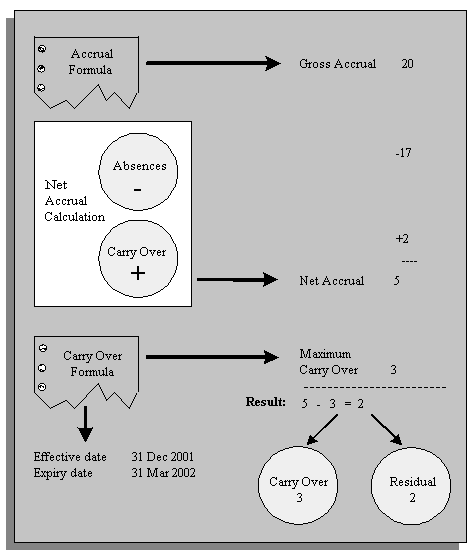
To manage the carry over of employees' unused PTO to a new accrual term, you run the PTO Carry Over process from the Submit Requests window:
For accrual plans with a fixed term start date (such as 1 April), you run the process at the end of each accrual term.
For accrual plans with a variable term start date (such as hire date or seniority date), you should run the process every night to update plan information for any employees whose term has ended that day.
For accrual plans based on a rolling plan term (such as those using the seeded PTO_ROLLING_ACCRUAL formula), this process is not relevant.
For each participant in an accrual plan, the PTO Carry Over process first uses the Accrual formula to calculate the participant's accrued PTO as of the last day of the plan's accrual term. The process then uses the Carry Over formula to get:
the maximum amount of time this employee can carry forward to the next accrual term
the effective date for the carry over, and
any expiry date by which the employee must use the time carried over, or lose it.
The process calculates the net accrual using time off recorded on the Absence element and any other elements associated with the plan. Finally, it compares the net accrual with the maximum carry over. permitted to determine both the amount to carry over, and the amount of any residual PTO that cannot be carried over.
For employees with unused, accrued time to carry over, Oracle HRMS enters this time on the plan's <plan name> Carried Over element. Similarly, for employees with unused, accrued time they cannot carry over, Oracle HRMS enters this time on the plan's Residual <plan name> element.