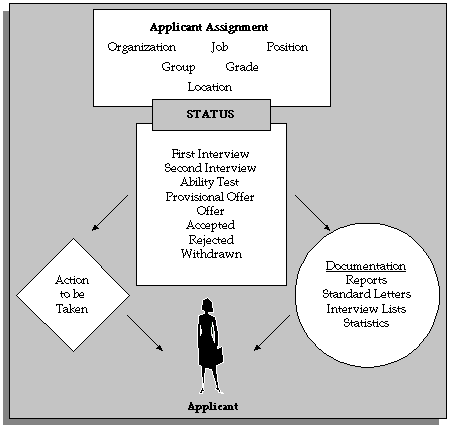
The progress of all applicants through the selection process is controlled by applicant assignment statuses. Each stage of the selection process is identified by a single assignment status. It is by changing the status that you can record the progress of any applicant assignment.
The Applicant Assignment and its Status
As with employee assignment statuses, there is a set of system statuses that are used in various internal processes:
Active Application: This is the normal status of an application as it progresses through the selection stages.
Offer: Use this status for your preferred candidate when an offer has been made.
Accepted: Update the preferred candidate's assignment to Accepted status when you are ready to hire him or her in the People window.
First Interview: Use this to indicate a candidate has reached the first interview.
Second Interview: Use this to indicate a candidate has reached the second interview.
Terminate Application. Use this status to end an applicant's assignment. You can only do this if the applicant has one or more other assignments in progress.
Note: The Terminate Application status is not recorded on the applicant assignment; it causes the assignment to end.
On your system, you can give these statuses different names (called User Statuses), appropriate to your enterprise. You can define user statuses such as Applicant Received, Applicant Acknowledged for the system status Active Application.
See: Defining Assignment Statuses
Primary statuses determine how the assignment is processed and handled by the system. An assignment must have one, and only one, primary status.
You can update an applicant assignment status in the following windows:
Application
Applicant Interview
Terminate Applicant
When you change the status, you can enter a reason for the change. Define valid reasons as values for the Lookup Type APL_ASSIGN_REASON.
You can also change the status of a group of applicants in the Mass Update of Applicants window. For example, if you want to call 20 applicants to a selection test and to reject all other applicants for the vacancy, you can do this in the Mass Update of Applicants window.
Changing a primary applicant assignment status can trigger the generation of a standard letter.
There may also be Secondary statuses set up on your system. You can use secondary statuses for analysis and reporting, but they are not used for processing.
See: Defining Secondary Statuses
You can give an assignment multiple secondary statuses. You enter secondary statuses in the Secondary Statuses window.