Purchase orders can be routed for approval to approvers defined in a position hierarchy or supervisor hierarchy.
See: Using Approval Hierarchies
However, in a typical business environment, purchasing organizations require:
Documents to be reviewed before approval to comply with the organization's review policy. For example, computer or server purchases must be reviewed by the IT manager before approval.
Flexible approval hierarchy to get approval from individuals or group of individuals along with people listed in the standard hierarchy. For example, purchase of hazardous material requires approval from Manager Safety and purchase order approval hierarchy.
Multiple signatories to sign purchasing documents. For example, based on item or total purchase amount, document requires e-signatures of business unit head and director.
Oracle Purchasing provides the flexibility to add any individual or a group of individuals to the approval hierarchy (position or supervisor) so that purchase orders can be routed for review, approval, and e-signature. To setup and use this feature, Oracle Purchasing provides the Purchase Order Approval AME transaction type and PO AME Approval Top Process, a workflow process. To use the feature, the following values must be set in the Document Styles page:
PO Approval in the Approval Workflow field.
PO AME Approval Top Process in the Workflow Startup Process field.
Purchase Order Approval in the AME Transaction Type.
Depending on business requirements, purchasing administrators can setup either parallel or serial process in AME for purchase order review, approval, and multiple e-signatures. Voting method can be First responder wins, Consensus, or Serial. Enterprises can use the predefined AME transaction type and PO workflow process or they can create custom transaction type and workflow process based on the supplied components.
This feature provides the PO Approval Notification Region (POApprvNotifRN ) configurable region to enable enterprises to personalize the notification page according to their business requirements. This region is available in the notification body. You can personalize this region to add or remove columns according to business needs. For example, you can configure this region to control what approvers can view or cannot view in the notification.
For information about AME, refer to the Oracle Approvals Management Implementation Guide
For information on how to setup this feature in Oracle Purchasing, see:
Note:
Oracle Purchasing supports this functionality for purchase orders in both OAF pages and in Forms. Purchase orders created in both Buyer Work Center (OAF pages) and Forms can be routed for review, approval, and multiple e-signatures.
To use the AME functionality rom Forms, you must enable AME for Standard Style.
The following restrictions apply to the use of this functionality in Oracle Purchasing:
The Current/Pending Approvers information in Action History is not supported in Forms. This information is available in the Buyer Worker Center Action History only. You cannot add adhoc approvers in Forms and also cannot view the list of approvers.
AME cannot be used for planned purchase orders and purchase order releases.
AME cannot be used for local blanket purchase agreements. If you want to use the AME feature, then use global blanket purchase agreements.
For information on setting up AME, see: Setting Up AME for Purchase Order Review, Approval, and Multiple E-Signatures
If you enable the AME feature, then in Buyer Work Center:
The Approval Options page for orders and agreements displays the AME Approval region. Depending on the AME setup, the Approvers region includes persons who are approvers, reviewers, and signers. In the Add Adhoc Approver region, buyers can select additional approvers and specify their position in the approval chain using insertion point. To add a person for e-signature, buyer can select an existing signer and must add that person before or after the existing signer. However, buyers cannot add adhoc reviewers
The Action History page shows AME Sequence No, Person name and Approver Type of current/pending approvers.
See: Entering Purchase Order Information
See: Create and Update Agreements
If you use AME for purchase order review, approval, and multiple E-Signatures, then the following business rules apply:
Business rules that apply during the purchase order review:
Reviewers have view only access to the document when they receive notifications for review.
Buyers cannot update the purchase order if the order is in the In Process or Pre-Approved status.
Reviewers cannot update documents when reviewing purchase orders.
Buyers cannot manually add reviewers in the Add Adhoc Approver region of the Approval Options page. They can add approvers and e-signers only.
Business rules that apply during the purchase order approval:
Buyers have the flexibility to send purchase order documents to approvers, reviewers, or e-signers based on the AME setup.
Approvers can edit purchase orders when they receive the approval notification.
If the e-signature feature is not enabled, then the purchase order status is set to Approved after all approvals are in. Approvers can approve, approve and forward, reject, or reassign the purchase order notification. They can add their comments to the notification page.
Business rules that apply if the E-signature functionality is used:
Notifiers who receive the notification for e-signature have view only access to the document.
Multiple E-signatures can be provided during the post approval phase only. During the post approval process, approvers cannot be added and document cannot be sent for approval. Esigners have to provide their login credentials to provide their e-signature.
If the purchase order is rejected during the approval, review, or e-signature stage, then the status of the purchase order changes to Rejected. Buyers can update and resubmit such rejected purchase orders.
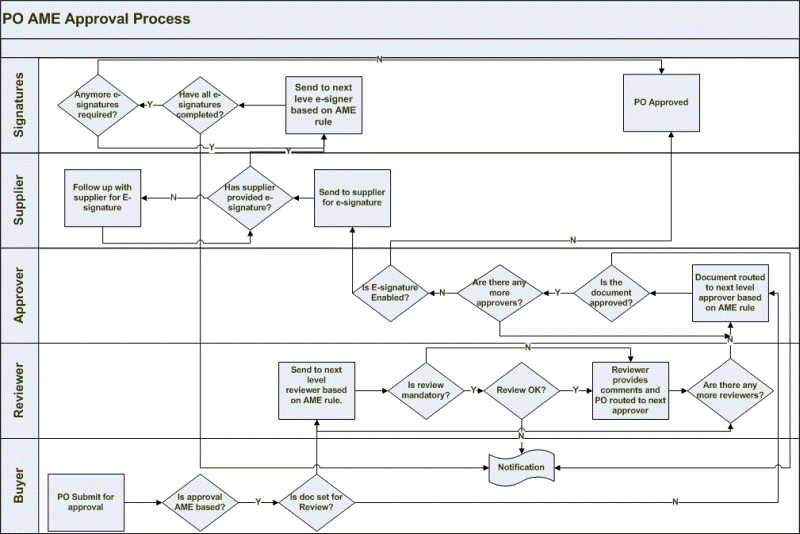
The following example describes the business flow if AME is setup for purchase order review, approval, and multiple e-signatures.
The following sections describe the diagram in detail:
Purchasing routes the document for review:
Buyer creates and submits the PO for approval. If review is required, then based on AME rule, Purchasing routes the document to reviewer for review. If review is not required, then the application sends the PO directly to approvers based on AME rule.
What happens during review, approval, and multiple e-signatures:
If e-signature is enabled for the purchase order document, after approval it goes to supplier for E-Sign and then based on AME rule, Purchasing routes the document to signers for e-signature. If e-signature is not enabled and approvers approve the purchase order document, then the application sets the document status to Approved.
If supplier signature is enabled and there are esigners as well, then after approvers have approved, Purchasing sets the document status to the Pre-Approved status and sends the document to the supplier. After supplier signature, the document is routed to esigners. Once all esigners have signed, the document will be set in Approved status.
If the purchase order is in the In Process or Preapproved status, then the buyer cannot update the document. In any case, if the document is rejected during review, approve, or e-signature stage, the status is set to 'Incomplete' and user can update and resubmit the document.