If you choose the Perpetual Accrual Method within Purchasing, Purchasing records an accounts payable liability to an AP accrual account for goods received but not invoiced. When Payables matches and approves the invoice for the received goods, Payables clears the accounts payable accrual account and records the actual liability amount to the invoice accounts payable liability account.
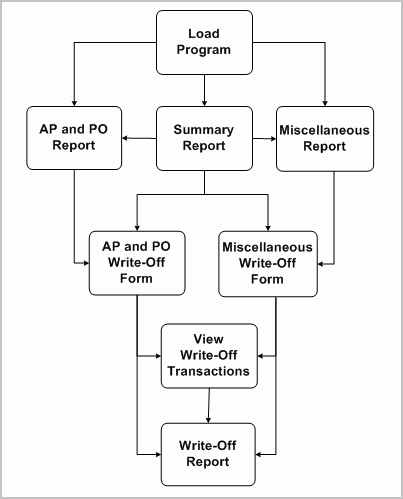
You might want to reconcile those transactions that leave some balance (liability) in accrual accounts. This can be done with accrual reconciliation process. The following flow diagram illustrates the flow for the accrual reconciliation and the accrual write off process.
After you have entered your receipt transactions, matched and approved your accounts payable (AP) invoices, you will need to run the accounting process that creates the accounting for these transactions in the final mode and subsequently transfer these transactions to the general ledger. You can then begin the accrual reconciliation process by running the Accrual Reconciliation Load program. This program is used to populate the accrual reconciliation table with all the necessary transaction data for you to perform the reconciliation process. The load program can be run for an operating unit incrementally. The program requires the two parameters from date and to date. These two dates represent the transaction dates that are used to fetch the transaction information from the transaction tables. All the affected purchase order (PO) distributions (in the case of AP/PO transactions and individual transactions in the case of miscellaneous transactions) will be deleted first and the transaction information for these distributions are loaded into the accrual reconciliation tables. See: Accrual Reconciliation Load.
Next you would run the Summary Accrual Reconciliation report to identify any differences between your Oracle Purchasing (PO) receipts and Oracle Payables (AP) invoices. This report shows which accounts have balances in them provides a partial breakdown of the balance source. You can see whether related AP and PO transactions and/or miscellaneous AP and Oracle Inventory transactions are contributing to the balance. Furthermore, the report shows the amount of write-offs already performed against the accrual account. See: Summary Accrual Reconciliation Report.
In addition, to aid in your analysis you can run the AP and PO Accrual Reconciliation Report and Miscellaneous Accrual Reconciliation Report. Each of the three reports can be run independently of each other as well as independent of the load program once the load program has been run and the data in the accrual reconciliation load tables is current.
The AP and PO Accrual Reconciliation Report provides a transactional breakdown of each accrual account with a net balance greater than zero in a summarized or full transaction details version. In summarized mode, for each accrual account, only the distribution information and PO, AP, WO (Write-Off) and Total Balances are displayed. For detailed mode, the individual transaction details for each distribution are also shown. You can also see the age of the distribution on this report. The report is first grouped by accrual account, then by aging bucket and then by purchase order distribution ID. Aging bucket is calculated depending on user specified value of "Aging period days" while submitting the report. Transactions are grouped according to their age into aging buckets. See: AP and PO Accrual Reconciliation Report.
The Miscellaneous Accrual Reconciliation Report provides reporting of all the miscellaneous AP (not matched to PO or PO receipts) and Oracle Inventory transactions hitting accrual accounts. The report is first grouped by accrual account, then by each accrual code that hits the specific accrual account and then by purchase order distribution id. See: Miscellaneous Accrual Reconciliation Report
After you have researched the reported accrual balances, you can use the AP and PO Accrual Write-Offs window to indicate which AP and PO transactions you wish to write off and remove from the AP and PO Accrual Reconciliation Report. You can use the Miscellaneous Accrual Write-Offs window to indicate which miscellaneous AP (not matched to PO) and Oracle Inventory transactions you wish to write off and remove from the Miscellaneous Accrual Reconciliation Report. See: AP and PO Accrual Write-Offs window and Miscellaneous Accrual Write-Offs window.
To complete the procedure you would review your write-offs using the View Write-Off Transactions window and then submit the Accrual Write Off Report. See: Accrual Write Off Report.
Prerequisites:
Oracle Payables and Purchasing are installed.
Define your transactions reasons in Oracle Inventory's Transaction Reasons window. This gives you a means of classifying your write-offs so you can record them in separate accounts when you record a manual journal entry to write off these transactions. The Accrual Write Off Report provides a summary by transaction reason. See: Defining Transaction Reasons.
If you use Oracle Inventory and Work in Process, transfer to your general ledger transactions from these two sources.
Transfer your Oracle Payables invoices to your general ledger. See: Payables Transfer to General Ledger Program.
To write off a transaction from an accrual account:
Use the Select Accrual Accounts window to verify or define all the accrual accounts to be used when loading accrual data. See: Select Accrual Accounts.
Run the Accrual Reconciliation Load Run program. See: Accrual Reconciliation Load.
Run the Summary Accrual Reconciliation Report for the desired operating unit to find out which accounts have balances and the amount of those balances. See: Summary Accrual Reconciliation Report.
If a balance is in AP and PO transactions where AP is matched to PO or a PO receipt, run the AP and PO Accrual Reconciliation Report. See: AP and PO Accrual Reconciliation Report.
If a balance is in other types of transactions, run the Miscellaneous Accrual Reconciliation Report. See: Miscellaneous Accrual Reconciliation Report.
Examine the transactions.
If AP and PO transactions where AP matched to PO or a PO receipt, use the AP and PO Accrual Write-Offs window to view transactions by PO distribution. See: AP and PO Accrual Write-Offs.
Otherwise, use the Miscellaneous Accrual Write-Offs window to view the transactions. See: Miscellaneous Accrual Write-Offs.
Choose those transactions that are candidates for write-off and perform the write off.
Use the View Write-Off Transactions window to see the write-off transactions. You may also reverse the write-off transactions from this window. See: View Write-Off Transactions.
[Optional] Run the Accrual Write-Off Report to see the history of write-off transactions See: Accrual Write-Off Report.
[Optional] Run the Summary Accrual Reconciliation Report to make sure that the balanced accounts do not appear in the report
Use this window to select the accounts to be evaluated by the Accrual Load program to select transactions for possible write off.
Navigate to the Select Accrual Accounts window.
Select the operating unit for the accrual accounts you are working on.
Click Get Default Accounts.
Clicking this button fetches the accrual accounts that were setup as accrual accounts in the prior releases in addition to the accrual accounts setup for each organization and the default accrual accounts from the Purchasing Options window for that operating unit.
Add or delete any accounts to be included in this write off analysis.
If you made any changes, click Save.
Use this window to "write off" the selected AP matched to PO transactions, which will automatically generate an accounting event.
Navigate to the AP and PO Accrual Write-Offs window.
Use the Find window to narrow the number of transactions displayed in the write-off window.
Enter the operating unit for write offs. You can optionally enter the following search criteria: Account number, Balancing Segment range, Item number, item Description, PO Number, PO Release, PO Line, PO Shipment, PO Distribution, Destination Type, Age range, and a Balance range.
If you are confident of your search results, check Auto-Select Results for Write-Off to have all your results selected for write off.
Click Find.
Select the transactions you wish to write off.
Select the transactions that you want to write off.
Save your work. A pop-up window will appear for you to enter:
Caution: When the form is saved/committed, all write-off transactions selected will be written off and are cleared from this window.
Enter a Write Off Date that is in the same accounting period as the journal entry you would prepare to write off selected transactions.
[Optional] Enter a Reason why the selected transactions are being written off.
[Optional] Enter a comment to provide more clarity to the reason for the write off.
AP and PO Accrual Reconciliation Report. They will appear on the Accrual Write Off Report.
AP/PO transactions are reconciled at purchase order distribution accrual account level. Hence write offs for these transactions are also performed at purchase order distribution accrual account level. The offset account for these transactions is defaulted from the distribution. The following set of rules determines the default offset account that is used to write the transaction off:
If the destination type on the PO distribution that is being written off is expense, the default offset account used is the charge account on the PO distribution.
If the destination type on the PO distribution is inventory or shopfloor, the default offset account used is the variance account on the PO distribution.
Use this window to "write off" the selected miscellaneous transactions, which will automatically generate an accounting event.
Navigate to the Miscellaneous Accrual Write-Offs window.
Use the Find window to narrow the number of transactions displayed in the write-off window.
Enter the operating unit for write offs. You can optionally enter the following search criteria: Account number, Balancing Segment range, Item number, item Description, Invoice Number, Invoice Line, PO Number, PO Release, PO Shipment, PO Distribution, Inventory Transaction Id, Date range, Amount range, and a Transaction Type. If the transaction type selected for filtering data is "Consignment", then you can also specify an age range for these transactions.
If you are confident of your search results, check Auto-Select Results for Write-Off to have all your results selected for write off.
Click Find.
Select the transactions you wish to write off.
Save your work. A pop-up window will appear for you to enter:
Caution: When the form is saved/committed, all write-off transactions selected will be written off and the transactions are cleared from this window.
Enter a Write Off Date that is in the same accounting period as the journal entry you would prepare to write off selected transactions.
Enter an Offset account. This account will be used as an offset account to write off the transaction balance.
[Optional] Enter a Reason why the selected transactions are being written off.
[Optional] Enter a comment to provide more clarity to the reason for the write off.
Transactions that you selected to write off in this window will no longer appear on the Miscellaneous Accrual Reconciliation Report. They will appear on the Accrual Write Off Report.
In addition to the inventory transactions and non-matched AP invoices, Invoice Price Variance Distributions (IPV), Exchange Rate Variance distributions (ERV), Tax Invoice Price Variance (TIPV), Tax Exchange rate Variances (TERV), Tax Rate Variance distributions (TRV) are treated as miscellaneous transactions and need to be written off like any other miscellaneous transaction.
The accrual reconciliation also attempts to group the consigned transfer transactions in inventory with the accounts payable invoice that may have been matched to the consumption advice. If there is no balance in the accrual account as a result of the AP invoice clearing the accrual created by the consigned ownership transfer, these transactions are automatically deleted and they will not appear in the reconciliation tables, forms and reports.
Use this window to view the selected write-off transactions.
Navigate to the View Write-Off Transactions window.
Use the Find window to narrow the number of transactions displayed in the window.
Select the operating unit for write offs. You can also enter Account number, Balancing Segment range, Date range and Reason.
Optionally if you check AP-PO Write-Offs Only check box you can also enter PO Number, PO Release, PO Shipment and PO Distribution. If you check Miscellaneous Write-Offs Only check box, you can also enter Inventory Transaction Id, Invoice Number and Invoice Line.
AP-PO Write-Offs Only and Miscellaneous Write-Offs Only check boxes restrict data queried for to AP-PO write offs or Miscellaneous write offs respectively.
Click Find.
Review your write-off transaction and optionally select the transactions you wish to reverse.
A reverse write-off transaction reverses the accounts used by the write-off transaction that is being reversed. If you have customized any of the accounts that are being used on the write off transaction, the same account needs to be customized on the reverse write off transaction as well to make sure that the accounts stay cleared after the write off.
Save your work.
Caution: When the form is saved/committed, all write-off transactions selected will be reversed. A write off transaction can be reversed only once. If you want to write these transactions off again, you will need to create a new write-off transaction.
To view the accounting:
From the Tools menu select View Accounting to view sub-ledger journal entry lines associated with the write-off transaction. This option is disabled if accounting has not been created for write-off transactions using the Create Accounting program in SLA .
To view the accounting events:
From the Tools menu select View Accounting Events to view accounting entry lines associated with a write-off transaction.
Accounting for the write off transactions includes journal entries for the accrual account and offset account. When the invoice is matched to receipt, the write off variance may be generated due to the exchange rate difference between the write-off date and various receipt dates. In some cases, there might be a balance left over in the accrual account due to rounding inconsistencies. If the Write off is performed in such a case, the accrual account is cleared by the write off transaction and the write off variance is generated against the write off variance account.
The following rules determine the default write off variance account that is used:
If the invoice is matched to purchase order, the write off variance account used is the variance account on the purchase order distribution.
If the invoice is matched to receipt and the destination type on the purchase order distribution is expense, the write off variance account used is the charge account on the distribution. If the destination type is non-expense, the write off variance account used is the exchange rate gain or loss account that has been setup for that operating unit.
