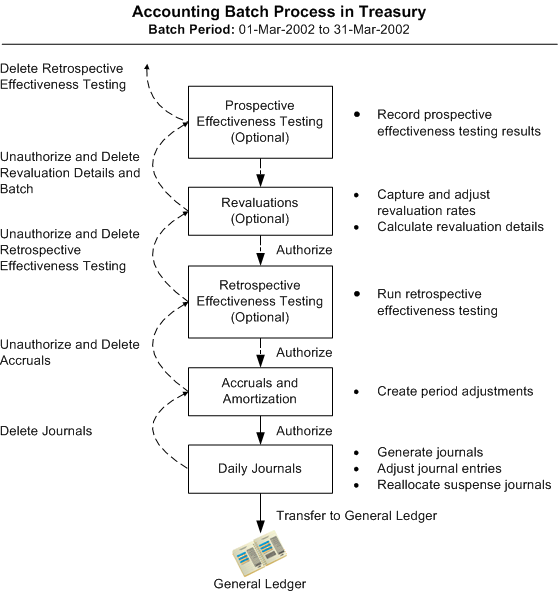
The Treasury accounting process creates company journal entries and transfers journal entries from Treasury to General Ledger. This process comprises the following steps, some of which are optional:
Prospective hedge effectiveness testing (optional)
Perform revaluations (optional)
Retrospective hedge effectiveness testing (optional)
Generate accruals and amortizations
Generate daily journals
Transfer journals to General Ledger
You can automate the Treasury accounting process by running the Accounting Streamline Processing concurrent program. You can link any of the four steps together in a sequence and the program can be scheduled during non-business hours without any user intervention. The program also lets you run the accounting process in batch mode for either a single company or for all the companies available based on your user access level. For more information, see: Streamline Accounting Process.
This figure illustrates the Treasury accounting process.
You can post journal entries for cashflow amounts (that is, non-revaluation and non-accrual journal entries) on a daily or weekly basis, and post journal entries for your revaluation/accrual deals on a separate timeline. The posting of cashflow amounts does not require performing revaluations or generating accruals prior to generating daily journals.You choose, for each company in Treasury, whether to start the accounting process at revaluations or accruals by setting the Accounting - Perform Deal Revaluations company parameter. For more information on setting company parameters, see: Company Profiles. If you set the Accounting - Perform Deal Revaluations company parameter to Yes, then you must perform revaluations.
If you choose to perform revaluations, you can additionally choose whether to perform hedge effectiveness testing as a part of your accounting process by setting the Accounting - Perform Hedge Effectiveness Testing company parameter. For more information on setting company parameters, see: Setting Up Company Parameters. If you set the Accounting - Perform Hedge Effectiveness Testing company parameter to Yes, then you must start your accounting process with prospective hedge effectiveness testing.
You choose to create journal entries either for all transactions or for validated transactions only by setting the Validation Required for Accounting system parameter. See: System Parameters for more information.
You start the accounting process by creating an accounting batch. An accounting batch consists of a batch ID, a batch period (date range for the transactions included in the batch), and a set of transactions that fall within the batch period. If you perform revaluations, the set of transactions that fall within the batch period depends on the accounting method your company uses. For more information on choosing an accounting method, see: the Accounting - Trade / Settlement Date Method company parameter in Setting Up Company Parameters.
You can create an accounting batch and generate journals in one step for non-revaluation and non-accrual journal entries. If you are performing revaluations and/or generating accruals, then after you create an accounting batch, you must authorize the batch at each step of the accounting process. For example, once you complete revaluations you must authorize the batch before you can begin accruals for that same period. Similarly, the accruals batch must be generated and authorized before you can generate any journals for that date range.
You cannot change or delete an authorized accounting batch because it may affect the accounting process. If you have authorized the revaluations and accruals for a batch, you can only delete the batch or make any changes to the revaluations for the batch after you un-authorize both the revaluations and accruals. If you want to make changes to the accruals, you must first un-authorize the accruals.
Attention: Once a batch has been transferred to General Ledger, you cannot un-authorize, make changes, or delete the batch.
The table below lists the statuses that must exist before you can change or delete an accounting batch. For example, if you want to change revaluations for an accounting batch, the batch can have revaluations generated for it but the revaluations cannot be authorized.
| To Change or Delete an Accounting Batch at . . . | Status of Revaluations | Status of Accruals | Status of Daily Journals |
|---|---|---|---|
| Revaluations | Generated - Yes Authorized - No | Generated - No Authorized - No | Generated - No Transferred - No |
| Accruals | Generated - Yes Authorized - Yes | Generated - Yes Authorized - No | Generated - No Transferred - No |
| Daily Journals | Generated - Yes Authorized - Yes | Generated - Yes Authorized - Yes | Generated - Yes Transferred - No |
The start and end dates of the batch period are automatically populated based on the end date of the previous batch and the length of the periods that are defined in the company accounting calendar. Typically a period is one month. You can edit the period end date as required. For example, you can create a batch period of one day or two weeks in length. The first time you create a batch, the start date for the batch period is the date of the oldest transaction and the end date is the current system date.
The dates covered by batch periods must be consecutive, unique and gapless. Each date must appear in a batch, and the same date cannot appear in two different batches. For example, if you create a batch for the period June 1 to June 15, you cannot create another batch for the period June 1 to June 30, or start the next batch on June 17. Instead, you must either create another batch that covers all of the remaining dates (for example, a batch for June 16 to June 30) or delete the existing batch and create a new batch that covers all of the dates (June 1 to June 30).